Why Do Temporary Works Supervisors Need Different Apps?
Search for the best construction apps and you will find tools built for scheduling, estimating, drawings and project communication. They are useful, but they are mostly designed around the project as a whole.
A temporary works supervisor works at a different level of detail.
Temporary works, such as falsework, formwork, propping, scaffolding that is designed rather than standard, excavation support and temporary structures, exist for a limited time but carry real risk while they are in place. The people responsible for them need records that show what was designed, whether it was built as designed, who inspected it and when, and what was done about anything found.
Guidance on how the role works in practice consistently describes the same shape. On larger sites, or where several subcontractors are involved, one or more temporary works supervisors may be appointed to support the temporary works coordinator (TWC). Typical duties described in industry guidance include making sure the site follows the design and the relevant method statements, overseeing checks during erection and dismantling, carrying out or ensuring inspections and maintenance during use, and making sure those checks are recorded. In some systems the TWS also issues permits or handover certificates where the design category calls for them.
That is a workflow, not a feature list. The right app is the one that fits it.
Note: roles and procedures vary between projects and companies. Always follow the temporary works procedure for your own project and the edition of BS 5975 it specifies.
What Does a Temporary Works Supervisor Actually Do in a Week?
The table below translates typical TWS duties into what an app would need to support. It is a general summary, not a substitute for your project procedure.
| TWS task |
What the app should help with |
| Check that the design and method statement are on site and understood |
Easy access to the relevant documents from the place of work |
| Inspect materials and the works before and during erection |
Mobile checklists, photographs, clear pass or fail findings |
| Confirm the works are built as designed before use |
A recorded check that can be tied to the right item |
| Support permits or handover certificates where required |
A clear record of who signed what, and when |
| Carry out regular inspections while the works are in use |
Scheduled or repeatable inspection forms, with reminders |
| Record defects and make sure they are dealt with |
Issue logging, assigned actions and a path to close-out |
| Confirm it is safe to dismantle |
A recorded check before the next stage, with evidence |
| Keep the TWC informed |
Records the coordinator can see without chasing |
Some industry guidance sets pre-use and in-use inspection intervals at no more than a week, and gives time-limited permits as an example. For instance, the HBF's temporary works guidance for housebuilders describes permits as typically time-limited and inspections at regular intervals not exceeding one week. That guidance is written for a specific sector, and your project may require something different, so treat it as an example of how tight these cycles can be rather than a rule.
The point for software is that these are repeated, time-sensitive checks. An app that makes a recurring inspection slow or awkward will be abandoned quickly.
What Makes an App Suitable for a Temporary Works Supervisor?
Fast, simple mobile inspections
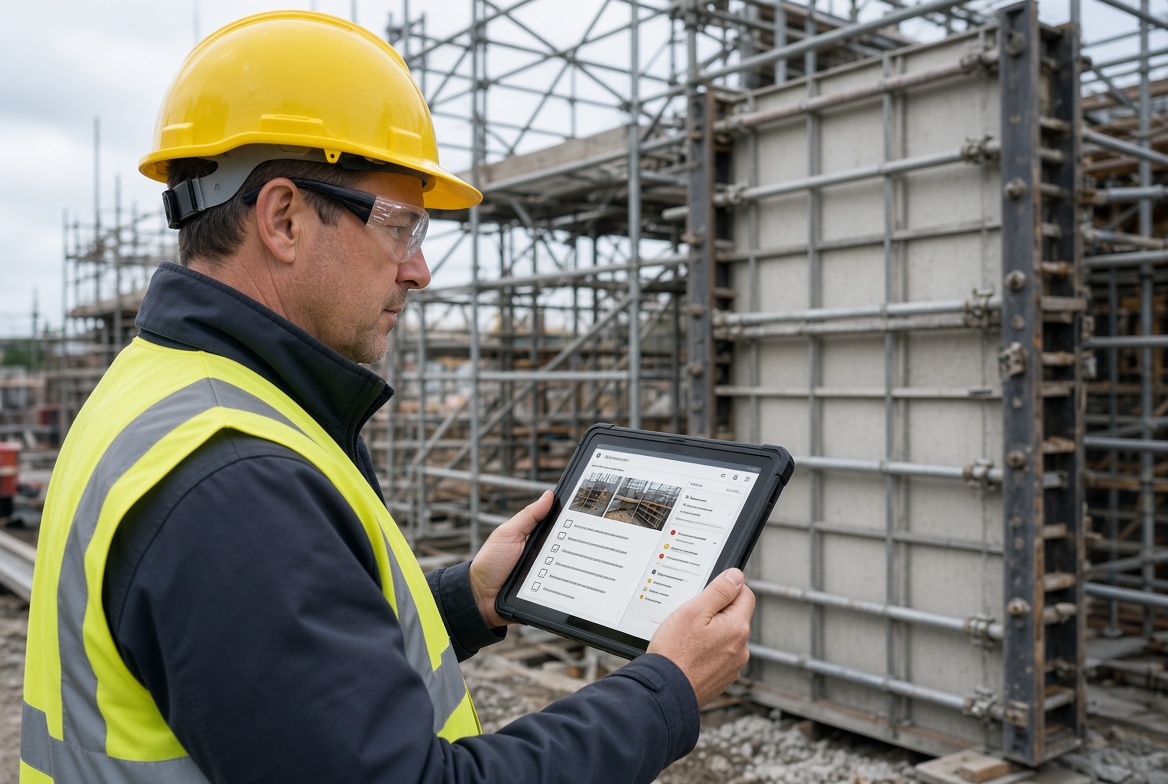
A TWS inspects on foot, often in poor conditions, sometimes wearing gloves. A form that needs several screens or repeated typing will not survive contact with the site.
Offline working
Temporary works are built wherever the permanent works are going, which includes basements, shafts and below-ground spaces. If the app needs a signal, the inspection is either postponed or written on paper first. Check that a full inspection, including photographs, can be completed offline and that records synchronise afterwards with timestamps that reflect when the check was done.
Photographs and evidence attached to the right record
A photograph of a prop, a connection or a base plate is often the most useful part of an inspection record. It needs to be attached to the correct item and inspection, not left in a phone gallery.
Findings that lead to actions
An inspection that finds a problem is only useful if the problem is assigned, fixed, checked and closed. Look for issue logging, a named owner, a status and a closing record.
A clear link to the register and the TWC
The temporary works register is normally maintained by the TWC. Whatever the TWS uses should either connect to it or produce records the TWC can see and rely on. An inspection app that cannot be reconciled with the register creates a second system to maintain.
Clear records of who did what
For any check, you will want to know who carried it out, when and what they found. Look for user identification, timestamps and a history that shows changes.
Flexibility to match your procedure
Every contractor has its own forms, categories and wording. An app that cannot be adapted forces people into workarounds.
Honest claims about compliance
Be cautious of any product that says it ensures compliance with BS 5975 or any other standard. Software can support a procedure. It does not make a design safe, replace competence or discharge anyone's responsibilities.
What Types of App Are Available?
For temporary works work, the options generally fall into four groups.
1. Dedicated temporary works management systems
These are built around the temporary works process itself, including the register, appointments, permits and inspections. They suit principal contractors and TWCs who want the whole process in one place.
Strengths: Designed around the process and the roles involved. Things to check: Whether the inspection experience is practical for a TWS on site, including offline use and speed on a phone.
2. Inspection and compliance apps
These focus on carrying out and recording inspections, with checklists, photographs, issues and reports. Some are general-purpose, while others are positioned for compliance and site safety.
Strengths: Quick to adopt, with a focus on the day-to-day inspection experience. Things to check: How the inspection records relate to your temporary works register and permits.
3. General construction platforms
Large project platforms often include forms, inspections and issue tracking. Users sometimes configure these to handle temporary works permits and registers, and questions about doing exactly that appear on some vendors' community forums.
Strengths: One system for the whole project, which may already be in use. Things to check: How much configuration is needed, who maintains it and whether the result works well for a TWS on a phone.
4. Paper, spreadsheets and messaging
Many sites still manage temporary works this way. It can work, particularly on small projects, if the records are complete, legible and retained.
Strengths: No cost to start and no learning curve. Things to check: Whether you can reliably find records, show timings and follow up findings as the number of items and sites grows.
Which Temporary Works Apps Can You Evaluate?
The options below are ones we could verify from public information. We have not tested any of them, and details change, so confirm everything with the vendor and through a trial. Where a page did not state something, we say so rather than assuming.
| Option |
Type |
What its public information says |
Not stated on the page we reviewed |
| Temporary Works Management Software (temporaryworks.online) |
Dedicated temporary works system |
Describes itself as a UK temporary works management system covering the register, appointments, permits and weekly inspections online. Says it is built for principal contractors, TWCs, designers and clients and aligned with BS 5975:2024 Section 2. Published by Eryri Consulting Limited. |
Offline use, mobile app details, pricing, role permissions |
| Working Load |
Digital temporary works platform |
Describes itself as a digital platform for managing temporary works and associated risk. |
Specific features, offline use, pricing (the page content available to us was limited) |
| KaelSite |
Mobile-first inspection and compliance platform |
Built for UK construction teams, with offline-first inspections, photo, video, voice and geotag capture, Form Studio for custom inspection forms, an Issue System for near-misses, non-conformances, defects and observations, and Certificates with expiry alerts. |
Check how it fits your own register and permit process |
| General construction platforms |
General project platform |
Often include forms, inspections and issue tracking that can be configured. |
Depends on the product and how it is set up |
Two cautions about this table. First, it is not a ranking. The best choice depends on whether your main need is a temporary works register and permit workflow for a TWC, or a fast inspection and follow-up tool for a TWS on site. Second, a claim of alignment with a standard on a vendor's page is a marketing statement. Ask what it means in practice, and check it against the edition your project specifies.
Which Type of App Fits Which Situation?
| If you are... |
You may want to prioritise |
| A TWC or principal contractor who needs the register, appointments and permits in one system |
A dedicated temporary works management system |
| A TWS or supervisor whose main pain is inspections, photographs and follow-up |
A mobile-first inspection app with offline working and issue tracking |
| A contractor already committed to a large project platform |
Testing whether it can be configured to match your temporary works procedure |
| A small contractor with a few items of temporary works |
Whether a simple, well-organised paper or spreadsheet process is still enough |
| A business that wants one tool for inspections, issues and certificates across several types of work |
A broader compliance platform, tested against your temporary works procedure |
These are not exclusive. Some teams use a register system for the coordinator and a separate inspection tool for supervisors, provided the two can be reconciled.
How Should a Temporary Works Supervisor Test an App?
Ask the TWS to run the test. A demonstration led by a sales team will show the best case. A supervisor completing a real task will show the everyday experience.
- Set up one realistic item. Use something your team actually builds, such as a propped excavation support or a section of falsework.
- Complete a pre-use inspection on a phone. Add photographs and note the time it takes.
- Repeat it offline. Switch on flight mode, complete the inspection, reconnect and check that every record and photograph arrived correctly.
- Record a defect. Assign it to someone who has not used the app before and ask them to resolve it.
- Verify and close. Have a different person check the fix and close the issue.
- Try a recurring inspection. Check how the app handles a repeat inspection a week later.
- Look at the record from the coordinator's side. Ask the TWC whether they can find and rely on what the TWS recorded.
- Check your exit. Ask how you would export your records, including photographs, if you changed provider.
If any step needs repeated explanation, expect the same problem across your wider team.
Temporary Works Supervisor App Checklist
- [ ] A full inspection can be completed on a phone without extra steps.
- [ ] Inspections, including photographs, work without a connection and synchronise correctly.
- [ ] Timestamps reflect when the check was done, not just when it was uploaded.
- [ ] Photographs and evidence attach to the correct item and inspection.
- [ ] Defects can be logged, assigned, checked and closed with a clear history.
- [ ] Recurring inspections are easy to repeat and to track.
- [ ] Records show who carried out each check and when.
- [ ] Records can be connected to, or reconciled with, the temporary works register.
- [ ] Forms can be adapted to match your own procedure and design categories.
- [ ] Permits or handover records, if you use them, can be supported in the way your procedure requires.
- [ ] The TWC can see the records they need without chasing.
- [ ] The vendor's claims about standards have been tested, not just read.
- [ ] You can export your data, including attachments.
- [ ] The app has been tested by a supervisor on a real task.
How KaelSite Fits Temporary Works Supervisors
KaelSite is a mobile-first construction compliance platform for UK teams. Its strength for temporary works supervisors is on the inspection side: offline-first inspections with photo, video, voice and geotag capture, Form Studio for building inspection forms that match your own procedures, an Issue System for recording and following up findings and Certificates with expiry alerts.
It is a broader inspection and compliance platform rather than a dedicated temporary works register and permit system, so the right test is how it fits alongside your own register and permit process. If your main need is a full register-and-permit workflow for coordinators, evaluate a dedicated system as well, and compare both against the scenario above.
Frequently Asked Questions
What does a temporary works supervisor do?
A temporary works supervisor (TWS) supports the temporary works coordinator by making sure temporary works on site are built, inspected, maintained and dismantled in line with the design and the project's procedure. Typical duties include overseeing checks, ensuring inspections are done and recorded and helping control permits or handover certificates where they are used.
Is a temporary works supervisor a legal requirement?
Guidance from training providers describes the role as good practice rather than a role required by law in itself, although many contractors and clients expect it, particularly on larger or higher-risk projects. Check your contract and your project's temporary works procedure to see what is required.
What is the difference between a TWC and a TWS?
The TWC coordinates the temporary works process on a project, including making sure designs are prepared and checked and that the register is maintained. The TWS is usually on site supporting the TWC, overseeing the works and making sure checks and inspections are carried out and recorded.
Do temporary works supervisors need an app?
Not necessarily. Paper or spreadsheet systems can work if they are complete, legible and retrievable. An app tends to become worthwhile when there are many items, several sites or subcontractors, or a need for linked evidence, follow-up actions and quick retrieval.
Can an app issue permits to load?
Some systems claim to support permits. Whether a digital permit is acceptable depends on your project's procedure, so check how the app records the check, who signs and what evidence it keeps, and confirm that it fits the way your coordinator and designer expect permits to work.
Does using an app mean we comply with BS 5975?
No. Software can help you record and manage a temporary works process, but compliance depends on competent people, suitable procedures and the requirements of the edition your project uses. Treat any claim that an app ensures compliance with caution.
Should the TWC or the TWS choose the app?
Ideally both are involved. The TWC will care most about the register, appointments and permits, and the TWS about how quickly inspections can be completed on site. A product that suits one but frustrates the other is likely to be used inconsistently.
Final Thoughts
The best app for a temporary works supervisor is not the one with the longest feature list. It is the one that makes repeated, time-sensitive checks quick to complete on site, keeps evidence and findings connected and gives the coordinator records they can rely on.
Start with the supervisor's week. Decide whether your biggest gap is the register, the inspections or the follow-up. Then test a shortlist on a real item with the people who will use it.
This article is intended as general information for orientation and does not constitute legal or professional advice. Software can support temporary works procedures but does not replace competent people, designs, checks, permits or the responsibilities set out in BS 5975, CDM 2015 and your project's own temporary works procedure.
Sources
- HSE, The management of temporary works in the construction industry (operational guidance for inspectors; refers to earlier BS 5975 editions): hse.gov.uk
- Home Builders Federation, Temporary Works Guidance, Version 002 (January 2025), for TWC and TWS roles, registers, permits and inspection intervals in housebuilding: hbf.co.uk
- CST Training, Temporary Works Supervisor: Do You Actually Need It?: csttraining.co.uk
- Temporary Works Management Software (Eryri Consulting Limited): temporaryworks.online
- Working Load: workingload.com

Comments (0)
Add a Comment
No comments yet. Be the first to comment!