



CITB

- Works offline Zero stress on site
- Your whole team One shared picture
- Capture everything Photos, voice, video and location
- All your paperwork Inspections, reports and records, sorted
Simple. Fast. Built for the field.
What is KaelSite?
KaelSite is a simple, intelligent construction app and site management platform that brings everyday site operations, inspections, reporting, health and safety, and project documentation together in one place. Available on the web and your phone, it helps construction teams streamline site workflows, create professional reports with AI-powered report drafting, and support workforce learning with an AI training coach, all without complicated software or lengthy training.
No big IT department, no lengthy training. If you can use a phone, you can use KaelSite.
From daily site inspections and progress reports to Risk Assessments and Method Statements (RAMS), Construction Phase Plans (CPPs), and COSHH assessments and substance registers, KaelSite helps you manage the documentation and processes that keep projects organised and safe.
Whatever your role in construction, stay organised, maintain accurate site records and keep track of what needs doing next. From large contractors to sole traders and small teams, KaelSite helps everyone involved in a project stay on the same page.
Designed for real working conditions, KaelSite works online or offline, so you can carry on when the signal doesn't. Capture site information using forms, photos, videos, voice notes, geotagging and digital signatures, then turn your records into professional reports in a few taps.
Whether you're inspecting scaffolding, checking plant and welfare facilities, recording site progress, managing RAMS, preparing your Construction Phase Plan or tracking hazardous substances, KaelSite helps you capture, manage and report the information that matters, all in one place.
Designed to support CDM 2015 compliance and adaptable to the standards, documentation and processes your project requires.
Less admin. More action.
A better day on site
starts here.
All the everyday tools you need.
One simple place to get things done.
-
Start a Project
Start Strong. Stay Organised.Add your project name, location, type and key dates, and KaelSite sets up the rest. Your inspections, RAMS, Construction Phase Plan …
-
Add Your Team
Instant Team Collaboration.Bring in supervisors, coordinators, foremen, subcontractors and more with a unique code. You decide who sees what, and everyone works from the …
-
Form Studio
Your Forms. Your Way.Build bespoke inspection forms to match how your site actually works, or start from ready-made templates and be inspecting in minutes.
-
Regular Inspections
Set It Once. Never Miss One.Schedule your daily, weekly and monthly inspections, get reminded when they’re due, and complete them quickly on site.
-
Capture on Site
Capture It Where It Happens.Add photos, videos, voice notes, geotags and digital signatures as you work. Mark up your photos on the spot, with …
-
Works Offline
Keep Working When the Signal Doesn't.Inspect, log issues and record on site with no connection. KaelSite saves your work and syncs it as soon …
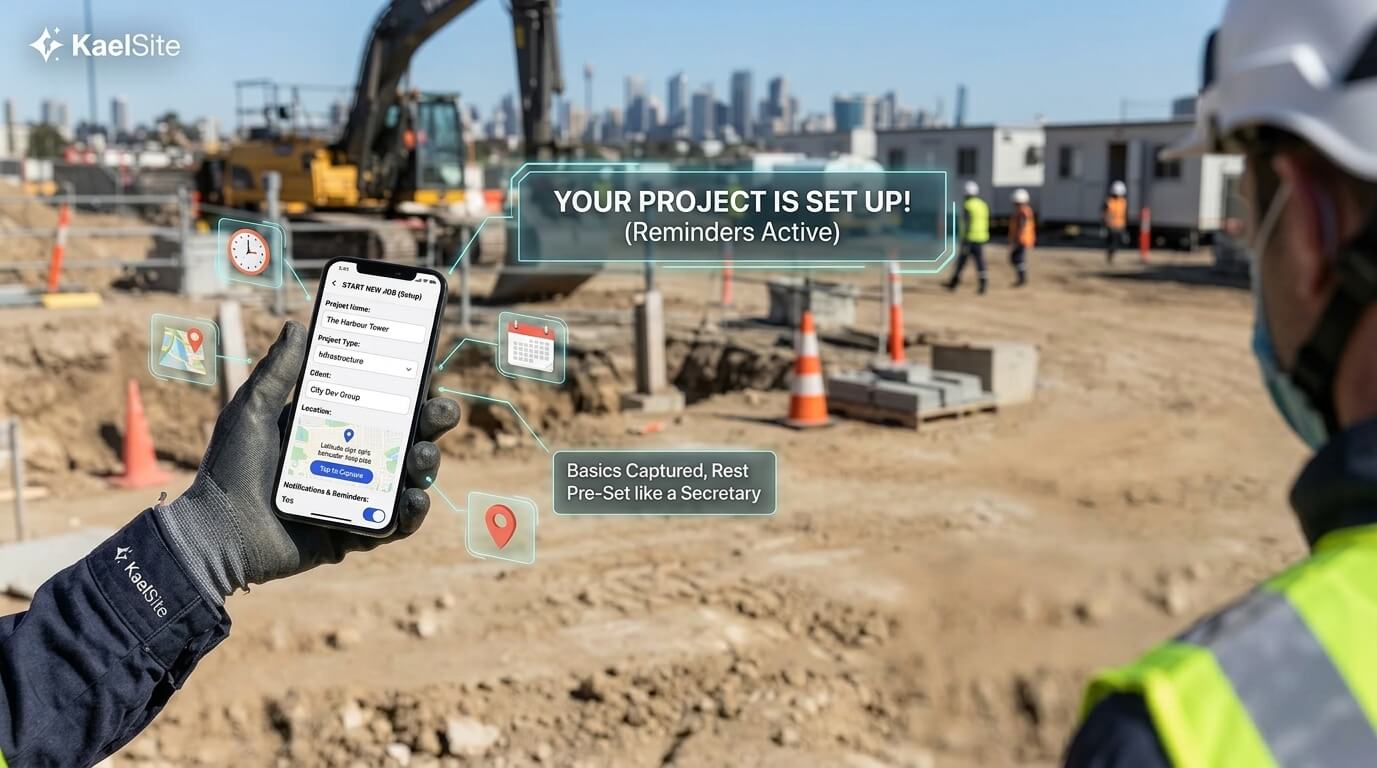
DAY ONE, SORTED
Start Every Job in Seconds
Tell KaelSite the basics and it sets up the rest, like a secretary who already knows what a new project needs.
- Project name and code
- Project type (residential, commercial, infrastructure and more)
- Client information
- Start and end dates
- Site location, with one-tap GPS capture
- Notifications and reminders, so nothing gets missed
Your project is set up and your reminders are in place, so you can get on with the job.
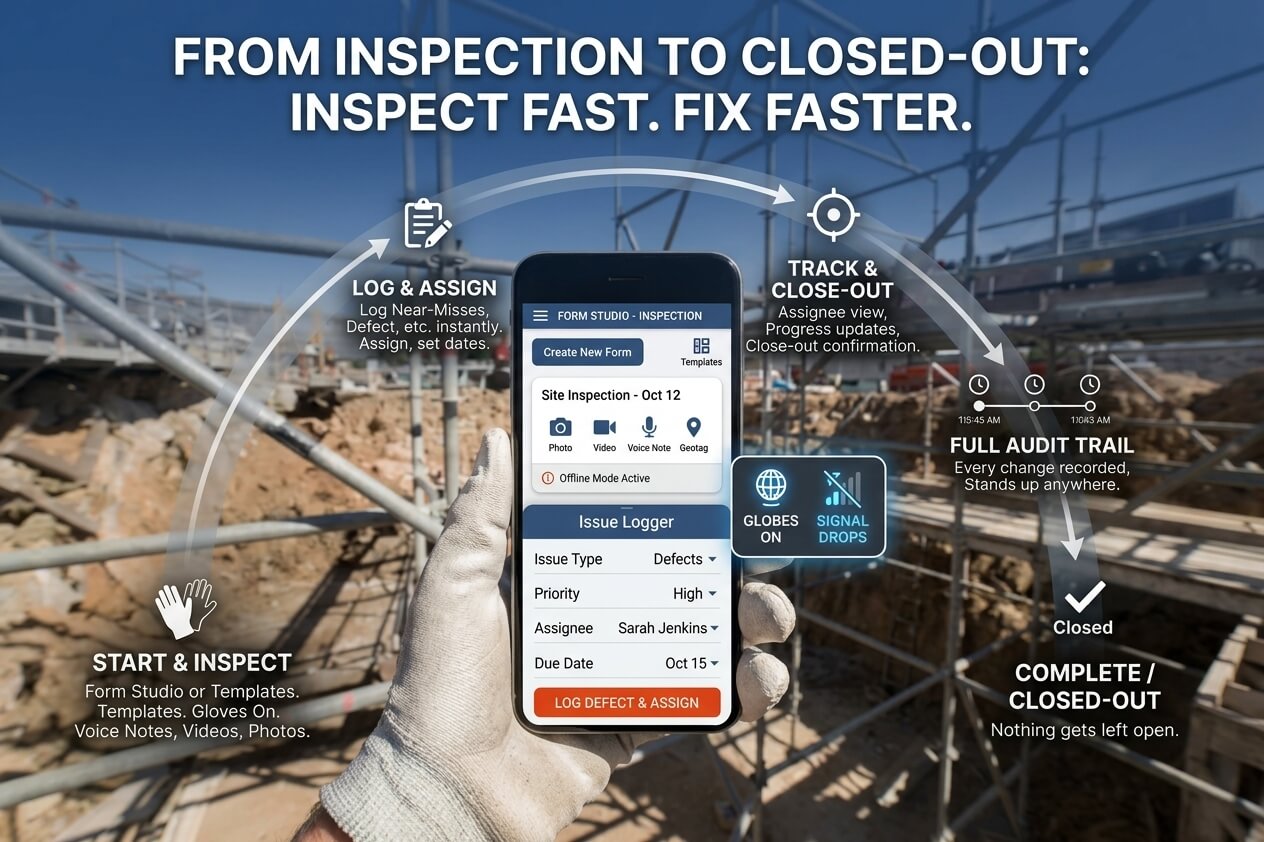
FROM INSPECTION TO CLOSED-OUT
Inspect Fast. Fix Faster
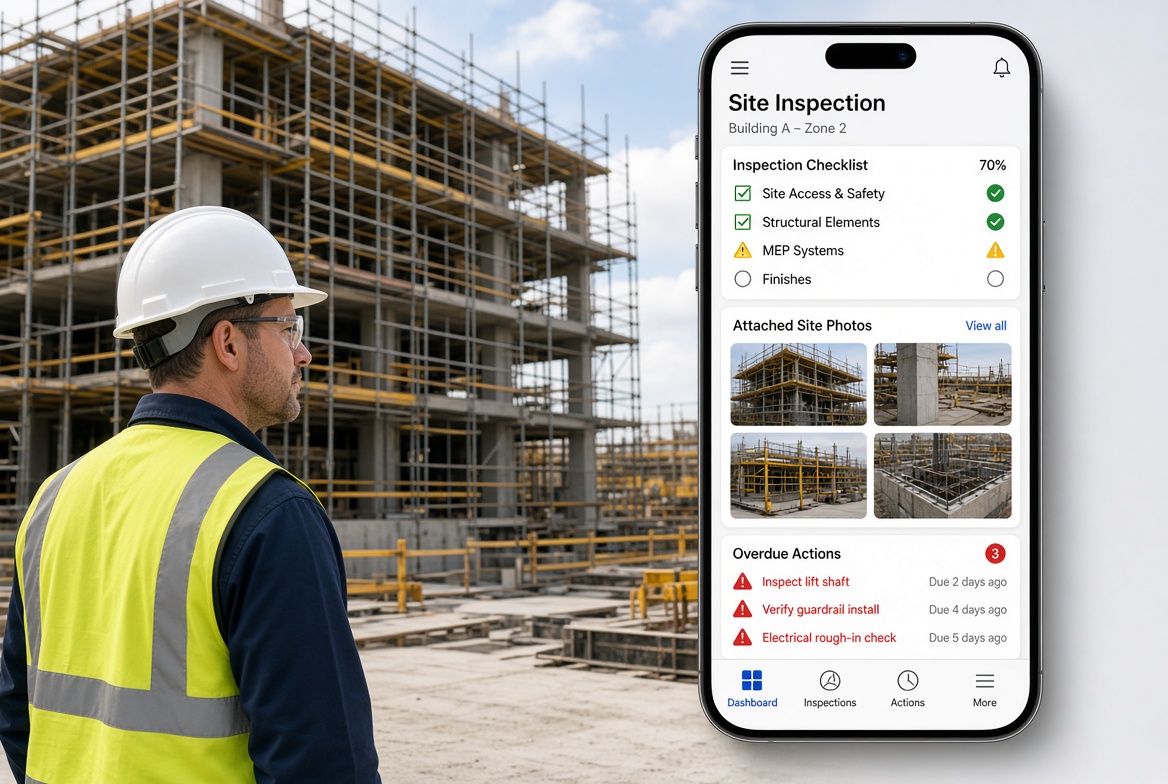
Build your own inspection forms in Form Studio, or start from ready-made templates. Complete inspections quickly, even with gloves on, with photos, videos, voice notes and geotags, and keep working when the signal drops.
When something goes wrong, log it on the spot: Near-Misses, Non-Conformances, Defects or Observations. Assign it to a team member, set a due date and follow it through to closure, with a full audit trail every step of the way.
- Your own forms in Form Studio, or ready-made templates
- Photos, videos, voice notes and geotags, even offline
- Log Near-Misses, Non-Conformances, Defects and Observations instantly
- Assign, set due dates and track to closure
- A full audit trail, so every record stands up
Nothing gets lost, and nothing gets left open.
YOUR TEAM, ONE PLACE
Your Whole Team, on the Same Page
Bring in everyone with a share in the job: Supervisors, Coordinators, Foremen, Site Managers, subcontractors and more. Share a unique code and they're in. The project owner decides who can see what, and everything stays live and shared from day one. What each person records stays theirs, so nobody else can delete it, not even the owner. Every record can be trusted.
- Add anyone to your project with a unique code
- The owner decides who sees what
- Everyone's records stay their own, and can't be deleted by others
- One live set of records for the whole team
One code, and your team is in

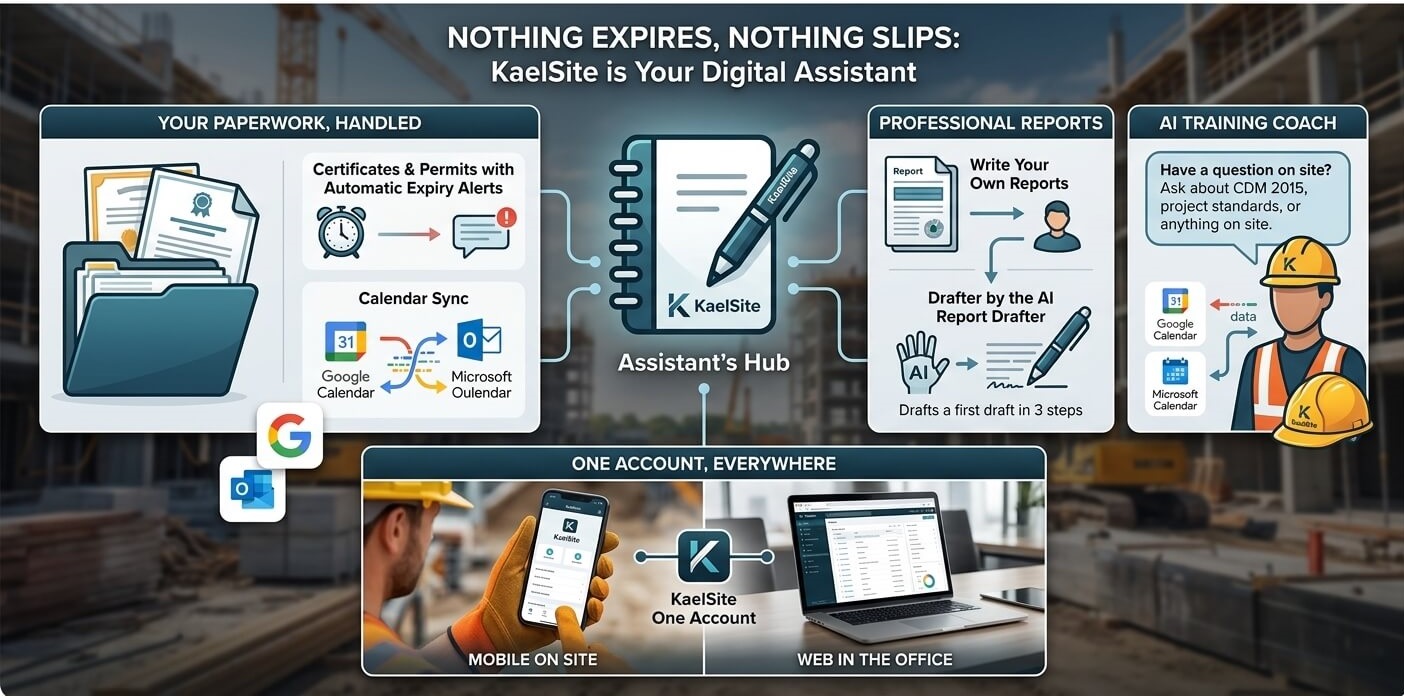
NOTHING EXPIRES, NOTHING SLIPS
Your Paperwork, Handled
Upload certificates and permits and KaelSite keeps an eye on the expiry dates for you, with alerts and calendar sync for Google and Microsoft. Write your own reports from your inspection data, or let the AI Report Drafter prepare a first draft.
Have a question about CDM 2015, your project's standards or something on site? Ask the AI Training Coach. And it's all on one account: on your phone on site, or on the web in the office.
- Certificates and permits with automatic expiry alerts
- Calendar sync with Google and Microsoft
- Professional reports, written by you or drafted by the AI Report Drafter
- The AI Training Coach for CDM 2015, project standards and site questions
- One account on mobile and web
One account, on site and in the office.
Day one, sorted
No learning curve.
Just forward progress.
If you can use a phone, you can use KaelSite.
Let’s get you started-
01
Create your project
Add the basics. KaelSite helps you take care of the rest.
-
02
Bring your team in
Share a unique code. Everyone’s on the same page.
-
03
Get on with the job
Inspect, capture, report. On your phone or on the web.
From the news desk
Stay ahead of the site.

From the blog
Latest articles.

What is KaelSite?
KaelSite is construction site management software for the UK, available as a mobile app and on the web. It brings your site inspections, issue tracking, safety reporting, certificates and permits, and project records together in one place. Build your own digital inspection forms, complete them offline, capture photos, videos, voice notes and geotags, and publish professional PDF reports.
It's made for anyone working in construction, from site managers, supervisors and temporary works teams to specialist trades, sole traders and small firms, and it's built around CDM 2015. It's quick to learn, so you can use it from the day after you start.
Who is KaelSite designed for?
KaelSite is designed for everyone with a share in construction, from large contractors to sole traders and small teams. If you inspect, supervise, record or report on work on a UK building site, it's built for you.
That includes:
- Site managers and supervisors, including those trained through SMSTS and SSSTS courses
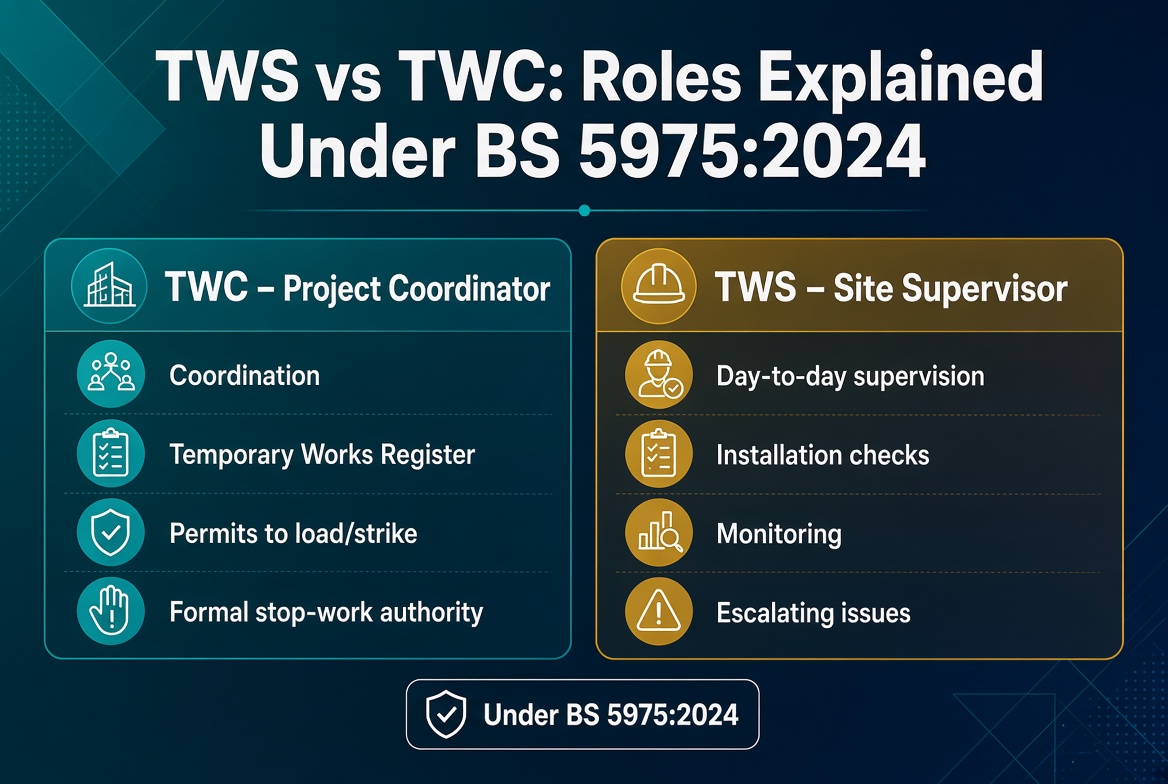
- Temporary works coordinators and supervisors (TWC and TWS)
- Health and safety advisers and compliance officers
- Principal contractors, contractors and subcontractors
- Specialist trades, such as scaffolders, groundworkers, electricians and roofers
- Sole traders, independent consultants and small construction firms
KaelSite works on your phone and on the web, offline when there's no signal, and it's built around CDM 2015. You don't need an IT department or lengthy training, so you can start using it the day after you begin a job.
Does KaelSite work offline?
Yes. KaelSite is an offline-first construction inspection app, so you can keep working on site with no signal. Open your digital inspection forms, complete inspections, log issues, and capture photos, videos, voice notes and geotags, all without a connection. Your work is saved on your phone and syncs automatically when you're back online, so nothing is lost in basements, tunnels, remote plots or anywhere else the signal drops.
Features that need a connection, such as the AI Report Drafter and AI Training Coach, work again as soon as you're back online.
Is KaelSite compliant with BS 5975 and CDM 2015?
Compliance with CDM 2015 and BS 5975 comes from how you and your team manage the work, not from the software you use. What KaelSite does is make that work easier to keep on top of. It's built around CDM 2015, so you can build your own digital inspection forms to match the checks your project needs, record inspections and issues with photos, videos and signatures, track them through to closure, and keep certificates and permits under watch with expiry alerts. Everything is stored in one place with a full audit trail, ready to show when someone asks.
KaelSite's AI Training Coach can also help you understand areas such as CDM 2015 and BS 5975. It's a learning aid, so check important decisions against the official guidance and with a competent person.
Mobile app
Take KaelSite to site
Run inspections, log issues and capture photos from your phone, even when the signal drops.
- Works offline
- Photos & voice notes
- Syncs with the web app

THE EASIEST WAY TO MANAGE YOUR SITE
The best construction site management app
Run every project from one place. Inspections, issues, work items, diary, notes, clients and reports, all linked to the project they belong to. Easy to learn, quick to use on site, and built for UK construction.