
NOTHING EXPIRES, NOTHING SLIPS
Your Paperwork, Handled by a Construction App That Never Forgets
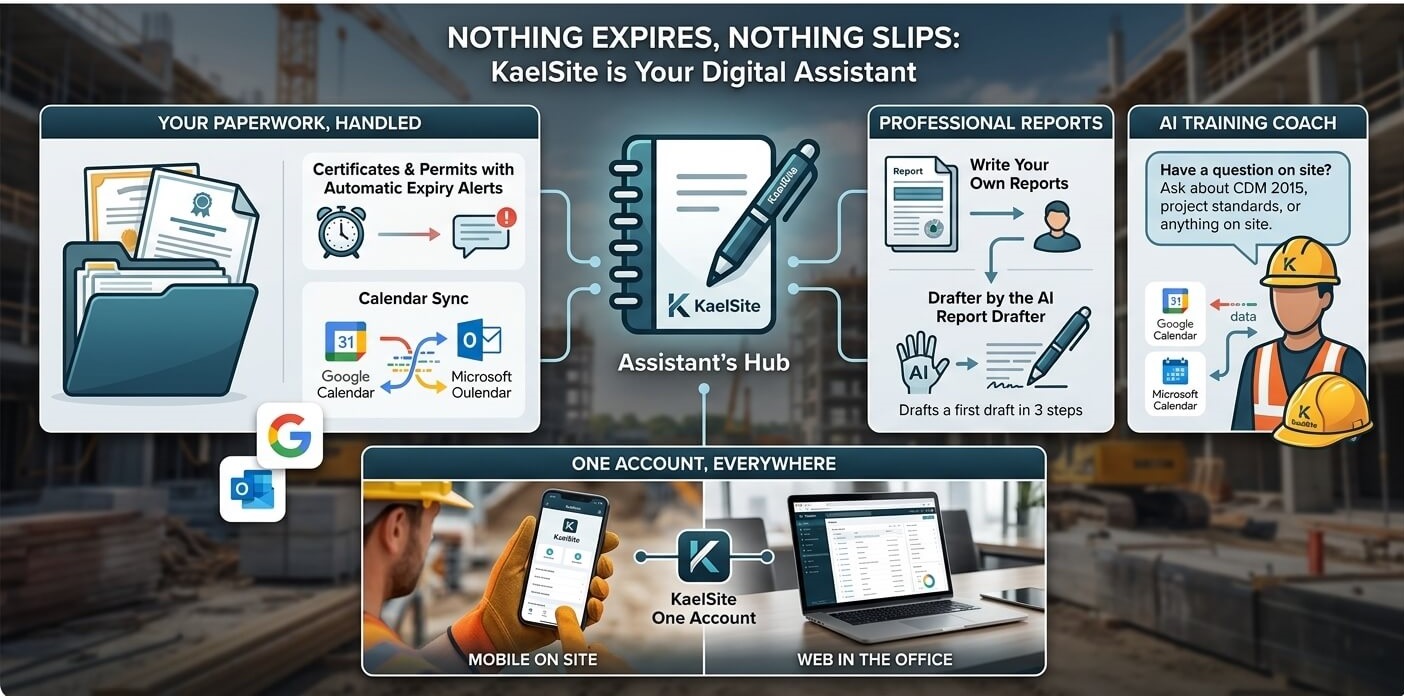
KaelSite is a construction app that handles your paperwork so nothing expires and nothing slips. Upload certificates and permits and get automatic expiry alerts, with calendar sync for Google and Microsoft. Write professional reports from your inspection data, or let the AI Report Drafter prepare a first draft. Ask the AI Training Coach about CDM 2015, project standards and site questions, all on one account across mobile and web. It is built for site managers, foremen, site admins, TWC, TWS and solo contractors, and is designed to be the easiest way to reduce risk and support your BS 5975 and CDM 2015 responsibilities.
Upload certificates and permits
KaelSite keeps an eye on the expiry dates for you, with alerts and calendar sync for Google and Microsoft. Write your own reports from your inspection data, or let the AI Report Drafter prepare a first draft.
Have a question about CDM 2015, your project’s standards or something on site? Ask the AI Training Coach. And it’s all on one account: on your phone on site, or on the web in the office.
- Certificates and permits with automatic expiry alerts
- Calendar sync with Google and Microsoft
- Professional reports, written by you or drafted by the AI Report Drafter
- The AI Training Coach for CDM 2015, project standards and site questions
- One account on mobile and web
One account, on site and in the office.
Why paperwork control matters on a construction site
An expired certificate or permit is one of the easiest ways to put a job at risk. It can stop work, fail an audit or leave a worker on site without the right competence. KaelSite is designed to be the easiest construction app for staying ahead of this. You upload the document once, KaelSite watches the date, and the right person is alerted before it becomes a problem.
Good records also support risk management and the working practices behind BS 5975 and the duties in CDM 2015, where being able to show that the right checks, permits and competence were in place is just as important as doing the work.
How each role uses KaelSite for paperwork
Site managers
Keep every certificate, permit and competence record in one place and know what is about to expire across the whole project. Use the AI Report Drafter to turn inspection data into a first draft of your weekly or client report, then edit it and issue it.
Foremen and supervisors
Upload permits and certificates from your phone as soon as you receive them, and get alerts when they need renewing. When you need to report, your inspection data is already in KaelSite, so you are not starting from a blank page.
Site admins
Stop chasing renewals with spreadsheets and sticky notes. Expiry alerts and calendar sync put deadlines in front of the right people, and the AI Report Drafter takes the first pass at your reports so you can spend your time checking and finishing them.
Temporary works teams (TWC and TWS)
Temporary works permits, certificates and checks have dates that matter. Upload them, let KaelSite track them and use the calendar sync to keep deadlines in your normal diary. It supports the record keeping behind BS 5975 working practices without extra admin.
Subcontractors, specialist trades and solo contractors
Your certificates and permits are your livelihood. Keep them in one place, get warned before they expire and show clients a clean, up-to-date record. Use the AI Training Coach for quick answers on CDM 2015 and site standards, with no big office team needed.
How to get your paperwork under control in KaelSite
- Upload your certificates and permits.
- Let KaelSite track the expiry dates and send you alerts.
- Sync your calendar with Google or Microsoft, so deadlines appear where you already look.
- Write your report from your inspection data, or let the AI Report Drafter prepare a first draft for you to review.
- Ask the AI Training Coach when you have a question about CDM 2015 or your project’s standards.
- Use one account on your phone on site and on the web in the office.
In summary
KaelSite is a construction app that handles your paperwork so nothing expires and nothing slips. Upload certificates and permits and get automatic expiry alerts, with calendar sync for Google and Microsoft. Write professional reports from your inspection data, or let the AI Report Drafter prepare a first draft. Ask the AI Training Coach about CDM 2015, project standards and site questions, all on one account across mobile and web. It is built for site managers, foremen, site admins, TWC, TWS and solo contractors, and is designed to be the easiest way to reduce risk and support your BS 5975 and CDM 2015 responsibilities.
One account, on site and in the office.
Shorter version (about 40 words), for a card:
KaelSite tracks certificate and permit expiry, syncs with Google and Microsoft calendars, drafts reports with AI and answers CDM 2015 questions, all on one account for site managers, foremen and site admins.