Temporary Works Management Software: How to Manage TWS, TWC and the Temporary Works Register
Managing temporary works involves much more than keeping a list of temporary structures.
Depending on the project, teams may need to coordinate temporary works items, responsibilities, design information, checks, inspections, changes, issues and records.
When this information is spread across spreadsheets, paper forms, emails, shared drives and messaging apps, it can become difficult to see what is happening.
That is where temporary works management software can help.
A good system brings the relevant information together and gives the people responsible for temporary works a clearer way to manage inspections, actions and records.
This guide explains what temporary works management software is, what features to look for, and how digital tools can support TWS and TWC workflows.
What Is Temporary Works Management Software?
Temporary works management software is a digital system used to organise information and processes associated with temporary works on construction projects.
Depending on the software and the project's requirements, it may help teams manage:
The exact workflow should reflect the organisation's Temporary Works Procedure and project requirements.
Software is there to support the process, not replace it.
Why Do Construction Companies Need Temporary Works Software?
Temporary works can involve many moving parts.
For example, a project might have several temporary works items being managed at the same time:
| Temporary works item |
Current stage |
Inspection |
Action |
| Temporary propping |
In use |
Completed |
None |
| Excavation support |
In use |
Completed |
Review required |
| Temporary platform |
Installation |
Due |
Pending |
| Formwork |
In use |
Completed |
None |
| Temporary access |
Installation |
Due |
Pending |
A spreadsheet can record this information.
But as the number of projects, temporary works items and inspections increases, spreadsheets can become harder to maintain.
The problem is not necessarily the spreadsheet itself.
The problem is that information can become fragmented.
One file may contain the register.
Another may contain inspections.
Photographs may be stored on someone's phone.
Actions may be in an email.
And the latest status may be discussed in a WhatsApp group.
Temporary works management software can bring these activities into a more structured workflow.
Temporary Works Register Software
One of the most useful features of a temporary works management system is a digital Temporary Works Register.
A register provides an overview of the temporary works being managed on a project.
Depending on the project's procedures, useful information may include:
The exact fields should be determined by the project's temporary works procedure.
The advantage of a digital register is that authorised users can access the current information without searching through multiple spreadsheets or folders.
What Is the Difference Between a Temporary Works Register and Temporary Works Software?
They are not the same thing.
A Temporary Works Register is a record of temporary works.
Temporary works management software is a system that can potentially manage the register alongside related workflows.
Think of it like this:
Register = what temporary works exist and their status
Software = the system used to manage the information and associated activities
A modern system can connect the register to inspections, issues and actions.
For example:
Temporary Works Item
↓
Inspection
↓
Observation
↓
Issue
↓
Corrective Action
↓
Evidence
↓
Review
↓
Closed
This can provide a much clearer audit trail of what happened.
What Should Temporary Works Management Software Include?
Not every company needs the same features.
However, there are several capabilities worth considering.
1. Digital Temporary Works Register
The foundation should be a clear register that allows authorised users to see temporary works items across a project.
A good register should make it easy to answer:
-
What temporary works are currently active?
-
Where are they?
-
Who is responsible?
-
What is their current status?
-
Which inspections are due?
-
Are there outstanding actions?
-
What needs attention?
2. TWS and TWC Management
Temporary works software should fit the responsibilities established by the organisation and project.
For example, users may need to identify relevant roles associated with a temporary works item.
This makes it easier to see who is involved without relying on separate spreadsheets or documents.
However, software should not be treated as defining responsibilities by itself.
The project's Temporary Works Procedure and organisational arrangements remain important.
3. Temporary Works Inspections
A register tells you what exists.
An inspection tells you what was observed.
A useful system should therefore connect temporary works items to inspection records.
A TWS or other appropriately competent person may be able to:
-
Open an inspection
-
Complete a checklist
-
Record observations
-
Take photographs
-
Identify issues
-
Assign actions
-
Submit the record
The inspection process should remain consistent with the project's procedures.
4. Mobile Working
Temporary works are managed on construction sites, not just in offices.
That means the software should work properly on mobile devices.
A site user should be able to:
Open → Inspect → Record → Photograph → Submit
without needing to return to a computer.
This can significantly reduce the amount of administration required after an inspection.
5. Offline Capability
Construction sites do not always have reliable internet connectivity.
Basements, tunnels, remote parts of sites and partially completed buildings can all create connectivity problems.
For that reason, offline capability can be an important consideration.
A practical system should allow users to continue recording information when connectivity is unavailable and synchronise information when a connection becomes available, where the software supports that workflow.
For site teams, this can be far more useful than a system that only works reliably from the site office.
6. Photographic Evidence
Temporary works inspections can benefit from clear photographic records.
Instead of storing photographs separately from the inspection, a digital system can associate them directly with the relevant record.
For example:
Temporary Works Item: TW-024
Inspection: 7 October 2026
Location: Level 02
Photographs: 6
Observation: Connection requires attention
Action: Assigned to responsible person
Now the evidence is connected to the activity that generated it.
7. Issue and Defect Management
Temporary works software should not simply collect completed checklists.
It should also help teams manage problems.
An issue could contain:
-
Description
-
Location
-
Photograph
-
Priority
-
Responsible person
-
Due date
-
Corrective action
-
Status
-
Completion evidence
This creates a clear workflow from finding a problem to managing its resolution.
8. Corrective Action Tracking
One of the biggest benefits of digital systems is visibility.
Instead of asking:
“Has that temporary works issue been dealt with?”
a manager can look at the system and see the status.
For example:
| Issue |
Responsible person |
Due date |
Status |
| Damaged component |
Assigned |
08 Oct |
Open |
| Missing protection |
Assigned |
07 Oct |
In progress |
| Access obstruction |
Assigned |
06 Oct |
Closed |
This makes follow-up much easier.
9. Due Dates and Reminders
Outstanding actions can easily be forgotten when they are recorded in paper notes or email chains.
Digital action tracking can make deadlines more visible.
Depending on the system, teams may be able to identify:
The exact notification process should be configured around the team's workflow.
10. Searchable Records
A temporary works management system should make it easy to find historical information.
Imagine a project manager asking:
“Show me all inspections for this temporary works item.”
With a digital system, the information can potentially be retrieved without searching through hundreds of files.
Useful search fields might include:
Good search functionality becomes increasingly valuable as projects generate more records.
11. Reporting
Management software should make reporting easier rather than create another administration task.
Useful reports could include:
-
Completed inspections
-
Outstanding actions
-
Overdue actions
-
Temporary works status
-
Inspection history
-
Issue history
-
Photographic evidence
-
Project activity
PDF reporting can also make it easier to share completed records where required.
12. User Permissions
Temporary works information may involve multiple people across a project.
A useful system should allow organisations to control who can access or edit information.
For example:
-
Project managers
-
Site managers
-
TWC
-
TWS
-
Supervisors
-
Inspectors
-
Administrators
Different users may require different levels of access.
The software should support the organisation's information-management approach rather than creating unnecessary access to project records.
Temporary Works Software vs Spreadsheet
Spreadsheets are still widely used in construction.
They can be useful, especially for straightforward registers.
But there are differences between a spreadsheet and a dedicated management system.
| Spreadsheet |
Temporary Works Software |
| Register-based |
Workflow-based |
| Usually office-focused |
Designed for site and office use |
| Manual updates |
Structured updates |
| Separate photo storage |
Photos can be attached to records |
| Manual action tracking |
Digital action tracking |
| Manual reporting |
Automated reporting may be available |
| Difficult to use offline on mobile |
Mobile workflow |
| Limited notifications |
Alerts/reminders may be available |
| Can become difficult across projects |
Designed for project-based management |
This does not mean every company needs dedicated software.
The right choice depends on the size and complexity of the organisation and its existing processes.
Is Excel Good Enough for a Temporary Works Register?
For some projects, yes.
A spreadsheet may be perfectly adequate for maintaining a straightforward register.
The problem occurs when the spreadsheet becomes responsible for everything.
For example:
Register + inspections + photographs + actions + approvals + status + reporting
At that point, teams may start creating multiple tabs, multiple files and multiple versions.
A dedicated system can reduce this fragmentation.
The question should not be:
“Is Excel bad?”
It should be:
“Is our current system making temporary works management easier or harder?”
Temporary Works Management for Multiple Projects
The challenge becomes greater when a company manages several construction projects.
A company may have:
-
Project A
-
Project B
-
Project C
-
Project D
Each project can have its own temporary works register, inspections and actions.
A centralised system can provide management-level visibility while keeping individual project information separated.
For example:
Company
→ Project A
→ Project B
→ Project C
→ Project D
This can make it easier to identify where attention is required without opening multiple spreadsheets.
What About TWS Software?
A TWS does not necessarily need a specialist piece of software called “TWS software”.
What matters is whether the system supports the activities the TWS needs to perform within the project's arrangements.
Useful functionality can include:
-
Inspection checklists
-
Mobile inspections
-
Photo capture
-
Issue reporting
-
Corrective actions
-
Due dates
-
Inspection history
-
Reports
The software should support the TWS's work rather than attempt to replace the role.
What About TWC Software?
The same principle applies to the TWC.
A TWC may benefit from having a broader overview of temporary works information.
Depending on the project, useful features may include:
The exact requirements depend on the organisation's temporary works procedure and project arrangements.
How Does Temporary Works Software Support BS 5975?
BS 5975 provides a framework for the management and control of temporary works, while the current standard is structured as BS 5975-1:2024 for management procedures and BS 5975-2:2024 for falsework design and implementation.
Software can help organisations organise information associated with their established procedures.
For example, it can help keep records of:
-
Temporary works items
-
Inspections
-
Issues
-
Actions
-
Evidence
-
Status
-
Reports
But software should not be presented as a substitute for the project's Temporary Works Procedure, competent people, engineering decisions or required checks and approvals.
There is an important difference between:
“Software helps us manage our process.”
and:
“The software makes the project compliant.”
The first is a sensible use of technology.
The second is an overstatement.
What Happens When a Temporary Works Inspection Finds an Issue?
A strong management system should make the next steps clear.
A typical workflow could be:
Step 1 — Record the issue
Document what was observed.
Step 2 — Capture evidence
Attach photographs and relevant information.
Step 3 — Escalate where appropriate
Notify the responsible people according to the project procedure.
Step 4 — Take appropriate control measures
Where necessary, restrict use or loading until the matter has been appropriately assessed and addressed.
Step 5 — Assign corrective action
Identify what needs to happen and who is responsible.
Step 6 — Track progress
Monitor the action until completion.
Step 7 — Record evidence
Add completion information or photographs where appropriate.
Step 8 — Review and close
Close the action through the project's established process.
The software manages the information.
It does not make the technical or engineering decision about what is safe.
What Is the Best Temporary Works Management Software?
There is no universal answer.
The best temporary works software is the system that fits the company's actual workflow.
Before choosing one, consider:
Ease of use
Can a site supervisor understand it immediately?
Mobile capability
Can inspections be completed from a phone?
Offline working
Can users work when signal is poor?
Custom checklists
Can the company create appropriate inspection templates?
Photo evidence
Can photographs stay connected to the relevant record?
Action management
Can issues be assigned and tracked?
Reporting
Can professional reports be generated?
Search
Can old records be found quickly?
User permissions
Can access be managed appropriately?
Multi-project support
Can the system handle more than one project?
Speed
Can an inspection be completed quickly?
The last point is particularly important.
If software takes longer to use than the paper system it replaces, site teams may stop using it.
Questions to Ask Before Buying Temporary Works Software
Before committing to a system, ask the supplier to demonstrate a real scenario.
For example:
“A TWS is carrying out an inspection and finds an issue. Show us what happens from start to finish.”
Watch how the system handles:
-
Selecting the project
-
Finding the temporary works item
-
Starting the inspection
-
Completing the checklist
-
Taking photographs
-
Recording an issue
-
Assigning an action
-
Setting a due date
-
Tracking completion
-
Adding evidence
-
Closing the action
-
Generating the final report
This is much more useful than watching a generic software presentation.
The Best Temporary Works Software Is Not Necessarily the Most Complicated
Construction software often suffers from a common problem:
Too many features, too many screens and too much administration.
A TWS working on a construction site does not need a complicated enterprise system just to record an observation.
They need to be able to:
Open → Inspect → Record → Photograph → Assign → Complete
quickly.
The management team may need dashboards and reports.
The site user needs simplicity.
The best platform should accommodate both.
How KaelSite Can Support Temporary Works Management
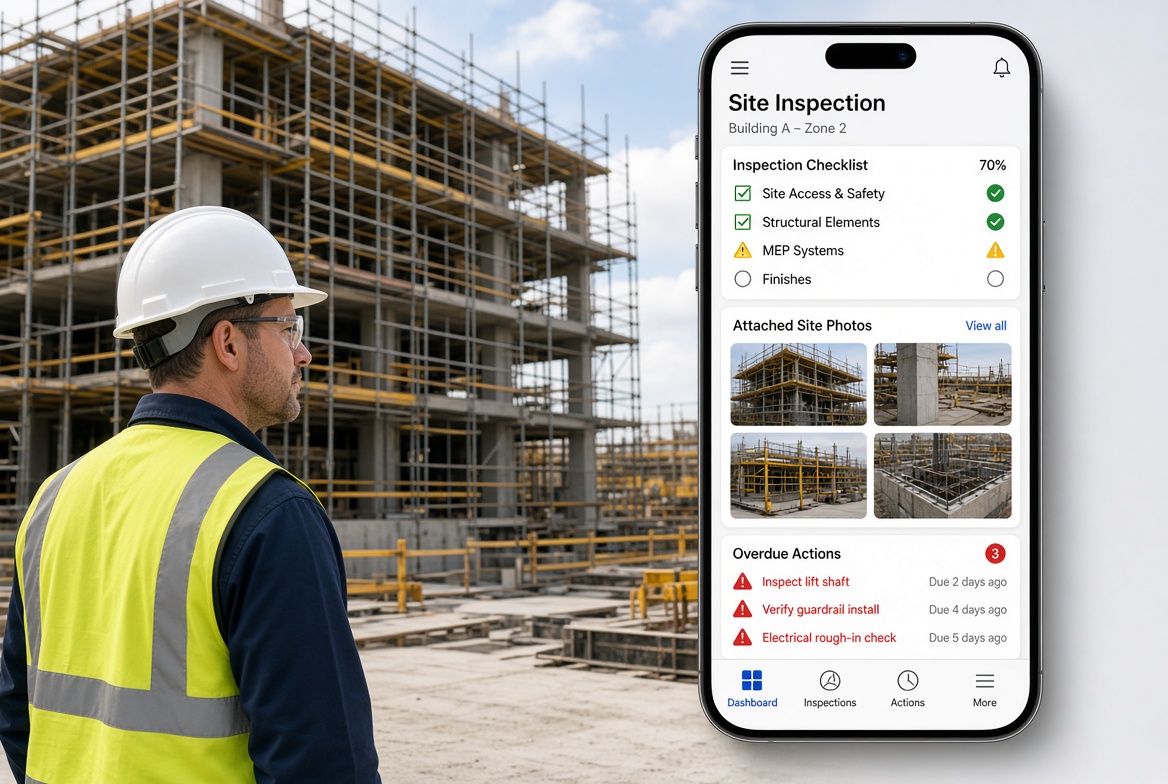
KaelSite is designed around the practical needs of construction teams working on site.
Instead of treating inspections, issues and records as completely separate activities, KaelSite can bring them together into a simple workflow.
For example:
Project
↓
Inspection
↓
Checklist
↓
Photographs
↓
Issue
↓
Corrective Action
↓
Completion Evidence
↓
Report
This approach can be useful for teams managing temporary works alongside their wider site inspection and reporting activities.
KaelSite is not intended to replace the TWS, TWC, engineer, designer or project-specific temporary works procedure.
It provides a digital tool for recording, organising and following up site activities.
Temporary Works Management + Wider Site Inspections
One advantage of using a broader construction platform is that temporary works do not exist in isolation.
The same project may also need to manage:
Using separate systems for every activity can create another problem:
Information becomes fragmented again.
A broader construction inspection platform can give teams one place to manage multiple site workflows while still using specific templates for different activities.
Temporary Works Management Software Checklist
Before choosing software, use this checklist:
| Requirement |
Check |
| Digital Temporary Works Register |
☐ |
| Mobile access |
☐ |
| Offline capability |
☐ |
| Inspection checklists |
☐ |
| Custom templates |
☐ |
| Photo evidence |
☐ |
| Issue reporting |
☐ |
| Corrective actions |
☐ |
| Due dates |
☐ |
| Action tracking |
☐ |
| Inspection history |
☐ |
| Searchable records |
☐ |
| PDF reports |
☐ |
| User permissions |
☐ |
| Multiple projects |
☐ |
| Easy site workflow |
☐ |
Use the checklist to compare systems based on what your team actually needs.
Frequently Asked Questions
What is temporary works management software?
It is software that helps construction teams organise and manage information associated with temporary works, including registers, inspections, issues, actions, evidence and reports.
What is temporary works register software?
Temporary works register software is a digital system for maintaining information about temporary works items and their current status. Some systems also connect the register to inspections and corrective actions.
Can temporary works software replace a Temporary Works Register?
A software system can provide a digital Temporary Works Register, but the register still needs to reflect the project's own procedures and requirements.
Can a TWS use temporary works software?
Yes. Software can support a TWS with inspections, checklists, photographs, observations, issue reporting and action tracking where those functions fit the project's arrangements.
Can a TWC use temporary works software?
Yes. A TWC can potentially use software to maintain an overview of temporary works information, inspections, actions and records, depending on the organisation's workflow.
Is a temporary works app better than Excel?
Not automatically. Excel can be effective for straightforward registers. Dedicated software becomes more attractive when teams need mobile inspections, photographs, action tracking, reporting and multiple interconnected records.
Does temporary works software make a project compliant with BS 5975?
No. Software does not automatically make a project compliant with a standard. It can support the organisation's established temporary works management processes.
Should temporary works software work offline?
For many construction sites, offline capability is an important feature because reliable internet connectivity cannot always be assumed.
What is the difference between temporary works software and a construction inspection app?
Temporary works software focuses specifically on temporary works management. A construction inspection app can cover a wider range of site inspections. Some platforms can support both.
What is the easiest temporary works management software to use?
The easiest system is usually the one that matches the team's workflow and requires the fewest unnecessary steps. A simple mobile workflow is particularly important for site users.
Final Thoughts
Temporary works management can become complicated when information is spread across different systems.
A spreadsheet may contain the register.
An email may contain an outstanding action.
Photographs may be on a phone.
An inspection may be stored as a paper form.
And the latest status may be somewhere in a message thread.
The problem is not necessarily any individual tool.
The problem is the gaps between them.
Temporary works management software can help connect those activities into one clearer workflow.
The goal should be simple:
Know what temporary works exist.
Know who is responsible.
Know what has been inspected.
Know what issues have been found.
Know what actions remain outstanding.
Know where the records are.
For construction teams, that can mean less administrative chasing and a clearer picture of what is happening across the project.
And for teams looking beyond temporary works, the same principle applies to inspections, defects, observations, corrective actions and wider site reporting.
KaelSite brings these everyday construction workflows together in one mobile-first platform — designed for the people actually working on site.

Comments (0)
Add a Comment
No comments yet. Be the first to comment!