Is Excel Still Enough for Construction Management?
Excel is widely used in construction for good reason. It is flexible, familiar and useful for maintaining lists, registers, calculations and basic project records.
A small contractor might use a spreadsheet to track site inspections. A site manager might maintain a list of outstanding issues, while a Temporary Works Coordinator (TWC) uses another file to manage a Temporary Works Register.
When the information is straightforward and only a few people need to update it, this approach can work well.
The difficulty often begins when the business grows or the records become more complicated.
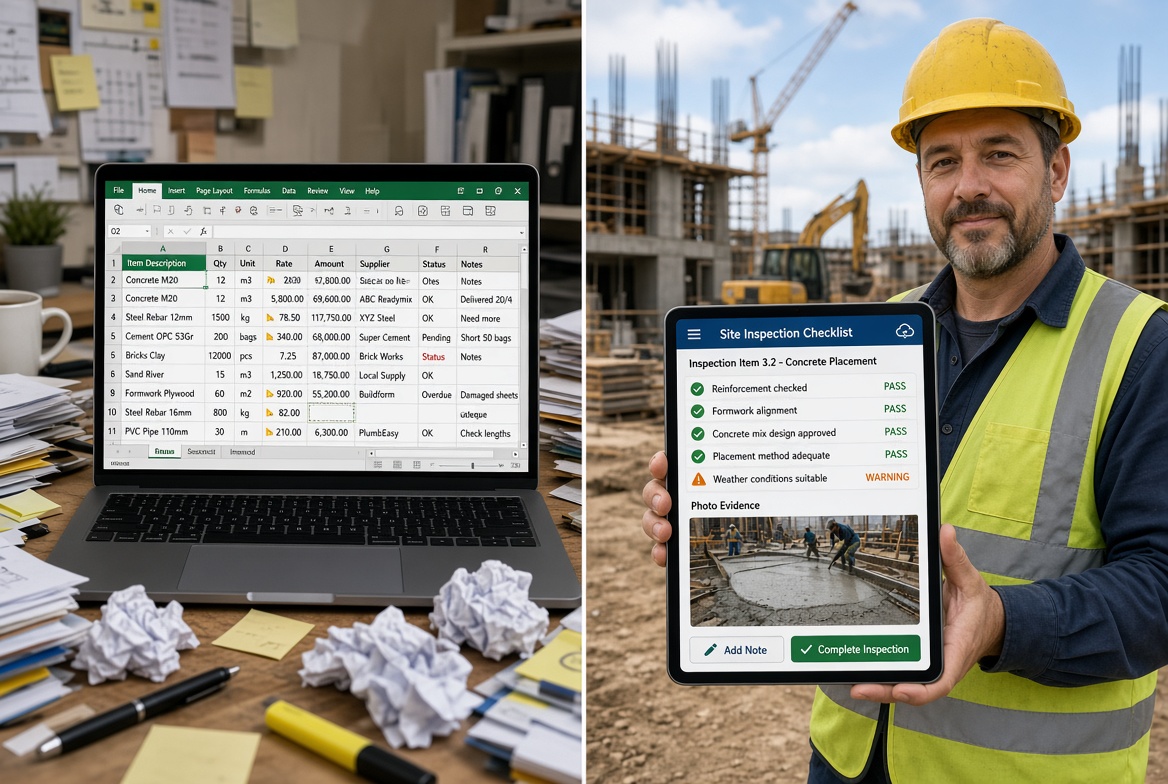
Several people may need to update the same information. Inspection photographs might be saved separately from the relevant spreadsheet. Corrective actions may be discussed through emails or WhatsApp messages, while certificates and expiry dates are managed in another file.
At this point, the problem is not necessarily Excel itself. It is the amount of manual work required to keep everything connected, current and accessible.
A construction management app can help bring these activities into a more structured workflow, allowing teams to record information on site and manage the resulting records in one system.
The question is not whether every construction company should abandon spreadsheets. It is whether your current approach still supports the way your team works.
7 Signs Your Construction Spreadsheets Are No Longer Working
There is rarely one moment when Excel suddenly becomes unsuitable. More often, small problems begin to appear more frequently until managing the records becomes a job in itself.
1. Different people are maintaining different versions
A spreadsheet might be saved on a shared drive, emailed to a colleague or downloaded onto a site manager's laptop.
Once several copies exist, it becomes difficult to know which one contains the latest information.
Someone may update an inspection record in one file while another person continues working from an older version. The team then has to compare records and reconcile the differences manually.
A centralised construction management app can reduce this problem by giving authorised users access to the relevant records in a shared system.
Before choosing a platform, check how it handles simultaneous updates, access permissions and record history.
2. Inspection photographs are stored separately
Construction inspections often produce photographs that help explain what was found on site.
With a spreadsheet-based process, those photographs may be stored in phone galleries, email attachments, messaging conversations or folders with inconsistent filenames.
Finding the right image later can take longer than expected, particularly when several inspections cover similar locations or equipment.
A construction inspection app can allow photographs to be attached directly to the relevant inspection or finding, depending on its functionality.
This creates a more organised record and makes it easier to review the evidence associated with a particular inspection.
3. Corrective actions are difficult to follow up
Recording a problem does not guarantee that it will be resolved.
A spreadsheet may contain an issue and a target date, but someone still needs to assign responsibility, communicate the action, monitor progress and confirm the outcome.
When follow-up takes place through separate emails or conversations, the status of an issue can become unclear.
A dedicated construction management app may support assigned actions, status updates, deadlines and supporting evidence, helping teams manage the process from the initial finding through to close-out.
The important distinction is between recording an issue and managing its resolution.
4. Certificate expiry dates are easy to miss
Construction companies may need to maintain training and competency records for employees and subcontractors.
Excel can store certificate details and expiry dates, but reliable tracking also depends on someone maintaining the information and ensuring that reminders reach the right people.
As the number of workers, certificates and sites increases, this process can become harder to manage manually.
Software with certificate tracking and expiry reminders can help identify upcoming renewals and highlight records requiring attention.
The benefit depends on the quality of the underlying data and whether the business has a clear process for acting on reminders.
5. Reporting takes too much time
Some construction teams record information in spreadsheets throughout the week, then spend additional time turning those records into reports for project managers, clients or compliance teams.
Photographs must be collected, findings rewritten, outstanding actions checked and information copied between documents.
This creates repetitive work and introduces opportunities for errors or omissions.
Construction management software can streamline parts of this process by generating reports from information already recorded in the system.
Before selecting a product, check whether its reporting features produce the documents your business actually needs.
6. Managing multiple sites requires constant chasing
A contractor overseeing several sites may have separate spreadsheets for each project, each maintained by different people.
To understand the overall position, a manager might need to request updates, combine information and check whether outstanding actions have been completed.
This makes it harder to identify recurring problems or see where attention is needed most.
A construction management platform with multi-site reporting can bring relevant records together in one place, subject to its reporting and access capabilities.
Instead of collecting every update manually, managers can review available information through a central view.
7. Site teams avoid updating the records
Even a well-designed spreadsheet is only useful if people enter accurate information at the right time.
If completing a form requires returning to an office, finding the correct file or transferring notes from paper, updates may be delayed.
This can leave managers working with incomplete information.
A mobile construction app can allow users to record findings, capture photographs and update supported workflows directly from site.
For teams working in areas with poor connectivity, offline functionality is especially important. Check whether the app supports completing and saving the necessary tasks without an internet connection.
Construction Management App vs Excel: What's the Difference?
Both spreadsheets and dedicated construction management apps can organise information. The difference lies in how they support the wider process around that information.
| Requirement |
Excel spreadsheets |
Construction management app |
| Basic lists and registers |
Flexible and effective |
Can manage structured records |
| Inspection checklists |
Can be built manually |
Often available as dedicated workflows |
| Photograph evidence |
May require separate storage and links |
May attach images directly to records |
| Corrective actions |
Often require manual tracking |
May support assignments and status updates |
| Certificate expiry reminders |
Need additional setup or processes |
Available in some platforms |
| Mobile site use |
Depends on the spreadsheet setup |
Often designed for mobile workflows |
| Offline inspections |
Depends on the device and setup |
Depends on the app's offline capabilities |
| Multi-site reporting |
May require combining separate files |
May provide a central reporting view |
| Audit trail |
Version history and manual records vary by setup |
May provide timestamps and activity histories |
| Initial cost |
Often low if suitable tools are already available |
Usually depends on the provider and plan |
Neither option is automatically better for every construction business.
Excel remains a sensible tool for simple records, calculations and smaller tasks. A dedicated app becomes more attractive when the process involves several connected activities, multiple users or a need for consistent evidence and follow-up.
The decision should be based on the workflow, not simply on whether the information is stored in a spreadsheet or an app.
Why Construction Compliance Can Be Difficult to Manage in Excel
Compliance-related records often need to do more than store information. Teams may need to show what was checked, what was found, who was responsible, what action followed and whether the relevant records are available for review.
For UK construction businesses, this can involve inspections, certificate records, corrective actions and temporary works documentation.
Temporary Works Registers
A Temporary Works Register can be maintained in Excel, and spreadsheets may remain suitable for some projects.
However, when registers need to be updated alongside inspection records, design and checking information, approvals and outstanding actions, the process can become more complicated.
The challenge is keeping related information organised and ensuring that the people responsible can access the current records.
Specialist temporary works management software can help connect these workflows, depending on the features provided.
Inspection records and evidence
Inspection records may need to include findings, photographs and follow-up actions.
If these details are scattered across spreadsheets, separate folders and email conversations, retrieving a complete record can require manual investigation.
A dedicated inspection workflow can keep supported information together and make it easier to review later.
Certificate and competency records
A spreadsheet can list certificate holders and expiry dates, but it does not automatically guarantee that records are accurate or that renewals happen on time.
A suitable tracking system can support reminders and clearer visibility of upcoming expiries. The business still needs to maintain accurate records and ensure that someone acts on the information.
Audit readiness
Preparing for an audit or internal review can become time-consuming if records are distributed across different systems.
A structured digital workflow may make it easier to retrieve inspection records, supporting evidence and action histories.
However, using software does not automatically establish compliance with CDM 2015, BS 5975 or other applicable requirements. The relevant procedures, competent people and accurate records remain essential.
When Should You Move From Excel to a Construction Management App?
There is no fixed number of employees, sites or spreadsheet rows that determines when you should switch.
A better approach is to look at the amount of manual effort involved and the consequences when information is missing or outdated.
Moving to a dedicated app is worth considering when:
-
Your team regularly spends time chasing updates or reconciling spreadsheet versions.
-
Inspection photographs and findings are difficult to retrieve together.
-
Corrective actions are frequently delayed or require repeated follow-up.
-
Certificate expiry tracking depends on manual checks.
-
Reporting across sites involves combining several files.
-
Site teams need to complete records on mobile devices.
-
Unreliable internet access makes online-only workflows impractical.
-
You need a clearer, more consistent record of inspections and actions.
You may not need to replace every spreadsheet. Some businesses benefit from keeping Excel for calculations and basic planning while using a dedicated app for inspections, evidence, corrective actions and compliance-related workflows.
The objective is to use the right tool for each task while avoiding unnecessary duplication.
How to Move From Spreadsheets to a Construction App Without Disrupting Site Work
Switching systems can create its own problems if the process is rushed. A gradual rollout helps teams adapt and gives the business an opportunity to identify issues before expanding the change.
Step 1: Review your existing spreadsheets
Identify which spreadsheets are actively used, who maintains them and what information they contain.
Look for duplicate records, outdated files and fields that are no longer necessary.
Decide which information must be retained, which records need to be transferred and which processes can be simplified.
Step 2: Choose one workflow to improve first
Start with a recurring process that causes noticeable administrative work.
For example, you might begin with site inspections, certificate tracking or corrective action management.
Avoid trying to digitise every process at once. A focused starting point makes it easier to evaluate whether the new system actually improves the workflow.
Step 3: Define what success looks like
Before implementing the app, establish what you want to improve.
You might measure:
-
Time required to complete and prepare inspection reports.
-
Time taken to retrieve previous inspection records.
-
Number of overdue corrective actions.
-
Frequency of missing or incomplete records.
-
Time spent preparing multi-site updates.
These measures help you evaluate the results instead of assuming that adopting software automatically creates savings.
Step 4: Test the workflow with site users
Ask the people who complete the work to test the app using realistic site tasks.
Can they complete the form easily? Can they attach the required photographs? Is it clear how to record and close out an issue?
If offline working is required, test the actual workflow without connectivity and confirm how records synchronise afterwards.
Step 5: Train the team and transfer relevant records
Provide clear instructions on how the new workflow should be used and who is responsible for maintaining the records.
Transfer the information that is genuinely needed, rather than importing every historic spreadsheet without review.
Keep appropriate copies of historical records and establish how the business will retain and access them.
Step 6: Review the results before expanding
After the team has used the new process, compare the results against your original objectives.
Ask whether the workflow is easier, whether records are more accessible and whether any new administrative burdens have appeared.
Use that feedback to improve the process before moving additional activities into the system.
How KaelSite Helps Construction Teams Move Beyond Spreadsheets
KaelSite is a mobile-first platform designed to help UK construction teams manage temporary works inspections, site evidence and compliance-related workflows.
For businesses that rely on spreadsheets and paper records, its value lies in supporting connected site processes rather than simply storing information digitally.
KaelSite supports workflows including:
-
Mobile inspections: Record inspection information and capture supporting evidence.
-
Offline-first working: Complete supported activities in areas with limited connectivity and synchronise records when the connection returns.
-
Temporary works management: Organise temporary works registers, inspections and related records.
-
Issue tracking: Record findings and manage follow-up actions.
-
Certificate tracking: Maintain relevant records and monitor upcoming expiry dates.
-
Reporting: Produce structured reports from site information.
-
Compliance documentation: Support traceable records associated with site procedures.
These features can be particularly relevant to Temporary Works Supervisors, Temporary Works Coordinators, site managers and contractors who need to keep inspections, evidence and follow-up actions organised across projects.
KaelSite will not eliminate every spreadsheet or replace every business system. Excel can remain useful for calculations and tasks where a spreadsheet is the simplest tool.
But if your team is spending too much time managing inspection paperwork, searching for evidence, updating registers or chasing outstanding actions, it is worth evaluating whether a dedicated construction app would make those workflows easier to manage.
The best starting point is to identify one recurring problem and assess how KaelSite handles it in practice.
Frequently Asked Questions
Is Excel good enough for construction management?
Excel can work well for simple registers, calculations and basic records. It becomes harder to manage when information is spread across multiple files, several people need to update records, or inspections require linked photographs, follow-up actions and reporting.
Whether you need a dedicated app depends on the complexity of your workflows and the reliability of your current process.
What is the difference between a construction app and a spreadsheet?
A spreadsheet is a flexible tool for storing, calculating and organising data. A construction management app is designed to support specific workflows, which may include inspections, photographs, issue tracking, notifications and reporting.
The exact difference depends on the spreadsheet setup and the app's features.
Can construction management software replace Excel completely?
Not necessarily. Some businesses continue to use Excel for calculations, cost analysis and straightforward lists while using dedicated software for site inspections and compliance-related records.
Using each tool for the tasks it handles best can be more practical than trying to move everything into one system.
Can I manage a Temporary Works Register in Excel?
Yes, a Temporary Works Register can be maintained in a spreadsheet if the arrangement suits the project and its procedures.
As the complexity of the register and associated records grows, dedicated software may help organise inspections, approvals and outstanding actions more consistently. The chosen approach must still meet the project's temporary works procedures and record-keeping requirements.
Does a construction management app work without internet access?
Some apps support offline working, while others require an internet connection for certain or all functions.
Before choosing a product, confirm which tasks are available offline, how information is stored and how synchronisation works when connectivity returns.
Will switching to a construction app save money?
It may reduce some manual administration, repeated data entry and time spent retrieving records. However, the outcome depends on the existing process, subscription costs, implementation effort and how consistently the team uses the app.
Measure the time spent on your current workflow and compare it with the results after implementation.
Final Thoughts
Excel is not the enemy of efficient construction management. It is a useful tool that can become difficult to maintain when the process around it grows more complicated.
If your team is regularly reconciling spreadsheet versions, searching for inspection photographs, chasing corrective actions or preparing reports manually, it may be time to consider a dedicated construction management app.
Start with the workflow causing the most friction, define what you need to improve and test a suitable solution with the people who use it on site.
For UK construction teams managing temporary works inspections, site evidence, certificates and compliance records, KaelSite offers a focused option to evaluate when moving beyond disconnected spreadsheets and paperwork.

Comments (0)
Add a Comment
No comments yet. Be the first to comment!