What Is a Site Diary For?
A site diary records what actually happened on site each day, not what was planned.
On a good day, nobody looks at it. On a bad day, it is one of the first things people ask for.
Guidance on keeping diaries describes the same set of uses. It supports day-to-day monitoring of progress, labour, plant and conditions. It records instructions, including verbal ones that were later confirmed or contradicted. And it becomes evidence, in a delay claim, a variation valuation, an adjudication, a health and safety investigation or a productivity review.
That last use is why the question of paper versus digital deserves more than a shrug. The diary is cheap to keep and expensive to be without.
What a diary typically records
Published guides tend to list similar categories. This list is drawn from one such guide, written by a software vendor, so treat it as a starting point and adapt it to your contract and procedures:
- Project details and weather
- Labour numbers by trade, subcontractors and agency staff
- Plant on site, deliveries and downtime
- Work completed, with locations and quantities
- Material deliveries, including short or rejected items
- Instructions and communications, including verbal directions
- Delays and disruption, with their effect on progress
- Health and safety activity
- Inspections and tests
- Visitors
- Variations and potential compensation events
- General observations
Whether the diary is a bound book or an app, the content matters more than the medium. A thin digital diary is no better than a thin paper one.
Why Does the Timing of Entries Matter?
The recurring theme in guidance on construction records is that they should be made at the time.
The Society of Construction Law's Delay and Disruption Protocol is a useful reference point. It is guidance, not law, and it has no legal force unless a contract adopts it, which a law firm's review of the second edition (published in 2017) describes as very rare. Even so, it is widely used as a benchmark for good practice, and it stresses keeping records. It suggests parties agree in advance which records will be kept, that the work is resourced, and that where practical records are signed by representatives of both sides to reduce later disputes. One of the contract forms it discusses defines contemporary records as those made at the same time as, or immediately after, the event.
Two practical points follow for anyone choosing a diary format:
- A diary written at the time is stronger than one written up from memory. Format should make it easy to write the entry on the day.
- A record both sides have seen is stronger than one only you have. Format should make it easy to share, countersign or at least send.
Neither point favours paper or digital automatically. Each format can support or undermine them.
Note: the protocol has been commented on since this review, and a newer edition may exist. Check the current position before relying on it, and take legal advice about records for any dispute.
Traditional Site Diaries: What They Do Well
Paper diaries have lasted because they have real strengths.
They are simple. A bound, numbered book needs no battery, no signal, no login and no training.
They are quick for a short entry. Writing a line of text is faster than finding the right screen, as long as the entry is short.
They show the order of writing. Bound pages with consecutive numbers are hard to alter without leaving a trace, which many people find reassuring.
They are familiar to everyone. Clients, quantity surveyors and lawyers all understand a bound book.
They have no data or licence cost. The diary is cheap to buy and the running cost is close to zero.
They keep working when technology does not. There is nothing to crash, no account to lose and no update that changes the layout.
Traditional Site Diaries: Where They Struggle
The strengths are real, but so are the problems, and they tend to appear as the work grows.
Legibility. Handwriting varies, and a diary written in a hurry in poor conditions can be hard to read months later, when the person who wrote it has moved on.
Completeness. Nothing stops an entry leaving out the weather, the labour numbers or the instruction that mattered. A blank space looks the same as a quiet day.
Evidence stays separate. Photographs sit on a phone, delivery notes are in a folder and the diary says "see photos". Matching them later takes time.
Retrieval. Finding a particular day, or every mention of a particular subcontractor, means turning pages. Across several sites and years, it can be close to impossible.
Single copy. A paper diary exists in one place. It can be lost, damaged, left in a van or taken home by the person who left the company.
Visibility. The project manager cannot see this week's entries until someone brings the book to them or photographs the pages.
Rewriting. Information is often written once in the book and typed again into a weekly report.
Timing is a matter of trust. A paper entry carries a date, but nothing shows when it was actually written. A diary completed on Friday for the whole week looks like one written daily.
Digital Site Diaries: What They Do Well
Entries are structured. Fields for weather, labour, plant, deliveries and instructions make it harder to leave things out, and mandatory fields can force the essentials.
Evidence attaches to the entry. Photographs, video and voice notes sit with the diary entry for the day.
Records are timestamped and attributable. A good system records who wrote the entry and when, and whether it was changed afterwards.
Retrieval is fast. Search by date, trade, location or keyword is quicker than turning pages.
Visibility is immediate. A project manager can see the diary for each site without waiting for it to arrive.
There is a backup. A record held centrally survives a lost phone or a damaged book, if the system is set up and backed up properly.
Reporting draws on the diary. Weekly and monthly summaries can use recorded data instead of retyping.
Offline use is possible. Well-designed apps let you write an entry without a signal and synchronise afterwards.
Digital Site Diaries: Where They Struggle
Dependence on devices. Batteries die, screens crack and phones get lost. A diary kept on a personal phone raises its own questions about ownership and access.
Signal. An app that needs a connection to save an entry will fail in basements and remote sites. Offline capability has to be tested, not assumed.
Friction. If writing an entry takes longer than on paper, people will skip it or do it in bulk at the end of the week, which defeats the purpose.
Over-structuring. Too many mandatory fields lead to box-ticking, and a free-text note may be exactly what is needed on a difficult day.
Training and adoption. Not everyone is comfortable on a phone, and a poorly introduced system will be ignored.
Perceived tamper risk. Some readers are more comfortable with a bound book than a database. A digital system needs a clear audit trail and access controls to answer that concern.
Cost and lock-in. Subscriptions, per-user pricing and difficulty exporting records are real costs, and your diary history should not be trapped in a product you stop paying for.
Data protection. A diary can include names, photographs of workers and other personal data, so it needs sensible access control and retention.
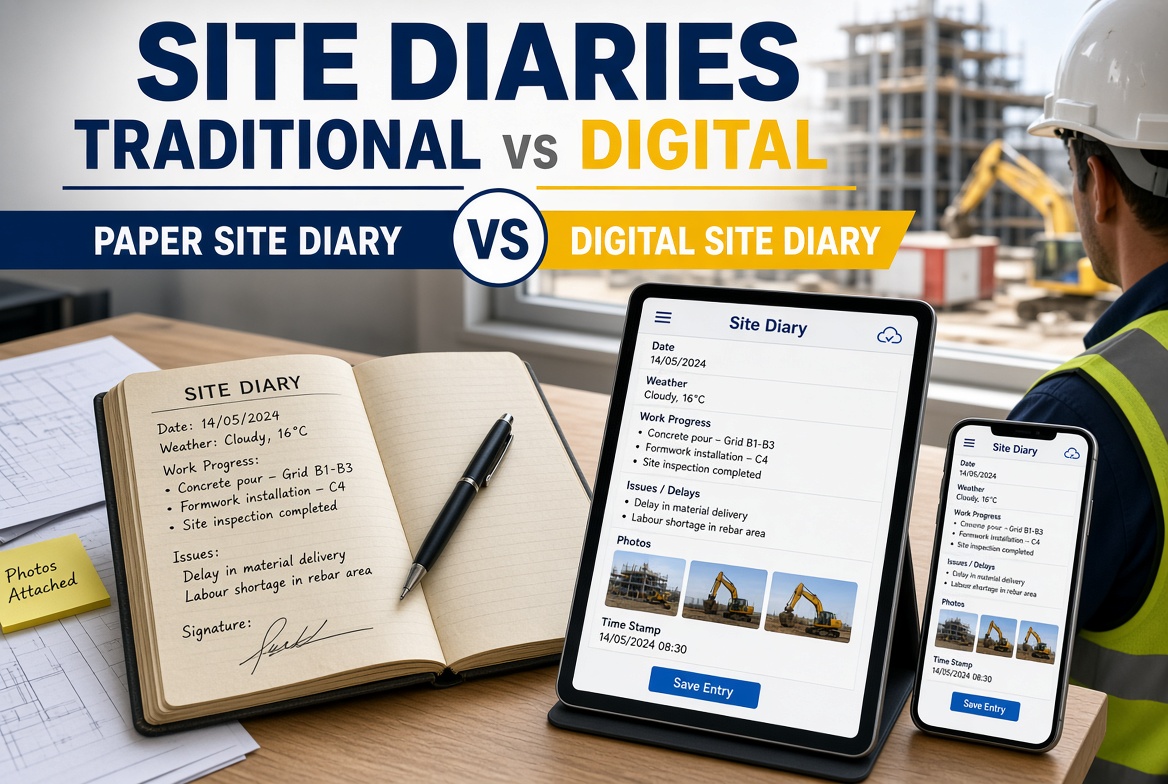
Side by Side: Digital vs Traditional Site Diaries
| Criterion |
Traditional (bound book or paper sheets) |
Digital (app or system) |
| Setup and training |
Almost none |
Needs setup, forms and training |
| Writing a quick entry |
Fast |
Fast if well designed, slower if not |
| Completeness |
Depends on the writer |
Can be enforced with required fields |
| Legibility |
Varies |
Typed or dictated, so consistent |
| Evidence (photos, documents) |
Separate, matched later |
Attached to the entry |
| Proof of when it was written |
Date on the page; actual time of writing unclear |
System timestamp, if configured |
| Tamper evidence |
Numbered pages, but no history of changes |
Audit trail, if the product provides one |
| Signatures and countersigning |
Physical signature |
Electronic sign-off, depending on the product |
| Retrieval |
Page by page |
Search and filter |
| Visibility to the project manager |
When the book is brought or photographed |
As soon as it is synchronised |
| Works without a signal |
Yes |
Only if the product supports offline use |
| Loss and damage risk |
Single copy, can be lost or damaged |
Depends on device, backup and vendor |
| Reporting |
Retyped |
Can draw on recorded entries |
| Running cost |
Very low |
Subscription, devices and admin time |
| Exit and retention |
The book stays with you |
You need an export route |
| Data protection |
Physical security |
Access controls, storage location and retention |
No column wins every row. Which one is better depends on which rows matter most to you.
Which Is Better for Project Managers?
It depends on what you manage. Some situations favour each side.
| If your situation is... |
You may lean towards... |
Why |
| One small site, one supervisor, a short job |
Paper |
Setup cost outweighs the benefit, and a good diary habit is the main thing |
| Several sites and you need to see each one without a visit |
Digital |
Visibility and retrieval become important |
| Frequent delays, variations or instructions that may be disputed |
Digital, or paper with strict discipline |
Timeliness, evidence and retrieval matter most |
| A contract or client that specifies a diary format |
Whatever the contract requires |
Check before choosing |
| Work in basements, tunnels or remote areas |
Paper, or digital that you have proved works offline |
Signal is the deciding factor |
| A team that is not comfortable with phones |
Paper at first, or digital introduced gradually |
Adoption is the main risk |
| Large subcontractor workforce reporting into your diary |
Digital |
Structured entries and shared access help |
| Records you may need to produce years later |
Either, if retention and export are planned |
The risk is the plan, not the medium |
A fair summary: paper is a perfectly good diary if it is written daily, completely and legibly, and kept safe. Digital is better at making sure that happens at scale, and at making the result easy to find and share. The failure mode of paper is inconsistency. The failure mode of digital is friction and dependency.
What About a Hybrid?
Many teams end up with a mixture, and it can work if it is deliberate.
Paper with photographed pages. Supervisors keep a bound diary and photograph each day's page, so the project manager has a copy. This improves visibility and backup, but not searchability.
Digital for structured data, paper for notes. Labour, plant and weather in an app, with free-text notes kept elsewhere. This risks splitting the record, so be clear which is the primary one.
Digital with a paper fallback. The app is the diary. A simple paper form is used if the device fails, and entries are transferred promptly.
Whichever you choose, decide which version is the record. Two diaries that disagree are worse than one.
What Should a Digital Site Diary Include?
If you move to digital, use these as test criteria.
- Daily structure matching your contract and procedures: weather, labour, plant, deliveries, work done, instructions, delays, health and safety, visitors.
- Free-text fields for things the structure does not anticipate.
- Photographs, video and voice notes attached to the entry.
- Timestamps and named users, showing who wrote what and when.
- An audit trail, showing any edits.
- Offline entry, with automatic synchronisation.
- Sign-off or acknowledgement, where your contract expects it.
- Search and filtering across days, sites and subcontractors.
- Reports drawing on diary entries.
- Access control, so the right people can read or edit.
- Export, including photographs and attachments, in a usable form.
- Retention and backup arrangements you understand.
How to Test Both Before You Decide
A short, honest test is worth more than a demonstration.
- Pick one real site and one real week. Have the supervisor keep the diary in the format you are evaluating.
- Time the daily entry. Note how long it takes, and whether the entries were made on the day.
- Check completeness. At the end of the week, ask what is missing: weather, labour numbers, an instruction, a delay.
- Try retrieval. Ask someone else to find a particular day, a particular instruction and every entry mentioning one subcontractor. Time it.
- Try offline. If testing a digital product, write an entry in flight mode and check it after reconnecting.
- Try a handover. Imagine the supervisor leaves. Can a successor pick up the record?
- Ask the supervisor. If they dislike it, the entries will degrade quickly.
- Check the exit. For digital, ask how you would export the full diary, with photographs.
How to Move From Paper to Digital Without Losing the Habit
The risk in changing is not the technology. It is that the diary stops being written.
Fix the content first. Agree what the diary must contain before choosing a tool. A better paper template can improve the diary even if you never go digital.
Start with one site. Pick a supervisor who is open to it and a project of moderate length.
Keep the entry short. The goal is a complete entry in a few minutes at the end of each day, not a long report.
Write it daily. Agree when the entry is made and by whom. Bulk entries at the end of the week should be the exception, and flagged as such.
Set a changeover date. Running paper and digital in parallel for weeks tends to produce two incomplete records.
Decide the record. Say clearly which version is the official one from the changeover date.
Plan the archive. Keep completed paper diaries safe, and decide how long to retain them, in line with your contract and company policy.
Review at 30 and 90 days. Check completeness, timeliness and feedback, and adjust the form.
Site Diary Format Checklist
- [ ] We have agreed what the diary must contain, in line with our contract and procedures.
- [ ] Entries are made on the day, by a named person.
- [ ] The diary records who wrote each entry and when.
- [ ] Photographs and supporting documents can be linked to the entry.
- [ ] Instructions, including verbal ones, are recorded and, where possible, confirmed.
- [ ] Delays and disruption are recorded with their effect on progress.
- [ ] The project manager can see entries without waiting for a site visit.
- [ ] We know which version is the official record.
- [ ] The diary can be searched or, for paper, reliably indexed.
- [ ] If digital, offline entry has been tested and an audit trail is available.
- [ ] If digital, we can export the full diary, including attachments.
- [ ] We have a plan to retain and protect records for the period we need.
- [ ] Access to the diary is controlled and personal data is handled sensibly.
- [ ] The supervisors who keep the diary have tried the format and are happy with it.
Where KaelSite Fits
KaelSite is a mobile-first construction compliance platform for UK teams, built around inspections, issues and certificates. Those parts of the product, including offline-first inspections with photo, video, voice and geotag capture, overlap with what a good site diary records on the health and safety, inspections and evidence side.
To be clear about the limits: KaelSite's published feature list does not describe a dedicated site diary module, so if your main need is a full daily diary with labour, plant and delivery tables, check whether it meets your requirements before assuming it does. A practical way to find out is to test whether your own diary template can be built in Form Studio, KaelSite's no-code form builder, and used on a pilot site. If a dedicated diary product is the better fit, it can sit alongside KaelSite for inspections and issues.
Frequently Asked Questions
What is a site diary?
A site diary is a daily record of what happened on a construction site, such as weather, labour, plant, deliveries, work done, instructions, delays and visitors. It is used for monitoring, reporting and, if needed, as evidence.
Is a digital site diary as good as a paper one?
It can be, and in some respects better, for example in timestamps, attached evidence and retrieval. Paper has advantages in simplicity and in working without technology. What matters most is that entries are complete, made on the day and kept safely.
Are digital site diaries accepted as evidence?
Practice varies, and the weight given to any record depends on its reliability and the circumstances. Digital records with timestamps, named authors and an audit trail are often easier to defend than undated entries, but this is a matter for legal advice in any real dispute. Check your contract and take advice if you expect a claim.
Does a contract require a site diary?
Some contracts and client requirements do, and many projects expect one as good practice. Check your contract and any client procedures for what is required.
How soon after the event should an entry be made?
As soon as practicable, ideally the same day. Guidance on construction records stresses contemporaneous entries, meaning records made at the time or immediately after the event.
Do we need to sign the site diary?
It depends on your contract and procedures. Delay and disruption guidance suggests that records signed by representatives of both sides can help reduce disputes. Agree the approach with the other party in advance where you can.
Can we keep both a paper and a digital diary?
You can, but decide which is the official record. Two versions that disagree cause more problems than one version, so use a hybrid only if the roles are clear.
What happens to digital diary records if we change provider?
It depends on the vendor. Before relying on a product, check how you can export all your records, including photographs and attachments, and how long they are retained.
Can a diary include personal data?
Yes, for example names and photographs of workers. Make sure access is controlled and that retention fits your obligations under UK data protection law.
Final Thoughts
The better site diary is the one that gets written, daily and completely, and can be found again when someone asks for it.
Paper does that well on small, simple jobs with disciplined supervisors. Digital does it better as the number of sites, people and questions grows, provided it works offline, does not add friction and can be exported.
Pick the format by testing it with the people who will use it, not by the brochure. And whichever you choose, treat the diary as the record it is.
This article is intended as general information for orientation and does not constitute legal or professional advice. Software can support site processes but does not replace competent people, project procedures or the responsibilities set out in your contract and applicable regulations. If you expect a dispute, take legal advice about your records.
Sources
- Fenwick Elliott, The SCL Delay and Disruption Protocol: a second edition (Annual Review 2017/2018), for the protocol's status, its emphasis on contemporaneous records and its suggestions on agreeing and signing records: fenwickelliott.com
- ProjectManager.com, How to Maintain a Construction Site Diary (published by a construction software vendor), for the typical categories recorded in a site diary and its uses: projectmanager.com

Comments (0)
Add a Comment
No comments yet. Be the first to comment!