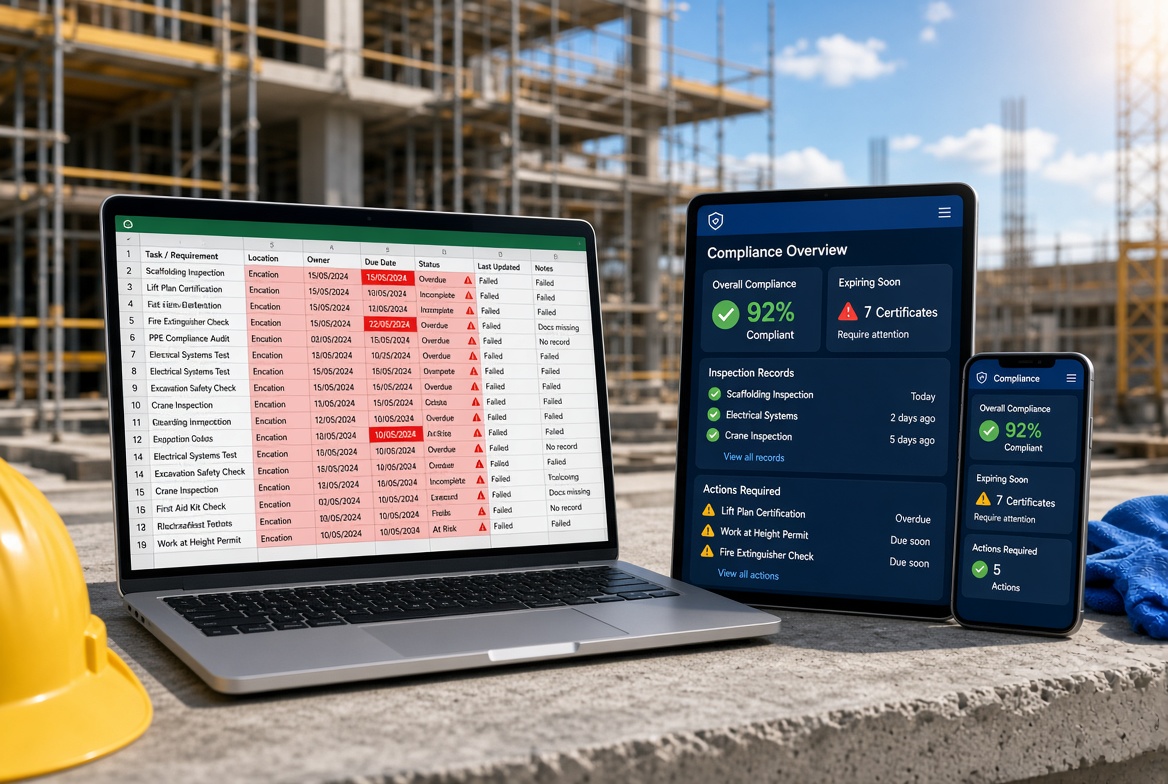
Excel is familiar, flexible and easy to get started with. For many construction companies, it is the first tool used to track inspections, certificates, training records, temporary works information and outstanding site issues.
At first, it can seem like a sensible solution. Create a spreadsheet, add the relevant dates and names, and ask the team to keep it updated.
But as projects grow and compliance responsibilities become more complicated, the weaknesses of spreadsheet-based processes start to show.
A certificate may expire without anyone noticing. An inspection may be completed on site, but the evidence is stored somewhere else. An outstanding action may remain in a spreadsheet long after the work has supposedly been completed. When an audit or management review comes around, someone has to pull the information together manually.
The problem isn't that Excel is a bad tool. It's that a spreadsheet alone may not provide the connected, reliable workflow that construction compliance requires.
Here's how to recognise when your current approach is no longer working — and what to consider instead.
1. Compliance information is scattered across multiple files
One spreadsheet tracks training certificates. Another lists inspections. A third records temporary works information. Site teams may also use separate folders for photographs, PDFs, email attachments and completed forms.
Each file might make sense on its own. Together, however, they can create a fragmented picture of what's happening across your sites.
This makes it harder to answer straightforward questions:
-
Which inspections are overdue?
-
Which certificates need renewing?
-
Which corrective actions remain open?
-
Where is the evidence that an issue was resolved?
-
Are all sites working from the latest information?
When answering these questions means opening several files and asking colleagues for updates, compliance management becomes unnecessarily time-consuming.
What to use instead: A centralised construction compliance system that brings relevant records, evidence, actions and status information together. Look for a solution that allows authorised team members to find what they need without relying on one person's collection of files.
2. It's too easy for information to become outdated
Spreadsheets depend on people updating them correctly and consistently.
A supervisor might record an inspection in one file but forget to update the master tracker. Someone in the office may correct a certificate date in a local copy while another team continues using an older version. A file shared by email can quickly become detached from the information other people are working with.
The result is uncertainty about which record is current.
This is particularly problematic when multiple people manage information across several projects. Even a well-designed spreadsheet can become difficult to maintain if there is no clear process for ownership, updates and version control.
What to use instead: A shared system with controlled access, a clear source of truth and a consistent process for updating records. Where appropriate, look for timestamps, user attribution and a record of changes so that teams can understand who updated information and when.
3. Expiring certificates can slip through the cracks
Construction teams may need to monitor training records, competency evidence, equipment documentation and other time-sensitive certificates.
A spreadsheet can store expiry dates, but it does not automatically guarantee that someone will act on them. Reminders may depend on formulas, conditional formatting, manual checks or calendar entries that are not consistently maintained.
As the number of people, certificates and projects increases, manually reviewing every date becomes more demanding.
A missed renewal can create avoidable disruption, particularly when a worker's required evidence is discovered to be out of date just before an assignment or site activity.
What to use instead: A certificate-tracking workflow that records expiry dates, identifies upcoming renewals and alerts the appropriate people. It should be easy to see which records need attention and who is responsible for following them up.
Before choosing a system, check how reminders are configured, who receives them and whether overdue items remain visible until they are resolved.
4. Inspection records don't tell the whole story
A spreadsheet may record that an inspection took place and whether it passed or failed. But compliance management often requires more than a date and a status.
Teams may also need to retain:
-
The completed inspection form or checklist.
-
Photographs and supporting evidence.
-
Details of defects or non-conformances.
-
The person responsible for corrective action.
-
Target dates and completion status.
-
Evidence that the action was closed out.
If these details are spread across spreadsheets, mobile phone galleries, email threads and shared drives, it can be difficult to reconstruct the full history of an inspection.
A recorded “complete” status is only useful if the supporting record is available and the underlying work has actually been verified.
What to use instead: A digital inspection workflow that connects the inspection, findings, evidence and follow-up actions. Ideally, the team should be able to move from identifying an issue to assigning it, tracking progress and recording its resolution without recreating the same information in several places.
5. Corrective actions get recorded but not closed out
Imagine a site inspection identifies a problem. The supervisor adds it to a spreadsheet and sends an email to the responsible person.
A few days later, another team member asks whether the issue has been fixed. The spreadsheet still says “open”, the email thread contains a possible update, and a photograph may exist on someone's phone.
Has the action been completed? Has the work been checked? Is there evidence to support closure?
Without a defined process, the team has to investigate instead of simply checking the record.
This becomes harder when a large number of actions are open across multiple sites.
What to use instead: An issue and corrective-action management system with named ownership, due dates, status tracking, escalation where appropriate and supporting evidence. Closure should be recorded clearly, with verification built into the workflow where the task requires it.
The aim is not just to maintain a list of problems. It's to make sure problems are followed through.
6. Preparing for an audit takes too much manual work
When an audit, client review or internal compliance check approaches, spreadsheet-based systems can create a familiar rush.
Someone has to locate the latest trackers, check for missing information, retrieve inspection forms, find photographs, confirm certificate dates and chase colleagues for outstanding evidence.
The work can take hours or days, depending on the number of sites and how consistently records have been maintained.
This does not necessarily mean the records are incorrect. It means they are difficult to assemble and demonstrate when needed.
What to use instead: A structured digital record system that keeps relevant documents, inspection histories, actions and supporting evidence organised and searchable. Reporting and export features can help teams assemble information more efficiently.
No software can guarantee that an organisation will pass an audit or meet every legal requirement. The value is in making records easier to maintain, review and produce — while people remain responsible for the quality of the work and the decisions made.
7. Multi-site reporting becomes a job in itself
For a company running several construction sites, individual spreadsheets may be manageable at first. The challenge comes when managers need a consistent overview across all projects.
Different sites might use different templates, status labels or update schedules. One supervisor may report an overdue action as “pending”, while another records the same situation as “in progress”. Dates may be formatted differently, and the information may not be updated at the same time.
Managers then have to standardise, combine and interpret the data before they can identify patterns or decide where support is needed.
What to use instead: A multi-site reporting system with consistent workflows and a consolidated view of relevant site information. It should help managers identify overdue inspections, recurring issues and outstanding actions without requiring them to manually combine multiple workbooks.
Local teams should still be able to manage their own work, while authorised managers gain visibility across the projects they oversee.
8. Site teams can't always update records where the work happens
A spreadsheet-based process often assumes that someone can access a computer, open the right file and enter information.
But construction work happens in environments where that isn't always practical. Supervisors may be moving between work areas, inspecting equipment, recording defects or working in locations with unreliable mobile signal.
If information has to be written down first and entered into a spreadsheet later, there is another step where details can be missed, delayed or recorded incorrectly.
Connectivity can create a further problem if the chosen digital system requires a reliable internet connection for every task.
What to use instead: A mobile construction management app that supports the tasks people actually perform on site. If teams work in areas with poor connectivity, investigate offline capabilities carefully.
Check whether the app can complete the required forms and capture evidence without a connection, how synchronisation works when connectivity returns, and how it handles conflicting updates. Offline capabilities vary between products, so verify the exact workflows before committing.
9. The spreadsheet depends on one person to keep everything running
Sometimes, the biggest warning sign is not the spreadsheet itself — it's the person who understands it.
One administrator knows which tabs matter, which formulas must not be changed, where supporting files are stored and which entries need to be checked manually. When that person is on leave or leaves the business, the process becomes difficult for anyone else to maintain.
This creates a knowledge gap and can make routine compliance administration unnecessarily fragile.
A process that only works when one individual remembers every detail is difficult to scale reliably.
What to use instead: A documented, repeatable workflow supported by a system that makes responsibilities and record status visible. Choose software that the wider team can learn, with clear user permissions, straightforward reporting and a sensible process for handing over responsibilities.
The goal is not to remove professional judgement. It's to reduce dependence on undocumented personal routines.
Excel vs construction compliance software: what's the difference?
Excel still has a place in construction. It can be useful for calculations, planning, analysis, one-off trackers and reporting extracts. The question is whether it should remain the main system for managing active compliance workflows.
| Requirement |
Spreadsheet-based process |
Dedicated compliance workflow |
| Record inspections |
Flexible manual entry |
Structured digital forms and records |
| Attach evidence |
Often stored separately or linked manually |
Evidence can be connected to relevant records, depending on the system |
| Track corrective actions |
Requires manual status updates and follow-up |
Can assign ownership, due dates and statuses |
| Monitor certificate expiry |
Depends on maintained dates and reminder processes |
May offer expiry alerts and renewal tracking |
| Maintain current records |
Requires file and version discipline |
Can provide a shared source of truth and controlled updates |
| Report across sites |
Often requires combining workbooks |
May provide consolidated dashboards and reports |
| Work on mobile devices |
Possible, but can be awkward for field workflows |
Designed for mobile workflows, depending on the product |
| Work without signal |
Depends on device setup and the chosen tools |
Available in some apps; exact offline support must be checked |
| Produce an audit trail |
Requires a process for maintaining supporting records |
May capture history and user activity, depending on the system |
The key distinction is not simply digital versus paper. It's whether the process connects the record, the evidence, the responsible person and the follow-up action.
What should you use instead of Excel for construction compliance?
There isn't one perfect replacement for every construction business. The right option depends on the number of sites, the type of compliance records you manage, the complexity of your workflows and the way your teams operate.
Here are the main options to consider.
1. A dedicated construction compliance app
A construction compliance app is worth considering when inspections, certificates, issues and evidence need to be managed as connected workflows rather than separate files.
Look for features such as:
-
Digital inspection forms and checklists.
-
Photo and document evidence linked to records.
-
Corrective-action assignment and tracking.
-
Certificate expiry monitoring.
-
Temporary works records, where relevant to your operations.
-
Searchable records and reporting.
-
Multi-site visibility.
-
Mobile access and verified offline functionality.
-
Suitable permissions and record-history features.
Not every app includes all these functions. Prioritise the workflows that matter most to your business instead of choosing a product based on a long feature list alone.
2. A broader construction management platform
Larger projects or organisations may need a platform that covers a wider range of activities, such as project coordination, drawings, document control, quality management and site communication.
This can make sense if your teams need one connected environment for many project processes. However, broader platforms can also introduce additional complexity, so check whether the compliance functions are suitable for your actual site workflows.
3. A more structured spreadsheet process
If your organisation has relatively simple requirements, Excel may still be sufficient for some tasks.
Before replacing it, you could improve the process by:
-
Assigning a clear owner to each tracker.
-
Standardising templates and status labels.
-
Restricting editing where appropriate.
-
Maintaining a clear master version.
-
Setting up and testing reminder processes.
-
Linking to evidence using a consistent naming and filing system.
-
Reviewing outstanding items on a defined schedule.
-
Documenting how records are updated and handed over.
These steps can improve control, but they do not automatically create an integrated inspection, evidence and corrective-action workflow. If the same information is repeatedly entered into different files, the underlying problem may remain.
How to move away from spreadsheets without disrupting your sites
Replacing every workbook at once can be unnecessary and disruptive. A phased approach helps you focus on the areas where spreadsheets create the greatest risk or administrative burden.
Step 1: Identify the biggest pain points
Review the spreadsheets your team uses and ask:
-
Which records are frequently out of date?
-
Which expiry dates require manual checking?
-
Where do photographs and supporting documents live?
-
Which actions are difficult to close out?
-
How much time does monthly reporting take?
-
What information is hardest to retrieve during a review?
Use the answers to identify the workflows most in need of improvement.
Step 2: Map the workflow, not just the file
For each priority process, document what happens from start to finish.
For example, an inspection workflow may involve scheduling the inspection, completing a checklist, recording a finding, assigning corrective action, attaching evidence and verifying closure.
A replacement system should support the full process, rather than simply providing a digital copy of the spreadsheet.
Step 3: Check the records you need to retain
Determine which historical records, supporting evidence and documents need to be migrated or remain accessible.
Agree who can access them, how they will be organised and how the team will retrieve older information. Check the export and migration options available in the software you are considering.
Step 4: Trial one workflow on a live site
Choose a practical use case, such as inspections or certificate tracking. Test the system with the people who will use it, including supervisors and administrators.
Check how long common tasks take, how easy it is to find a record, how issues are followed up and what happens when a user has no signal.
Step 5: Set ownership and train the team
A new app won't solve an unclear process by itself. Decide who owns each workflow, who checks outstanding items and who can verify completion.
Provide practical training and keep the initial process straightforward. The aim is to make the correct workflow easier to follow than the old one.
Step 6: Measure whether the change is working
Compare the new process with your previous approach. Useful measures include time spent preparing reports, the number of overdue actions, missing records, time taken to find evidence and how consistently teams update information.
Use the results to refine the workflow before expanding it to more sites.
How KaelSite can help reduce spreadsheet-based compliance admin
KaelSite is designed to support construction teams with digital site workflows, including mobile inspections, issue tracking, certificate tracking, temporary works management and reporting.
For teams currently relying on separate spreadsheets and folders, bringing these activities into a more structured workflow can help reduce manual administration and make information easier to manage across sites.
Rather than relying on a spreadsheet to record an inspection, a separate list to track the resulting issue and another reminder process to chase completion, teams can look for a more connected way to manage the relevant records and actions.
If you're considering KaelSite, assess it against your own requirements. Test the inspection and issue workflows your team uses most, check how certificate reminders operate, review the available reporting and confirm which tasks are supported offline.
The objective is not to digitise every file for the sake of it. It's to make essential site information easier to record, find, review and act on.
Frequently asked questions
Is Excel suitable for construction compliance?
Excel can be suitable for straightforward trackers, calculations and smaller administrative tasks. It becomes harder to manage when many people and sites need to maintain current records, link evidence, track corrective actions and produce consistent reports. Whether it remains suitable depends on the complexity of the workflow and the controls around it.
What is the best alternative to Excel for construction compliance?
For teams managing inspections, certificates, issues and evidence across sites, a dedicated construction compliance app may be a better fit. Broader construction management platforms may be appropriate when project coordination and document management are also priorities. Compare products against your actual workflows rather than features alone.
Can construction compliance software track certificate expiry dates?
Some systems provide certificate registers, expiry dates and automated reminders. Check how reminders are configured, who receives them, how overdue records are displayed and whether the system supports the certificate types your business needs to monitor.
Can I keep using Excel alongside a construction management app?
Yes. Many businesses retain spreadsheets for analysis, calculations or specific reports while using dedicated software for active site workflows. Define which system is authoritative for each type of record to avoid creating competing versions of the same information.
Does construction compliance software guarantee legal compliance?
No. Software can support record keeping, visibility, follow-up and reporting, but it does not guarantee compliance. Organisations still need suitable procedures, competent people, accurate records and appropriate oversight.
What should I check before switching from spreadsheets?
Start with your highest-friction workflow. Check ease of use, mobile access, evidence handling, action tracking, reporting, permissions, historical-record access, offline capabilities if required, implementation effort and total cost. Trial the system with the people who will use it before rolling it out widely.
Stop letting the spreadsheet become the process
Excel is useful, but it shouldn't become a substitute for a clear compliance workflow.
If your team spends too much time chasing updates, searching for evidence, checking expiry dates and assembling reports, the issue may be bigger than an untidy workbook. It may be time to use a system designed around how construction work is inspected, recorded and followed up.
Start by identifying the process causing the most friction, then evaluate whether a dedicated construction compliance app can make it easier to manage.
The goal is simple: less time maintaining trackers, clearer visibility of outstanding work and better-organised records when your team needs them.

Comments (0)
Add a Comment
No comments yet. Be the first to comment!