Why Has the Clipboard Lasted So Long?
The clipboard survives for good reasons. It is cheap, it needs no battery or signal, it works in the rain with a bit of care and nobody needs training to use one. A paper form is also flexible: if something does not fit the boxes, you write in the margin.
Many site teams have worked this way for their whole careers, and plenty of inspections are done properly on paper.
The difficulty is not the inspection. It is everything that happens afterwards.
The form goes into a folder, a cabin or the footwell of a van. At some point it is read, typed into a spreadsheet or scanned, and the findings are passed on to whoever needs to act. The photographs stay on a phone. The defect that was noticed on Tuesday is chased on Friday. When someone asks to see the record from three weeks ago, the search begins.
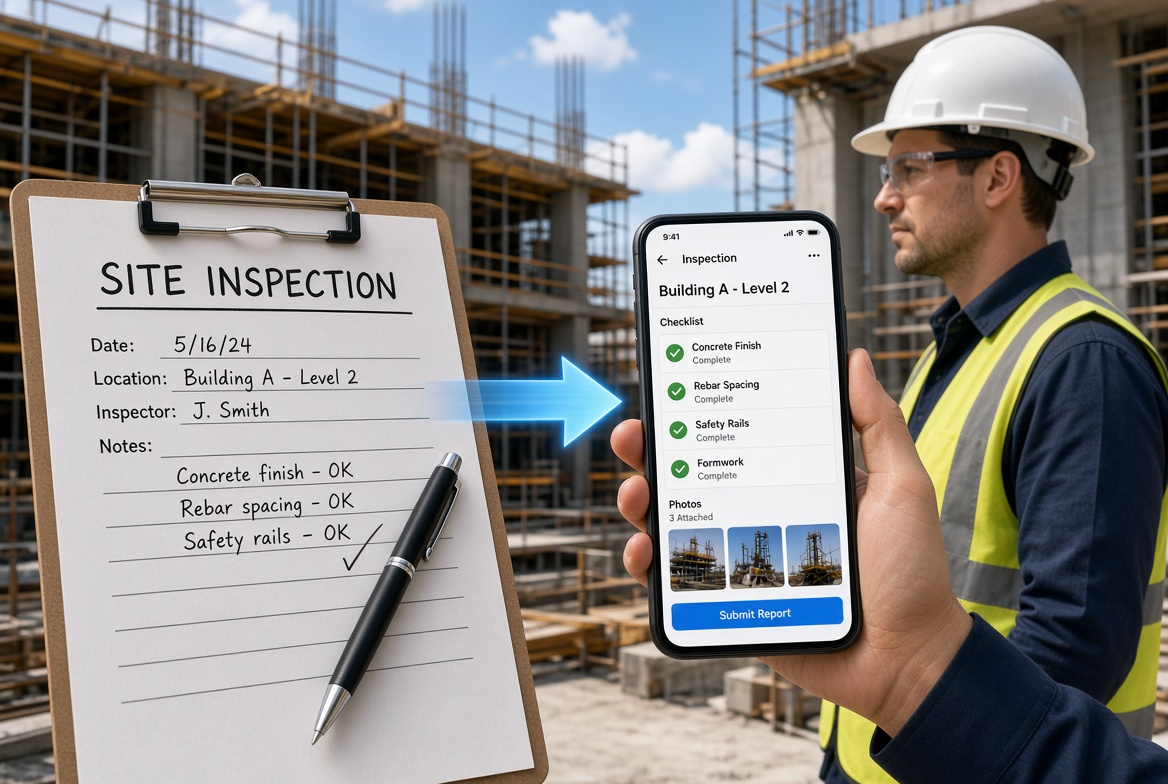
Mobile inspection apps are an attempt to shorten that journey, so that the information is captured once, in a usable form, at the point of work.
What Do UK Rules Say About Site Inspections?
It helps to be clear about why inspections are so repetitive and so record-heavy, because that is where software can help most.
The details depend on the type of work, so always follow your project's procedures and take competent advice. But two examples from UK health and safety law show the pattern.
Excavations. Under the Construction (Design and Management) Regulations 2015, a competent person must inspect an excavation at the start of each shift in which work is carried out, and after any event likely to have affected its strength or stability, such as a fall of material. Work should proceed only if the inspector is satisfied it can be done safely. If they are not satisfied, they must tell the person who commissioned the inspection before the end of that shift, and work must not continue until the problem is put right. HSE guidance on excavations says the same about inspecting at the start of each shift and keeping a record.
Working platforms. Under the Work at Height Regulations 2005, working platforms used for construction work, from which a person could fall two metres or more, must be inspected in position before use, by a competent person. The inspector must prepare a report, and the person on whose behalf the inspection was done must receive it within 24 hours of the inspection being completed.
The written report. In both cases the law expects a written report with specific particulars. For excavations, these include who the inspection was done for, the location and description of what was inspected, the date and time, any matters that could risk health or safety, the action taken and any further action considered necessary, and the name and position of the person making the report. The regulations also set retention periods: in both cases the reports must be kept at the site until the work is complete and then retained for three months afterwards (the Work at Height Regulations say at one of the employer's offices for that final period).
Other duties in the same regulations, such as checking traffic routes, energy distribution installations and fire-fighting equipment, are expressed more loosely, as "regularly" or at "suitable intervals".
The common features are worth noticing:
- Inspections are frequent and time-bound. Some must happen every shift or before use.
- They are done by named, competent people.
- They produce a written record with particular details.
- The record has to be delivered promptly and kept.
- A finding is meant to lead to action before work continues.
That is exactly the shape of task a mobile app is designed to handle well.
Note: the legislation was read in its published form at the time of writing, and the CDM text reviewed was the version as made in 2015. Regulations are amended from time to time, and duties vary by project, so check the current text and your own procedures.
How Does an App Map to What the Rules Expect?
An app does not make an inspection compliant. It can, however, make it easier to capture the information that a good inspection record contains.
| What the record needs |
How a mobile app can help |
| Who carried out the inspection, and their position |
The logged-in user and their role are recorded automatically |
| Who it was done for |
Project and client details are pre-filled |
| Location and description of what was inspected |
Project, area and item selected from a list, with an optional geotag |
| Date and time |
Recorded automatically at the point of inspection |
| What was found |
Structured fields, photographs, notes and voice memos |
| Action taken and further action needed |
Issues raised from the inspection, assigned with an owner and date |
| Prompt delivery of the report |
The record is available to managers as soon as it is completed and synchronised |
| Retention |
Records stored centrally and retrievable later |
This is where the clipboard falls short, not in the checking but in the particulars. A handwritten form can leave out the time, the position of the person signing or the action taken. A well-configured digital form can make it difficult to submit without them.
A caution applies. Software helps you record and retrieve information. It does not decide whether an excavation is safe, replace the competence of the person inspecting or satisfy anyone's legal duties. Those remain with people.
What Actually Changes When Inspections Go Mobile?
Six things tend to change in practice.
1. The record is created once
On paper, information is written on site and rewritten later. On a phone, it is entered at the point of work and does not need to be typed up. This removes a step where errors and delays creep in.
2. Evidence stays with the finding
A photograph taken during a paper inspection lives on a phone. In an app, it is attached to the relevant record, with a time and, if enabled, a location. This makes it far easier to explain a finding to someone who was not there.
3. Timing becomes visible
A digital record shows when it was created. That can matter when a check has to be done before work starts or at the start of a shift. It also helps managers see whether inspections are happening when they should.
4. Findings turn into actions
On paper, a defect noted on a form relies on someone reading it and acting. In an app, a finding can become an issue with an owner, a due date and a status, which reduces the chance that it is lost.
5. Retrieval gets faster
Finding last month's inspection means searching by project, date or type, not leafing through folders.
6. Reporting draws on recorded information
Managers can summarise inspections, issues and actions without compiling them by hand.
A Day on Site: Before and After
The following is an illustrative example, not a case study. It shows how the same inspection might look on paper and on a phone.
| Moment |
On paper |
On a phone |
| 7:00, start of shift |
The supervisor takes a printed form from the cabin and writes the date and time |
The supervisor opens the scheduled inspection, with project and location already filled in |
| 7:15, inspection |
Findings are written by hand, with photographs taken on a personal phone |
Findings are ticked or noted, with photographs attached directly to the record |
| 7:30, a problem is found |
The supervisor tells the site manager in person, and notes it on the form |
An issue is raised from the finding, assigned to a named person with a due date |
| 9:00, in the basement |
The form continues as normal, but the photographs will need matching later |
The app keeps working without a signal and records the time the check was done |
| 12:00, the follow-up |
The manager asks whether the problem was dealt with, and the supervisor checks the notebook |
The manager sees the issue status without asking |
| 17:00, end of day |
Forms are collected, handwriting is checked and some are typed up that evening |
The inspection is already complete, synchronised and ready to review |
| Three weeks later, a query |
Someone searches the filing and the phone gallery |
Someone searches the project's records by date and type |
Neither column is perfect. The paper version will often work. The difference is the amount of effort needed to keep it working, and how much depends on individual discipline.
What Do Mobile Apps Not Fix?
A fair account has to include the limits.
Competence. An app does not make anyone competent to inspect. The quality of an inspection still depends on the person doing it.
Poor forms. A confusing paper form becomes a confusing digital form. Digitising a process does not improve it.
Culture. If people do not value inspections or are unwilling to raise problems, an app will record the apathy in better detail.
Signal. An app that needs a connection will fail in the places that matter most. Offline capability needs to be tested, not assumed.
Practical issues. Phones can run out of battery, screens can be hard to read in bright sun or with wet or gloved hands, and not every team member will be comfortable on a touchscreen. These need thought in your rollout.
Overconfidence. A complete digital record may look more reliable than it is. A box ticked quickly is still a box ticked quickly.
Responsibility. The duties in the regulations stay with the people and organisations they apply to. Software supports the process but does not carry the duty.
How Do You Make the Move Without Losing Your Team?
The inspections themselves rarely cause resistance. Disruption and extra effort do. A gradual approach helps.
Start with the inspection that hurts most
Choose one recurring inspection that currently generates a lot of paperwork or follow-up, such as a daily check, and start there.
Fix the form first
Review the paper form before digitising it. Remove questions nobody uses and make sure the remaining ones are clear. A short, focused form is more likely to be completed properly.
Involve the people who will do the inspections
Ask supervisors to test the form on site and tell you what is awkward. Their feedback will be more useful than anything you learn in a demonstration.
Test it where the signal is bad
Complete a full inspection, including photographs, in flight mode, then reconnect and check the record.
Think about the devices
Decide who will use which phone or tablet, how they will be charged and what happens if one is lost or broken. Check how access is controlled.
Name a champion
Choose a respected supervisor to help colleagues and report problems.
Set a date to retire the paper
If paper and digital forms run side by side indefinitely, people will use whichever is easier on the day. Agree when the paper stops.
Review after 30 and 90 days
Check what is being completed, what is being skipped and what needs to change.
What Should You Look for in a Site Inspection App?
Beyond the points above, a few practical tests help.
- Speed. How long does a routine inspection take on a phone, compared with paper?
- Offline use. Can you complete an inspection with photographs without a signal, and do timestamps show when it was done?
- Required fields. Can you make key particulars mandatory, such as the person, time, location and findings?
- Custom forms. Can you build forms that match your own procedures?
- Issues and actions. Can a finding become an assigned, tracked action?
- Evidence. Do photographs, video and voice notes attach to the right record?
- History. Can you see who recorded or changed what, and when?
- Retrieval and reporting. Can you find old records and produce reports quickly?
- Export. Can you retrieve your records, including attachments, if you change provider?
Mobile Site Inspection Checklist
- [ ] We have identified the inspections that create the most paperwork or follow-up.
- [ ] We have reviewed and simplified the forms before digitising them.
- [ ] Key particulars, such as inspector, date and time, location and findings, can be made mandatory.
- [ ] Supervisors have tested the form on site.
- [ ] A full inspection, including photographs, works without a signal.
- [ ] Findings can be turned into assigned actions with due dates.
- [ ] Photographs and evidence attach to the right record.
- [ ] Records show who completed or changed them and when.
- [ ] We have decided which devices will be used, and how they will be charged and secured.
- [ ] A site champion has been named.
- [ ] We have set a date to retire the paper forms.
- [ ] We can export our records, including attachments.
- [ ] We have scheduled reviews at 30 and 90 days.
How KaelSite Fits
KaelSite is a mobile-first construction compliance platform for UK teams. Its regular inspections are built offline-first, with photo, video, voice and geotag capture, so inspections can be completed where the work is and synchronised when a connection returns. Form Studio lets you build inspection forms to match your own procedures, the Issue System turns findings into tracked near-misses, non-conformances, defects and observations, and Certificates tracks expiry dates.
As with any app, test it on a real inspection, in your own conditions, with the people who will use it.
Frequently Asked Questions
What is a site inspection app?
A site inspection app is software used on a phone or tablet to carry out and record inspections on a construction site. It usually supports digital forms, photographs, notes, issue tracking and reporting.
How often do construction sites need to be inspected?
It depends on what is being inspected and the rules and procedures that apply. For example, UK regulations require excavations to be inspected at the start of each shift, and working platforms to be inspected in position before use. Many other checks must be done regularly or at suitable intervals. Check your project's requirements and take competent advice.
Does a mobile app make inspections compliant?
No. An app can help capture the information a good inspection record needs and make it easier to retrieve, but compliance depends on competent people, suitable procedures and the duties that apply to the work.
Are digital inspection records acceptable?
Many organisations use them, but what is acceptable can depend on your contract, client and procedures. Check that the records contain the required particulars and can be retrieved and retained for the period you need.
Do inspection apps work without signal?
Some do and some do not. Test an app by completing a full inspection in flight mode, including photographs, and then reconnecting to check that the record arrived correctly.
Is paper still acceptable for site inspections?
Yes, paper can work if records are complete, legible, delivered when needed and kept. The challenge is maintaining that consistency across several sites and people.
How do I get site teams to use an inspection app?
Start with one inspection, simplify the form, involve supervisors in testing, name a champion, test the app in poor-signal areas and set a date to retire the paper form.
What happens to digital inspection records if I change provider?
It depends on the vendor. Check how you can export your records, including photographs and attachments, and how long they are retained, before you rely on the app.
Final Thoughts
The move from clipboard to cloud is not really about technology. It is about capturing information once, at the point of work, in a form that people can find, trust and act on.
Apps can make that easier, particularly for inspections that are frequent, time-bound and record-heavy. They cannot supply competence, fix a poor process or carry anyone's responsibilities.
Start with one inspection. Fix the form. Test it in the places where signal is poor. Then let the results, not the marketing, decide how far you go.
This article is intended as general information for orientation and does not constitute legal or professional advice. Software can support site processes but does not replace competent people, project procedures or the responsibilities set out in applicable regulations and standards.
Sources
- HSE, Excavations (construction safety topics), for inspection timing and record contents: hse.gov.uk
- The Construction (Design and Management) Regulations 2015, Part 4, regulations 22 and 24, for excavation inspection, reporting and retention (as-made text): legislation.gov.uk
- The Work at Height Regulations 2005, regulation 12, for inspection of working platforms and the 24-hour report: legislation.gov.uk

Comments (0)
Add a Comment
No comments yet. Be the first to comment!