Where Does the Time and Quality Go Between Inspection and Report?
Most inspection workflows have a quiet gap in the middle.
The inspection itself is done properly. The findings are real. But between the walk-round and the issued report, information passes through several hands and several formats: handwritten notes, a phone gallery, a message to the office, a typed summary, a formatted document and finally an email.
Every handover costs time, and every handover is a chance for something to change or go missing.
- Detail is lost. Notes written in a hurry are expanded from memory later.
- Evidence is separated. The photograph is on one device, the finding is on another.
- Wording drifts. A finding that was clear on site becomes vague in the report.
- Timing slips. The report arrives days after the inspection, by which time the situation may have changed.
- Follow-up is disconnected. The report goes out, and the action is tracked somewhere else, if at all.
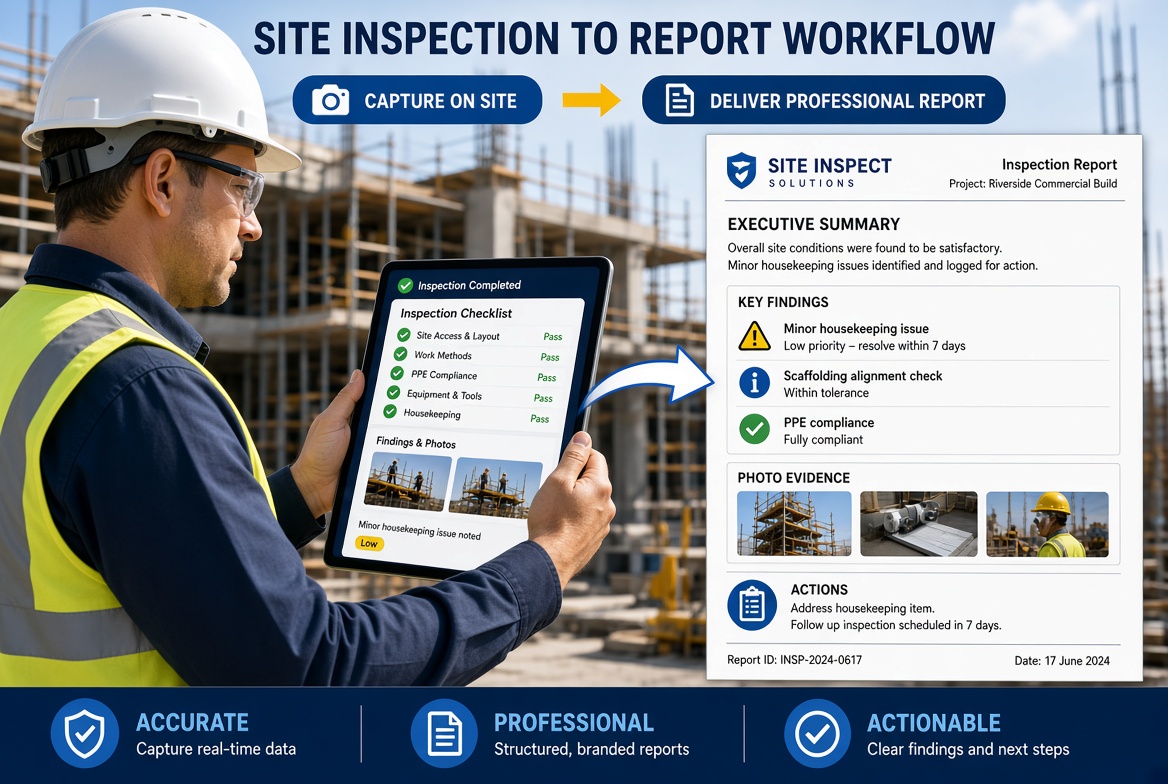
Digital tools do not fix everything in that chain, but they can shorten it. The aim is to capture the information once, in a structured form, with its evidence attached, so that the report becomes a view of the record rather than a new document.
This guide takes that chain stage by stage.
What Makes an Inspection Report "Professional"?
"Professional" is easy to say and harder to define. It helps to think of six qualities.
| Quality |
What it means |
What undermines it |
| Accurate |
The report says what was actually found |
Notes written up from memory, copied text |
| Timely |
It reaches the right people while it is still useful |
Delays in typing up and formatting |
| Complete |
It contains the particulars the reader needs |
Missing time, location, name or action |
| Traceable |
Each statement can be tied to evidence and a record |
Photographs stored elsewhere, no audit trail |
| Clear |
A reader who was not there can understand it |
Vague wording, unstructured notes |
| Actionable |
It says what needs to happen, by whom and by when |
Findings without owners or dates |
What do UK regulations expect from some inspection reports?
Some inspection reports are required by law, and their particulars give a useful benchmark for what a complete report contains.
Under the Construction (Design and Management) Regulations 2015, the report of an excavation inspection must include the name and address of the person for whom the inspection was carried out, the location and a description of the place inspected, the date and time, the matters identified that could give rise to a risk to health or safety, the action taken as a result and any further action considered necessary, and the name and position of the person making the report. The inspector must give the report to the person who commissioned the inspection within 24 hours, and it must be kept for a set period. The Work at Height Regulations 2005 set out a similar pattern for reports on working platforms.
These are two specific examples and they will not apply to every inspection. The CDM text I reviewed was the as-made version, so check the current wording. But the pattern is worth noticing: who, where, when, what was found, what was done, what remains, and who is reporting. A good report for any inspection answers the same questions.
The Eight Stages: From Inspection to Issued Report
The table summarises the workflow. Each stage is then described, with what changes when tools are digital.
| Stage |
Purpose |
Typical paper-based problem |
What digital tools can change |
| 1. Schedule and assign |
Make sure the right inspection happens at the right time |
Inspections depend on memory and the diary |
Scheduled inspections with named owners and reminders |
| 2. Prepare |
Have the right form, history and context |
Old forms, no history to hand |
One master form, with previous findings and open actions visible |
| 3. Capture |
Record observations accurately on site |
Notes and photographs end up in separate places |
Structured entry, evidence attached, time and user recorded automatically |
| 4. Act on urgent findings |
Deal with serious problems immediately |
The finding waits for the report |
Findings raised as actions on the spot |
| 5. Review and complete |
Check the record before leaving site |
Gaps found back at the desk |
Required fields and a quick on-site check of completeness |
| 6. Build the report |
Turn the record into a readable report |
Retyping and formatting |
Report drawn from the recorded data, then edited |
| 7. Check and issue |
Make sure it is right, then send it |
Errors found after issue |
Review step, then controlled distribution |
| 8. Follow up and close |
Make sure findings are dealt with |
Actions tracked elsewhere |
Actions with owners, dates, status and close-out evidence |
Stage 1: Schedule and assign
Many inspections are regular: daily, weekly, before a pour, at the start of each shift, before use. The weak point is remembering.
What changes: A digital system can schedule recurring inspections, assign each one to a named person and show what is due and what is overdue. The manager sees at a glance whether the day's inspections have been done, without having to ask.
What does not change: Someone still has to decide what needs inspecting and how often, based on risk and requirements.
Stage 2: Prepare
A good inspection starts before arriving.
What changes: The inspector opens the right form, with the project and location already filled in. They can see previous findings and open actions for the area, so they know what to check. The form works offline, so a poor signal does not matter.
What does not change: The inspector still needs to know what they are looking for. A form does not make someone competent.
Practical tip: Keep one master version of each form, so every site and inspector works from the same criteria.
Stage 3: Capture on site
This is where the biggest gains tend to appear.
What changes:
- Answers are entered as structured fields, so they can be searched and reported on later.
- Photographs, video and voice notes attach directly to the relevant question or finding.
- The user, date and time are recorded automatically, along with location if the tool supports it.
- Required fields stop the form being submitted with key information missing.
- Offline capture means the inspector does not have to write things down to enter later.
What does not change: A rushed inspection is still rushed. A box ticked without looking is still a box ticked without looking.
Practical tip: Describe what you see, not just a verdict. "Offcuts across the stair route on level 2, photograph attached" is more useful than "housekeeping poor".
Stage 4: Act on urgent findings
Some findings cannot wait for a report.
What changes: The inspector raises the finding as an issue on the spot, assigns it to a named person with a due date and attaches the photograph. The person responsible is notified immediately. The record shows what was found, when and what was done before work continued.
What does not change: The inspector still has to speak to the person in charge, in person, if the risk is serious. A notification is not a conversation.
Stage 5: Review and complete the record
Before leaving the area, check the record.
What changes: The tool can highlight incomplete answers and missing evidence. The inspector confirms the record is complete while still on site, when it is easy to fix.
What does not change: The inspector has to look at the record critically. Required fields ensure something is filled in, not that it is right.
Stage 6: Build the report
This is where hours are most often lost on paper.
What changes: The report is drawn from the recorded findings. Structured data, photographs and actions are assembled into a standard layout, instead of being retyped. Some tools also offer AI-assisted drafting to summarise findings.
What does not change: Someone still needs to decide what matters, how to explain it and what to recommend. See the section below on what to automate and what to keep human.
Stage 7: Check and issue
A report goes out under someone's name.
What changes: The report can be reviewed and edited in the tool before it is issued. Distribution can be controlled, so the right people receive it. The system records what was issued and when.
What does not change: The person issuing the report is responsible for what it says. Quality checks, described below, still need doing.
Stage 8: Follow up and close
A report that ends with a list of findings has done half its job.
What changes: Each finding is a tracked action with an owner, due date and status. The person who fixes it records what they did, with evidence. Someone else can verify it where the risk justifies it. Overdue items are visible without searching.
What does not change: People still have to act. Software shows who has not, but cannot make them.
A Day in the Life: Who Does What, and Where Are the Handoffs?
The following is an illustrative example of a single site's day, not a case study. It shows how the same inspection looks to four people in a paper workflow and a digital one.
| Person |
Paper workflow |
Digital workflow |
| Inspector (supervisor) |
Takes a printed form, writes notes, takes photographs on a personal phone, hands the form to the site manager at the end of the day |
Opens the scheduled inspection on a phone, answers questions with photographs attached, raises urgent actions on the spot, submits before leaving the area |
| Site manager |
Reads the handwritten form, asks questions about unclear entries, passes it to the office |
Sees the completed record as soon as it is submitted, checks urgent actions and adds any comment |
| Office or admin |
Types up the form, finds photographs, formats a report, emails it |
Reviews the draft report assembled from the record, adds commentary and issues it |
| Client or principal contractor |
Receives a report several days later, may ask for more detail |
Receives the report promptly, with evidence, and can ask follow-up questions of a specific record |
Notice that the digital workflow does not remove the people. It removes the handovers where information is retyped, reformatted or lost.
What Should You Automate, and What Should Stay Human?
Not everything that can be automated should be.
| Task |
Good candidate for automation |
Keep human judgement |
| Recording date, time, user and location |
Yes |
|
| Pre-filling project, area and previous findings |
Yes |
|
| Scheduling and reminders |
Yes |
|
| Attaching evidence to findings |
Yes |
Choosing what to photograph |
| Assembling findings into a standard layout |
Yes |
|
| Summarising the findings |
Possibly, as a draft |
Deciding what matters and what to emphasise |
| Classifying severity |
Possibly, with defined criteria |
Applying judgement to the specific case |
| Recommending actions |
Possibly, as suggestions |
Deciding what should be done |
| Explaining a finding to the reader |
|
Yes |
| Signing off the report |
|
Yes |
A note on AI-assisted drafting
Some tools can draft a report summary from the recorded findings. Used well, that can save time on the first draft. Used carelessly, it can introduce errors, overstate or understate findings and produce confident-sounding text that the evidence does not support.
Treat any generated text as a draft:
- Check every statement against the underlying records and photographs.
- Check numbers, locations and dates.
- Make sure it reflects the severity you actually judged.
- Remove anything you cannot support.
- Remember that you are accountable for what the report says, not the tool.
What Does a Good Report Contain?
A report is most useful when readers can find what they need quickly. The sections below are a practical structure, not a regulatory requirement, and should be adapted to your contract, client and procedures.
| Section |
Purpose |
Where it comes from |
| Header details |
Project, location, date and time, inspector's name and position, who the inspection was for |
Recorded automatically or pre-filled |
| Summary |
Overall result and the items needing attention, exceptions first |
Written or reviewed by the inspector |
| Scope |
What was inspected and what was not |
Form and inspector's notes |
| Findings |
Each finding with location, description, classification and photograph |
Structured entries and attached evidence |
| Actions |
What has been done and what remains, with owner and due date |
Issue and action records |
| Previous actions |
Status of items from earlier inspections |
Open issues linked to the area |
| Comments |
Explanation, context and recommendations |
Written by the inspector |
| Sign-off |
Name, position, date |
Recorded, reviewed and confirmed |
Some principles apply to almost any report:
- Lead with what matters. Put urgent and overdue items first.
- Be specific. State what was seen and where.
- Use evidence. Photographs and references make statements checkable.
- Separate fact from opinion. Observations first, interpretation second.
- Say what happens next. Every significant finding should have an owner and a date.
- Keep it proportionate. Detail lives in the record, so the report can be short.
Quality Checks Before You Issue a Report
A short checklist at the end of Stage 7 prevents most embarrassment.
- [ ] Header details are correct: project, location, date, time, inspector and position.
- [ ] The scope says what was and was not inspected.
- [ ] Every significant finding has a location, a description and evidence.
- [ ] Severity or priority is consistent with your agreed scale.
- [ ] Urgent items are clearly flagged and already actioned.
- [ ] Every action has an owner and a due date.
- [ ] Status of previous actions is included.
- [ ] Wording is factual and specific, with no unsupported statements.
- [ ] Any automatically generated text has been checked against the records.
- [ ] Photographs match the findings they accompany.
- [ ] The report goes only to the people who should receive it.
- [ ] The person issuing it is the person responsible for its content.
Where Digital Tools Do Not Change the Workflow
A fair guide has to be clear about the limits.
- Competence. Neither the inspection nor the report is better than the person doing it.
- Judgement. What matters, how serious it is and what to do are human decisions.
- Honesty. Digital records can be as optimistic or careless as paper ones.
- Culture. If findings are not welcome, they will not be reported, however easy the tool.
- Follow-up. Actions need people to act.
- Poor forms. A confusing form is no better on a phone.
- Signal. An app that needs a connection will fail where connections fail.
- Responsibility. Duties remain with the people and organisations they apply to.
How Do You Know the Workflow Is Improving?
Measure before and after. A handful of measures cover most of what matters.
| Measure |
How to capture it |
What it tells you |
| Time from inspection to issued report |
Date and time of inspection to date and time of issue |
Whether the gap has shortened |
| Time spent writing up per inspection |
Ask inspectors and office staff |
Whether re-typing has fallen |
| Findings with evidence |
Share of findings with a photograph or reference |
Evidence quality |
| Reports needing correction after issue |
Count of reports reissued or amended |
Whether accuracy has improved |
| Findings with an owner and due date |
Share of findings |
Whether follow-up is built in |
| Actions closed on time |
Closed by due date divided by due |
Whether findings are acted on |
| Inspections completed on time |
Completed against scheduled |
Whether the process is followed |
Look at them together. A faster report with fewer photographs and more corrections is not an improvement.
A 30, 60, 90-Day Rollout Plan
Days 1 to 30: Choose and pilot
- Choose one inspection type and one or two sites.
- Walk through the eight stages on your current process and note where time and errors arise.
- Rebuild the form from your own criteria, and make it shorter.
- Set up a report template, using the structure above as a starting point.
- Test offline capture where you inspect.
- Record your baseline measures.
Days 31 to 60: Run and refine
- Run real inspections and issue real reports from the new workflow.
- Compare reports from the old and new processes.
- Review a sample of reports for accuracy and clarity.
- Adjust forms, required fields and the report template.
- Agree a date to retire the old process for the pilot inspection type.
Days 61 to 90: Prove and extend
- Repeat your baseline measures and compare.
- Check that actions are being closed and verified.
- Decide whether to extend to other inspections and sites.
- Update your quality checks and definitions based on what you have learned.
Inspection-to-Report Workflow Checklist
- [ ] Recurring inspections are scheduled, assigned and visible when overdue.
- [ ] One master form is used for each inspection type, built from our own criteria.
- [ ] Inspectors can see previous findings and open actions before they start.
- [ ] Inspections, including photographs, work offline.
- [ ] Required fields capture the particulars a report needs.
- [ ] Time, user and location are recorded automatically.
- [ ] Urgent findings are raised as actions on site.
- [ ] Records are checked for completeness before leaving the area.
- [ ] Reports are drawn from recorded data, then edited by a person.
- [ ] Any AI-assisted text is checked against the evidence before issue.
- [ ] Reports are checked against a short quality list before they go out.
- [ ] Findings become actions with owners, due dates and close-out evidence.
- [ ] We measure time from inspection to issued report, and report accuracy.
- [ ] We can export records and reports, including attachments.
How KaelSite Supports the Workflow
KaelSite is a mobile-first construction compliance platform for UK teams. Several of its features line up with the stages above.
- Regular inspections are built offline-first, with photo, video, voice and geotag capture, so information is recorded once, where the work happens (stages 3 to 5).
- Form Studio, a no-code builder, lets you create inspection forms that match your own procedures and reuse them across projects (stage 2).
- An Issue System for near-misses, non-conformances, defects and observations lets findings become tracked actions (stages 4 and 8).
- Certificates and expiry alerts keep competence records current alongside inspections.
- A report editor and AI-assisted report drafting turn recorded information into structured reports (stages 6 and 7). These are available on the web version, with one account across mobile and web. Treat any AI draft as a first pass, and check it against your records.
For a team making this change, the sensible test is the pilot described above: one inspection type, your own form, your own conditions, and a real report issued at the end. If a specific need matters, such as particular report layouts or scheduled inspections, check that against your own scenario before assuming it is covered.
KaelSite supports your records and workflow. It does not replace a competent inspector, sound procedures or your own responsibility for what a report says.
Frequently Asked Questions
What is the best workflow for turning a site inspection into a report?
Capture structured findings and evidence on site, deal with urgent items immediately, check the record before leaving, draw the report from the recorded data, review and edit it before issuing and track the actions through to close-out. The principle is to capture information once and reuse it.
How quickly should an inspection report be issued?
It depends on the requirement. Some regulations set deadlines, for example reports of certain excavation and working platform inspections must be given to the person who commissioned them within 24 hours. For other inspections, follow your contract and procedures, and aim to issue while the details are fresh.
Can software write the inspection report for me?
It can assemble a report from recorded findings and, in some tools, draft a summary. A person still needs to review, correct and take responsibility for the report. Treat generated text as a draft.
What should a site inspection report include?
At minimum: who carried out the inspection and in what role, who it was for, where and when, what was found, what action was taken and what further action is needed. Many reports also include photographs, previous actions, comments and sign-off. Adapt this to your contract and procedures.
Do we need to change our forms when we go digital?
Usually it is worth simplifying them first. A shorter, clearer form with required fields for key particulars tends to produce better records than a direct copy of a long paper form.
Will digital reports be accepted by clients?
Many clients accept them, and some specify formats. Check your contract and client requirements, and make sure reports can be exported in the format they expect.
What if our site has poor signal?
Use a tool that supports offline capture and test it in flight mode, including photographs. Records made at the time are stronger than records written up later.
How do we keep reports consistent between inspectors?
Use one master form and report template, define your severity or priority scale with examples, and review a sample of reports for quality.
Does a faster report mean a better report?
Not necessarily. Speed is an improvement only if accuracy, completeness and follow-up hold up. Measure them together.
Final Thoughts
The distance between an inspection and a professional report is made up of handovers. Each one costs time, and each is a chance for detail to be lost.
Digital tools shorten that distance by capturing information once, attaching evidence at the source, turning findings into actions on the spot and building the report from the record. They do not replace the inspector's eye, the author's judgement or the follow-up that makes the whole exercise worthwhile.
Start with one inspection type. Walk it through the eight stages. Fix the form, test it where the signal is poor, issue a real report and measure what changed. Then decide how far to go.
This article is intended as general information for orientation and does not constitute legal or professional advice. Software can support inspection and reporting processes but does not replace competent people, project procedures or the responsibilities set out in applicable regulations and standards.
Sources
- The Construction (Design and Management) Regulations 2015, Part 4, regulations 22 and 24, for the particulars, 24-hour delivery and retention of excavation inspection reports (as-made text): legislation.gov.uk
- The Work at Height Regulations 2005, regulation 12, for inspection of working platforms and the 24-hour report: legislation.gov.uk
- HSE, Excavations (construction safety topics), for start-of-shift inspection and the contents of the written report: hse.gov.uk

Comments (0)
Add a Comment
No comments yet. Be the first to comment!