Why Does Visibility Break Down When You Add Sites?
On a single site, the manager's picture of what is going on comes from being there. They see the work, talk to the supervisors and notice what is slipping.
Add a second site and half of that disappears. Add a fifth and the manager is relying on phone calls, messages, weekly reports and whatever people remember to mention.
The usual result is a pattern most multi-site contractors will recognise:
- Information arrives in different forms. One supervisor sends a photograph, another a spreadsheet, a third a voice note.
- Sites define things differently. What counts as an "urgent" defect on one site is "routine" on another.
- Reports arrive at different times. Some are current, others are a week old.
- Problems surface late. The overdue action, the missed inspection or the lapsed certificate is discovered when someone happens to ask.
- Comparison is unreliable. It is hard to tell whether one site is genuinely doing better or just reporting differently.
A single dashboard is meant to solve this. But a dashboard is only a window onto data. If the data underneath is inconsistent, late or incomplete, a dashboard will show you a tidy picture of an untidy reality.
That is why most of this guide is about what sits underneath the dashboard.
What Should a Multi-Site Dashboard Actually Answer?
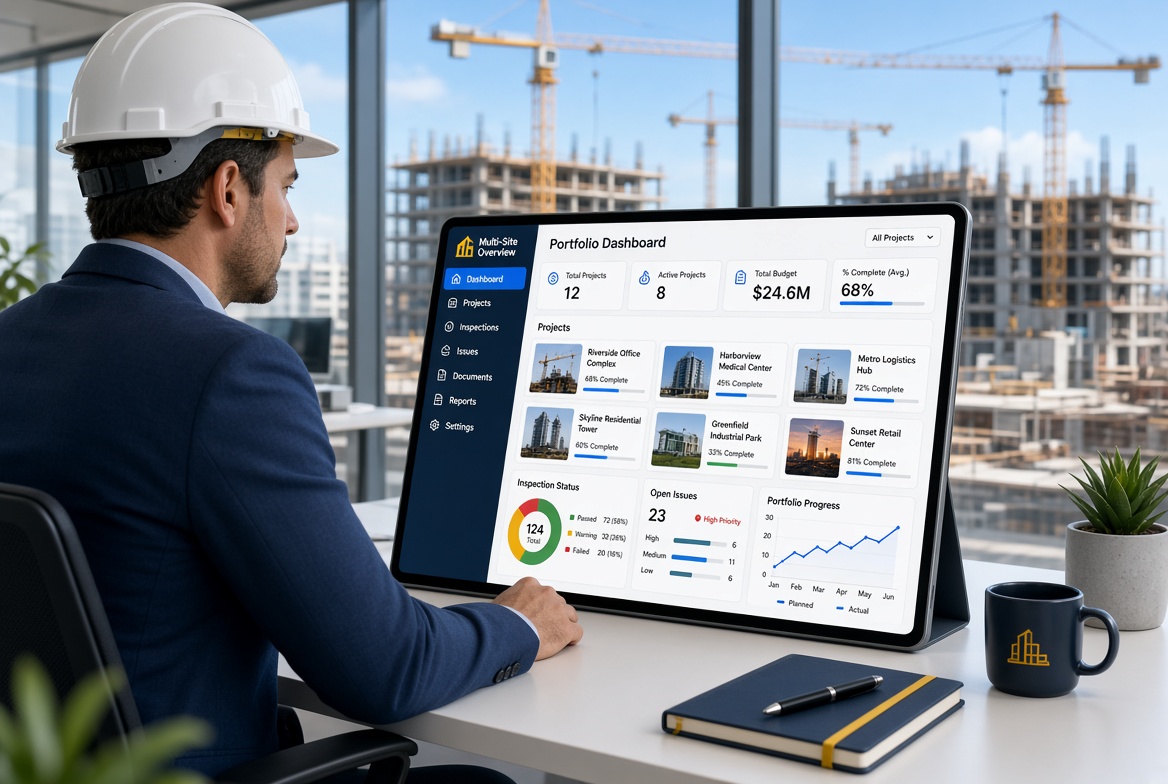
Before choosing tools or charts, decide the questions. A useful dashboard for someone running several sites should help answer these six.
- Is the work being checked? Are the inspections that should be happening actually happening, on time, on every site?
- What is overdue? Which actions, issues or inspections have passed their due date, and where?
- What is open, and for how long? How many issues are outstanding, and which have been open the longest?
- Who or what is about to lapse? Which certificates, competence records or permits are expiring soon?
- Where are the same problems recurring? Are particular types of finding, areas or trades generating repeat issues?
- Where do I need to look today? Which site or item needs my attention first?
The last question matters most. A good dashboard directs attention. It does not ask the manager to scan every number on every site.
What a dashboard is not
- It is not a substitute for visiting sites. Numbers cannot show everything, particularly conditions, behaviour and culture.
- It is not a programme or cost control system, unless it is connected to one. A compliance and inspection dashboard shows how checks and follow-up are going, not whether you are on time and on budget.
- It is not neutral. What you choose to show shapes what people pay attention to.
Step 1: Standardise Before You Visualise
The most common reason multi-site dashboards disappoint is that the sites are not recording information in the same way. The fix is not a better chart. It is a common language.
Agree common forms
If the same inspection is carried out on every site, use the same form. Local additions are fine, but the core fields and questions should match so results can be compared.
Agree common categories
Decide how you classify issues, for example near-misses, non-conformances, defects and observations, and make sure everyone uses the same definitions.
Agree a severity or priority scale
Define what each level means in practice, ideally with examples. "High" should mean the same thing in Leeds and Lincoln.
Agree statuses
Define the stages an issue can be in, such as open, assigned, resolved, verified and closed, and what has to happen to move between them.
Agree naming and location conventions
Projects, areas, packages and trades should be named consistently, so that results can be filtered and compared.
Agree ownership
Every issue, inspection and certificate should have a named owner. A dashboard cannot chase "the team".
A one-page reference helps. For example:
| Item |
Agreed definition |
| Inspection on time |
Completed within the scheduled period, by the named person |
| Overdue action |
Not closed by its due date |
| High-priority issue |
Could cause harm or serious damage if not dealt with before the next shift or stage |
| Closed issue |
Fixed, checked by someone other than the person who did the work, with evidence attached |
| Certificate expiring |
Expires within 30 days |
Your definitions will differ. What matters is that they are written down and used by everyone.
Step 2: Choose a Small Set of Measures That Matter
It is tempting to show everything. Resist it. Every extra measure dilutes attention and adds maintenance.
Leading and lagging measures
Health and safety guidance distinguishes between measures that look ahead and those that look back. HSE's guidance on managing health and safety, HSG65, includes a "Check" stage on measuring performance, covering monitoring and selecting the right measures, followed by an "Act" stage on reviewing performance. The Royal Society for the Prevention of Accidents (RoSPA) describes the distinction in plain terms.
- Leading (proactive) measures look at what is being done to prevent harm before it happens, such as inspections and workplace tours, the integrity of management systems and attitude surveys.
- Lagging (reactive) measures look at outcomes after the event, such as lost time injury rates, and the investigation of near-misses and hazardous events.
RoSPA recommends combining both and cautions against using accident data as the only measure of performance. A low injury count does not prove that risks are under control, since ill health can go unrecorded and a good record on minor injuries does not show that high-risk activities are well managed. It also notes that changes in accident rates can be down to chance and should be treated with care.
For a multi-site dashboard, the lesson is practical: show leading measures prominently, because they tell you whether the system is working before something goes wrong, and use lagging measures as a check, not as the headline.
A starter set of measures
| Measure |
Type |
How to calculate it |
Why it matters |
| Inspections completed on time |
Leading |
Completed on time divided by due, by site |
Shows whether the process is being followed |
| Overdue actions |
Leading |
Count of open actions past their due date, by site |
Shows whether findings are followed through |
| Age of oldest open issue |
Leading |
Days since the oldest open issue was raised |
Shows whether problems are left to linger |
| Open issues by priority |
Leading |
Count of open items at each priority level |
Shows the weight of outstanding risk |
| Certificates expiring soon or lapsed |
Leading |
Count expiring within an agreed period, and count lapsed |
Shows competence record health |
| Near-miss and observation reports |
Leading |
Count over time, by site |
Shows reporting culture, with the caution below |
| Records with complete evidence |
Leading |
Share of records with required fields and photographs |
Shows data quality |
| Repeat findings |
Lagging |
Count of issues of the same type on the same site or trade |
Shows whether fixes are working |
| Incidents and serious events |
Lagging |
Count and nature, by site |
A necessary check, not a sole measure |
A caution on near-miss and observation counts. A low number does not necessarily mean a safe site. It may mean people are not reporting. A rising number can be a sign of a healthier reporting culture. Interpret counts with the site manager, not in isolation.
Write each measure down
For each measure on the dashboard, record:
- Definition. What exactly is counted.
- Source. Where the data comes from.
- Owner. Who is responsible for the result.
- Threshold. What counts as good, concerning or urgent.
- Review frequency. How often it is looked at, and by whom.
A measure without an owner or a threshold is decoration.
Step 3: Design the Dashboard for Attention, Not Decoration
Start at the portfolio, then drill down
The first screen should show all sites at a glance, with the ability to open any one for detail.
Put exceptions first
Show what needs attention, such as overdue items, missed inspections and expiring certificates, before showing what is fine. A manager should be able to see in seconds where to look.
Make thresholds explicit
If you use red, amber and green, define the thresholds in advance and display them. Otherwise colours become opinion.
Show trends as well as current values
A figure that is moderate but worsening deserves attention. A figure that is poor but improving tells a different story.
Allow filtering
Managers should be able to filter by site, area, trade, priority and date.
Show when the data was last updated
If sites record offline, there can be a delay before information reaches the dashboard. Make it clear how current the data is.
Keep it short
Eight to ten measures on the main view is plenty. Use detail screens for everything else.
An illustrative example
The table below shows how a portfolio view might look. The figures are invented, and the thresholds are an example only.
Thresholds in this example: inspections on time, green at 90% or above, amber at 80 to 89%, red below 80%.
| Site |
Inspections on time |
Overdue actions |
Oldest open issue |
Certificates expiring in 30 days |
Status |
| Site A |
96% |
2 |
6 days |
1 |
Green |
| Site B |
78% |
9 |
31 days |
4 |
Red |
| Site C |
91% |
3 |
12 days |
0 |
Green |
Without reading anything else, the manager knows where to start: Site B. They can then drill into the overdue actions and the oldest open issue, and ask the site team what is getting in the way.
Step 4: Build a Review Routine Around It
A dashboard that nobody looks at is wasted. The value comes from a consistent rhythm.
Daily, on site
Site supervisors work from their own project's list of inspections due and actions outstanding. This is the source of the data and needs to be quick.
Weekly, portfolio review
A short meeting, about 30 minutes, with the people responsible for the sites.
A simple agenda:
- Exceptions. Which sites are red or amber, and why?
- Overdue and oldest items. What is stuck, and who is responsible?
- Certificates and renewals. What is about to lapse?
- Repeat problems. Is anything recurring across sites?
- Actions. Agree what happens before next week, and who owns it.
Monthly, trends and sampling
- Review trends over the month and quarter.
- Pick a few records at random from each site and check them for completeness: the right particulars, evidence attached, actions closed.
- Review definitions and thresholds. Are they still right?
Roles
- Site champion, who helps colleagues use the system and flags problems.
- Data owner, responsible for definitions and data quality.
- Reviewer, who chairs the weekly meeting and follows up on actions.
On smaller operations, one person may hold more than one role. The key is that someone does.
What Goes Wrong With Multi-Site Dashboards?
- Inconsistent data. If sites record things differently, comparisons mislead.
- Stale data. A dashboard showing last week's picture can be worse than none.
- Too many measures. People stop looking.
- Green by default. If a measure shows green when nobody has entered data, it hides problems. Make "no data" visible.
- Gaming. If sites are judged on a number, some will manage the number rather than the work. Pair measures and talk to people.
- Unfair comparison. Sites differ in risk, size and stage. A site with complex temporary works may reasonably raise more issues than a simple refurbishment.
- Punishing reporting. If a site is criticised for reporting many near-misses, it will report fewer.
- No follow-up. If red items do not lead to action, people learn that the dashboard does not matter.
- Treating it as the whole picture. Numbers cannot replace visits, conversations and judgement.
Spreadsheet Dashboard or Dedicated Software?
Both approaches can work, depending on scale.
| Approach |
Strengths |
Limits |
| Spreadsheet or BI tool built from exported data |
Flexible, low licence cost, tailored to your measures |
Someone must maintain it, data has to be collected and combined, risk of version and error problems |
| Dashboard inside the software where records are made |
Data is current without manual combining, drill-down to the underlying record |
Limited to what the product offers, and only as good as what is recorded in it |
| Both |
Product for operational views, spreadsheet or BI tool for custom analysis |
Two places to look, and a need to keep definitions aligned |
For two or three sites with simple measures, a well-kept spreadsheet may be enough. As the number of sites and measures grows, the effort of collecting and combining data tends to grow faster than the value, and a dashboard that draws directly from the records becomes more attractive.
What to Look for in Software for Multi-Site Visibility
- A project structure that lets you view all projects together and switch between them easily.
- Standard templates that can be used across projects, so data is comparable.
- Cross-project views and filters for inspections, issues, actions and certificates.
- Drill-down from a summary to the underlying record and its evidence.
- Overdue and exception views, so attention goes where it is needed.
- Roles and permissions, so managers see the portfolio while site teams see their own projects.
- Offline capture, with visibility of when data last synchronised.
- Reporting and export, for the analysis the product does not provide.
- Data quality controls, such as mandatory fields.
- Clear ownership and notifications.
Test these with at least two projects set up in the product, and ask a manager who does not use the system daily whether they can find what they need in a minute.
A 30, 60, 90-Day Plan for Going Multi-Site
Days 1 to 30: Agree and pilot
- Write down your six questions and the starter measures.
- Agree definitions for categories, severity, statuses and naming.
- Standardise one or two forms across two sites.
- Set up two projects in your chosen tool and test the portfolio view.
Days 31 to 60: Run the rhythm
- Hold the weekly review from the first week.
- Collect feedback from site teams and reviewers.
- Remove measures nobody uses and clarify those that cause confusion.
- Run a monthly sample check on records.
Days 61 to 90: Extend
- Review the dashboard against the six questions. Does it answer them?
- Add the next site or workflow.
- Revisit thresholds and definitions.
- Decide what stays in the dashboard and what moves to a detail view.
Multi-Site Dashboard Checklist
- [ ] We have written down the questions the dashboard must answer.
- [ ] Forms, categories, severity levels and statuses are consistent across sites.
- [ ] Every issue, action and certificate has a named owner.
- [ ] We track a small set of measures, mixing leading and lagging.
- [ ] Each measure has a definition, source, owner and threshold.
- [ ] Thresholds for red, amber and green are explicit.
- [ ] The main view shows exceptions first, and can be drilled into.
- [ ] "No data" is distinguishable from "green".
- [ ] The dashboard shows when data was last updated.
- [ ] Near-miss and observation counts are interpreted with care.
- [ ] We have a weekly portfolio review with a fixed agenda.
- [ ] We sample records monthly to check data quality.
- [ ] Definitions and thresholds are reviewed regularly.
- [ ] We visit sites as well as reading numbers.
How KaelSite Fits
KaelSite is a mobile-first construction compliance platform for UK teams. Work is organised by project, with one account across mobile and web, and its inspections, Issue System and certificates record information in a consistent, structured way, which is the foundation any multi-site view depends on. Inspections work offline-first, with photo, video, voice and geotag capture, and Form Studio lets you build the same inspection form for use across your projects.
If a particular cross-project view matters to you, such as overdue actions across all sites, test it on your own data with at least two projects before deciding. Whatever tool you use, the standardisation, measures and review routine described above matter more than any individual chart.
Frequently Asked Questions
What should a multi-site construction dashboard show?
It should answer a small number of questions: whether inspections are being completed, what is overdue, what is open and for how long, what is about to expire, where problems recur and where the manager should look first. Show exceptions before anything else.
How many measures should a dashboard have?
Eight to ten on the main view is usually plenty. Each one should have a clear definition, source, owner and threshold. Put additional detail on drill-down screens.
Should we focus on leading or lagging indicators?
Use both. Leading measures, such as inspections completed on time and overdue actions, show whether your systems are working before harm occurs. Lagging measures, such as incidents, show outcomes. Guidance from RoSPA cautions against relying on accident data alone.
How do we compare sites fairly?
Standardise definitions and forms first, and remember that sites differ in size, stage and risk. Compare trends over time on the same site, as well as across sites, and discuss results with site managers instead of ranking them.
Can we build a dashboard in Excel?
Yes, for a small number of sites and measures. The cost is the time spent collecting and combining data and keeping it accurate. As you add sites, a dashboard that draws directly from the records becomes easier to maintain.
How often should we review the dashboard?
Site teams work from their own lists daily, a portfolio review weekly and a trend and sample check monthly. The rhythm matters more than the format.
What if some sites record offline?
Make sure the dashboard shows when each site's data was last updated, so that a delay in synchronisation is not mistaken for inactivity.
Does a dashboard replace site visits?
No. It helps you decide where to go and what to ask, but it cannot show conditions, behaviour or culture.
Final Thoughts
A single dashboard across several projects is worth having, but it is the last step, not the first.
Start with the questions you need answered. Standardise how sites record information. Choose a few measures with clear definitions and owners, favouring those that show whether your systems are working. Then build a weekly rhythm in which the dashboard directs attention and people act on what it shows.
Do that, and the dashboard becomes a tool for managing. Skip it, and you will have an attractive screen showing a picture nobody trusts.
This article is intended as general information for orientation and does not constitute legal or professional advice. Software can support site processes but does not replace competent people, project procedures or the responsibilities set out in applicable regulations and standards.
Sources
- RoSPA, Measuring OS&H performance, for the distinction between leading and lagging indicators and the caution about accident data: rospa.com
- HSE, Managing for health and safety (HSG65), for the structure of its "Check: Measuring performance" and "Act: Reviewing performance" stages (contents reviewed only): books.hse.gov.uk

Comments (0)
Add a Comment
No comments yet. Be the first to comment!