Multi-Site Reporting: How to Manage Construction Projects from One Platform
Managing one construction site is challenging enough. Managing several sites at the same time creates a completely different level of administration.
Site managers, project managers, compliance teams and senior management may need to keep track of inspections, issues, corrective actions, photos, reports, certificates and site activity across multiple projects.
When this information is spread across spreadsheets, emails, WhatsApp messages, paper forms and different systems, it becomes difficult to see what is happening across the business.
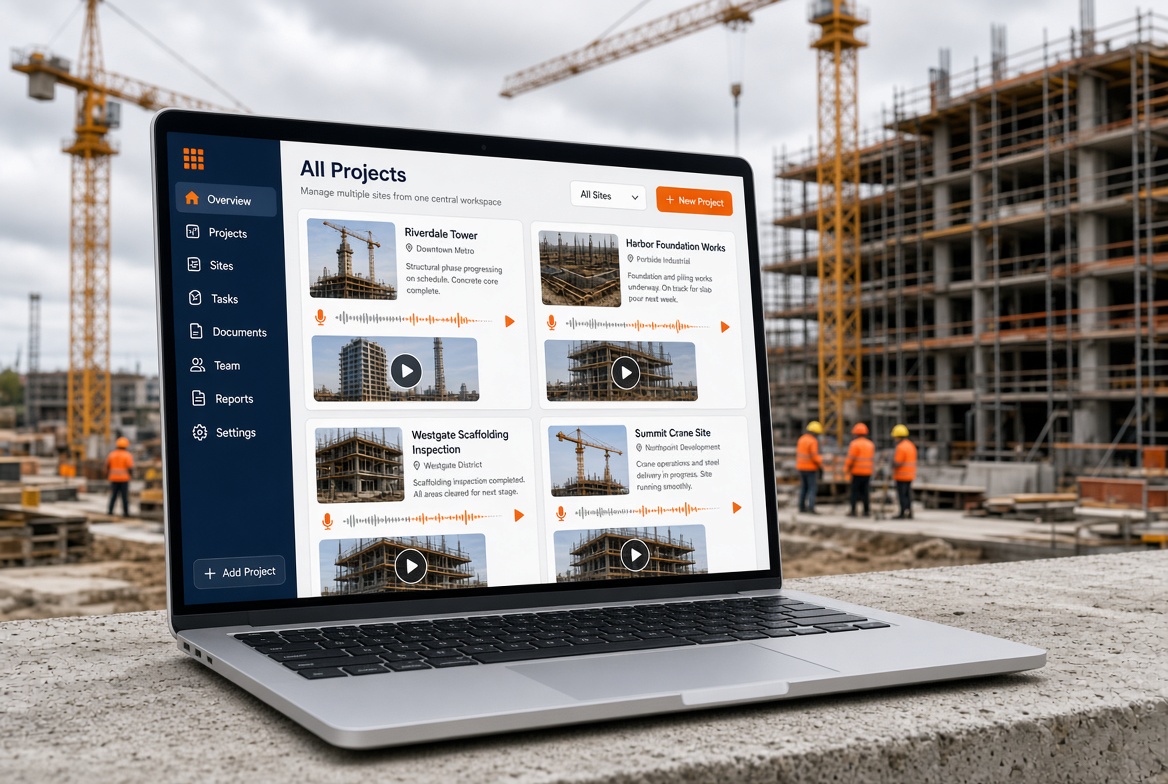
Multi-site reporting brings that information together so construction teams can monitor multiple projects from one central platform.
What Is Multi-Site Reporting?
Multi-site reporting is the process of collecting, organising and reviewing information from multiple construction sites in one system.
Instead of managing each project completely separately, a central reporting platform can provide visibility across different sites while still keeping each project's information organised.
Depending on the software, multi-site reporting can include:
The exact features depend on the platform and how the construction company uses it.
Why Is Multi-Site Reporting Important for Construction Companies?
When a company has several active projects, simply asking each site team for an update is not always enough.
Information can arrive at different times and in different formats.
One site might use Excel.
Another might send a PDF.
Another might use paper forms.
Another might send photographs through messaging apps.
This makes it difficult to create a consistent view of the business.
A central reporting system can make information easier to find, compare and review.
Common challenges with multiple construction sites
Construction companies managing multiple sites often need to deal with:
-
Different reporting formats
-
Large numbers of inspections
-
Multiple site teams
-
Separate project folders
-
Outstanding corrective actions
-
Expiring certificates
-
Missing information
-
Delayed reports
-
Difficulties finding historical records
-
Limited visibility for management
Multi-site reporting is designed to reduce this fragmentation.
What Should Construction Multi-Site Reporting Include?
A useful multi-site reporting system should provide more than a list of projects.
It should make it easy to understand what is happening, what needs attention and where action is required.
1. A central project dashboard
Management should be able to see the company's projects from one place.
For example:
| Project |
Inspections |
Open Issues |
Actions Due |
Certificates |
| Project A |
24 |
3 |
5 |
18 |
| Project B |
17 |
1 |
2 |
21 |
| Project C |
31 |
6 |
8 |
14 |
The exact information displayed will depend on the system, but the principle is simple:
one overview, multiple projects.
2. Separate project information
Centralised reporting should not mean mixing everything together.
Each project should maintain its own:
-
Inspections
-
Reports
-
Photos
-
Issues
-
Actions
-
Documents
-
Site records
This makes information easier to manage while still allowing authorised users to view information across projects.
3. Consistent inspection reporting
One of the biggest advantages of multi-site reporting is consistency.
A company can use standard inspection templates across multiple projects while allowing project-specific requirements where necessary.
This helps create a consistent approach to recording:
Multi-Site Reporting for Site Managers
Site managers need to concentrate on running their sites rather than spending excessive time producing administration.
A mobile-first reporting system can allow site teams to complete reports directly from the site.
For example:
Inspect → Record → Photograph → Report issue → Assign action → Track completion
This can reduce the need to complete paperwork later from an office.
Mobile reporting is particularly useful when site teams need to work away from desks.
Multi-Site Reporting for Project Managers
Project managers may need visibility across several projects.
Instead of opening individual spreadsheets or requesting separate updates, a central platform can provide a broader view.
They may want to identify:
-
Which sites have outstanding actions?
-
Which projects have recent inspections?
-
Where are issues increasing?
-
Which actions are overdue?
-
Which sites have missing reports?
-
Which certificates are approaching expiry?
This turns site information into something that can be reviewed at project or company level.
Multi-Site Reporting for Compliance Teams
Compliance teams often need to monitor information across multiple locations.
A central system can make it easier to locate records and identify outstanding tasks.
For example, a compliance team could review:
-
Inspection records
-
Corrective actions
-
Certificates
-
Expiry dates
-
Evidence photographs
-
Reports
-
Site observations
-
Training records
Instead of searching through separate project folders, information can be organised within one platform.
Can Multi-Site Reporting Include Photos?
Yes.
Photographic evidence can be particularly useful for construction reporting.
A site worker can take a photograph during an inspection and attach it to the relevant:
-
Inspection
-
Issue
-
Defect
-
Observation
-
Corrective action
-
Site report
This provides additional context alongside written information.
The photograph should support the record rather than replace the required written details or professional judgement.
Multi-Site Reporting and Corrective Actions
Reporting an issue is only the first step.
The next question is:
What happened afterwards?
A useful system should allow teams to track corrective actions through their lifecycle.
For example:
Issue identified → Action created → Person assigned → Due date set → Action completed → Evidence added → Closed
This creates a clearer record of what happened after an issue was identified.
Multi-Site Reporting and Certificate Expiry
Construction companies may also need to monitor certificates and other records with expiry dates.
For example:
A certificate tracking system can provide reminders before an expiry date rather than relying entirely on manual spreadsheets.
For teams managing many employees and projects, this can become particularly useful.
Multi-Site Reporting: Mobile App and Web Dashboard
For construction companies, the best solution may not be purely mobile or purely web-based.
Different users have different needs.
Site teams need mobile access
A site supervisor may need to:
-
Complete an inspection
-
Take photographs
-
Report an issue
-
Assign an action
-
Review previous records
These tasks are often performed directly on site.
Management teams need a web view
Managers may prefer a larger screen for:
-
Reviewing multiple projects
-
Searching records
-
Monitoring outstanding actions
-
Viewing reports
-
Managing users
-
Comparing project activity
This is why a combination of mobile app + web platform can be useful for construction reporting.
What Is the Best Multi-Site Reporting Software?
There is no single best platform for every construction company.
The right system depends on the size of the organisation, number of projects, workflows and reporting requirements.
Before choosing software, consider whether it provides:
-
Multi-project management
-
Mobile reporting
-
Web access
-
Offline capability where required
-
Digital inspection checklists
-
Photo evidence
-
Issue and defect reporting
-
Corrective action tracking
-
Due dates
-
Certificate tracking
-
Expiry reminders
-
User permissions
-
Searchable records
-
Reporting and dashboards
-
Exportable reports
-
Project-level access controls
The system should also be simple enough that site teams will actually use it.
Multi-Site Reporting vs Spreadsheets
Spreadsheets can be useful for small teams and simple records.
However, as the number of projects increases, managing multiple spreadsheets can become difficult.
| Spreadsheets |
Multi-Site Reporting Platform |
| Often managed separately |
Centralised system |
| Manual updates |
Structured records |
| Limited mobile experience |
Designed for mobile/site use |
| Difficult to track actions |
Action tracking |
| Manual reminders |
Automated reminders where supported |
| Files can become fragmented |
Centralised project records |
| Reporting can require manual work |
Dashboards and reports |
A spreadsheet is not automatically unsuitable. The important question is whether the system still works effectively as the number of sites, users and records increases.
How KaelSite Can Support Multi-Site Reporting
KaelSite is designed around the reality of construction teams working across active sites.
Instead of treating inspections, issues, evidence and actions as completely separate processes, KaelSite can bring these workflows into one construction-focused platform.
Teams can use KaelSite to support:
-
Multiple construction projects
-
Site inspections
-
Digital checklists
-
Photo evidence
-
Issue and defect reporting
-
Near-miss reporting
-
Corrective actions
-
Due dates
-
Site records
-
Certificate and expiry tracking
-
Mobile site work
-
Web-based management
-
User permissions
-
Project-level access
The aim is to give site teams a simple way to record information while giving managers better visibility across their projects.
KaelSite is a support and management tool. It does not replace competent people, project procedures, professional judgement, engineering decisions or required approvals and sign-off.
What Should You Ask Before Choosing Multi-Site Reporting Software?
Before buying a platform, ask:
Can it manage multiple projects?
You should be able to create and manage separate projects without losing the ability to see the bigger picture.
Can site teams use it on their phones?
If reporting is difficult on site, adoption can quickly become a problem.
Does it work with poor connectivity?
Construction sites do not always have reliable internet access. Offline functionality can therefore be an important consideration.
Can managers see outstanding actions?
Reporting is much more useful when you can see what still needs to be done.
Can you control user permissions?
Different people may need different levels of access.
For example:
-
Site workers
-
Supervisors
-
Project managers
-
Compliance teams
-
Senior management
-
External users
Can you keep records for each project?
A central platform should still maintain clear project separation.
Can you track certificates and expiry dates?
For organisations managing many workers and records, this can save significant administrative effort.
The Future of Construction Multi-Site Reporting
Construction reporting is moving away from isolated paperwork and disconnected spreadsheets towards connected digital workflows.
The goal isn't simply to create more data.
The goal is to make existing site information easier to capture, find, understand and act on.
For a company managing multiple construction projects, that can mean moving from:
“Can you send me the latest update?”
to:
“I can see the latest project information.”
That difference can make multi-site management much simpler.
Multi-Site Reporting Checklist
When evaluating a construction reporting platform, look for:
Frequently Asked Questions
What is multi-site reporting?
Multi-site reporting is a way of collecting and managing information from multiple construction projects through a central reporting system.
Why is multi-site reporting useful?
It can give construction companies better visibility across projects while keeping individual site records organised.
Can construction companies use an app for multi-site reporting?
Yes. A construction reporting app can allow site teams to capture inspections, issues, photographs and actions directly from their phones.
Can managers manage several construction sites from one platform?
Yes, depending on the software. Multi-site platforms can provide central visibility while maintaining separate project records and permissions.
Is multi-site reporting better than Excel?
Not necessarily for every company. Excel can work well for simple requirements, but dedicated software can become more useful as the number of projects, users and records increases.
Can multi-site reporting include certificate expiry reminders?
Some construction platforms provide certificate and expiry tracking, allowing teams to monitor records that need attention before their expiry dates.
Can multi-site reporting work on both mobile and web?
Yes. Some construction platforms provide a mobile app for site teams alongside a web platform for managers and administrators.
Conclusion
Managing multiple construction sites requires more than collecting individual site reports.
Teams need a practical way to capture information on site, organise it by project, track outstanding actions and give managers visibility across the wider business.
Multi-site reporting software can bring these processes together.
For construction companies looking for a combination of mobile site reporting and central project management, the right platform can make inspections, issues, evidence, actions and records much easier to manage across multiple projects.
That is the approach behind KaelSite: simple, mobile-first construction software designed to help teams manage site information without creating unnecessary administrative work.

Comments (0)
Add a Comment
No comments yet. Be the first to comment!