Construction inspections do not always happen somewhere with a reliable internet connection. Supervisors may need to complete checks in basements, plant rooms, tunnels, remote areas or parts of a site where mobile coverage is inconsistent.
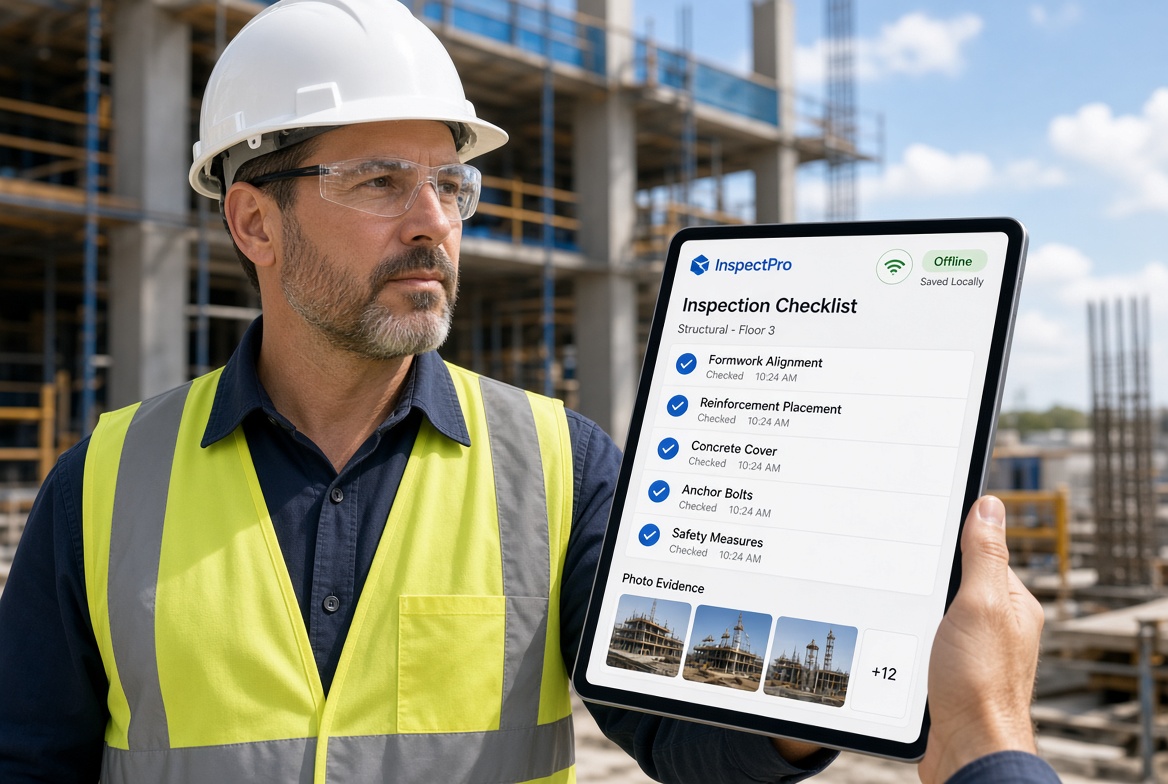
An offline construction inspection app can help teams record findings at the point of work without waiting for a connection. But not every app that advertises offline access supports the same functions.
Some tools may allow users to view information already downloaded to a device. Others support completing inspection forms, attaching photographs and saving records locally before synchronising them later.
For a site supervisor, that difference matters.
The right app should support the inspection process from start to finish, including recording findings, capturing evidence, identifying problems and making records available to the wider team when connectivity returns.
So, what should supervisors demand before committing to an offline construction inspection app?
1. Full offline inspection completion—not just offline viewing
The first question to ask a software provider is simple:
Can my team complete and save an inspection when the device has no internet connection?
Being able to open a previously downloaded form is useful, but it is not enough if the supervisor cannot complete the inspection and save the result.
Check whether the app allows users to:
-
Open the required inspection form offline.
-
Complete questions and record observations.
-
Enter comments and relevant details.
-
Save draft and completed inspections.
-
Reopen saved records on the device.
-
Record the relevant project, site or asset information.
-
Continue working if connectivity drops partway through an inspection.
Ask whether forms and project information must be downloaded before entering an offline area. If they do, establish how supervisors can prepare for the working day and confirm that the necessary information is available.
A good buying test is to complete a real inspection with mobile data and Wi-Fi disabled. If the essential workflow breaks, the app may not be suitable for your site conditions.
2. Photo evidence that stays attached to the right record
Photographs are often essential to an inspection record. They can help explain a defect, show the condition of an area or provide evidence of corrective work.
But capturing a photograph is not the same as storing it correctly within the inspection system.
Before choosing an app, check whether supervisors can:
-
Take photographs while offline.
-
Attach images directly to the relevant inspection or finding.
-
Add notes to explain what the images show.
-
Keep images associated with the correct record until synchronisation.
-
Identify attachments that have not yet uploaded.
-
Confirm that evidence is available in the central system after reconnection.
If your team uses videos, voice notes, signatures or other forms of evidence, test those too rather than assuming that every attachment type works offline.
Buying tip: Create an inspection with several photographs while disconnected. Reconnect the device and confirm that every image appears against the correct record.
3. Reliable synchronisation when connectivity returns
Offline records need to reach the wider team eventually. Supervisors should understand exactly how the app handles that transition.
Ask the provider to demonstrate what happens when a device reconnects after completing several inspections offline.
Check the following:
-
Does synchronisation happen automatically or require user action?
-
Can users see which records are waiting to sync?
-
Are photographs and attachments included?
-
Does the app show whether synchronisation has succeeded?
-
What happens if a connection drops during an upload?
-
Can failed uploads be identified and retried?
-
How are conflicting edits handled if a record changes elsewhere?
A record saved locally is not necessarily available to a site manager or office administrator straight away. The app should make the distinction between locally saved information and successfully synchronised records clear.
For supervisors, this visibility helps prevent uncertainty about whether inspection information has reached the people who need it.
4. Issue tracking built into the inspection workflow
An inspection can identify a problem, but the work does not end when the finding is recorded.
Depending on the issue and your procedures, someone may need to investigate it, take corrective action, provide evidence and confirm that it has been resolved.
An inspection app should make it easy to connect findings with follow-up actions, rather than leaving supervisors to transfer details into another spreadsheet or messaging system.
Look for the ability to:
-
Record defects, observations or non-conformances.
-
Describe the problem and attach evidence.
-
Assign responsibility where appropriate.
-
Set target dates or priorities.
-
Track outstanding and completed actions.
-
Record evidence of resolution.
-
Produce a report showing the issue's status.
If your team needs to create issues offline, test that specific function. Some apps may allow an inspection to be saved offline while requiring a connection for assignment, notifications or other parts of the workflow.
Also establish what happens to notifications when a record is synchronised. A person assigned to an issue may not be notified until the device reconnects.
5. Inspection forms that match your work
Construction inspections vary by project, asset, activity and company procedure. A rigid set of generic forms may not capture the information your supervisors need.
Before buying, establish how easily forms can be adapted to your workflows.
Consider whether the app supports:
-
Custom questions and response options.
-
Mandatory fields for critical information.
-
Relevant photographs and supporting notes.
-
Different forms for different inspection types.
-
Repeatable inspection schedules, if required.
-
Clear identification of the project or asset.
-
Suitable record and report formats.
Ask who can create or amend forms and whether those changes are available to users working offline. If forms must be downloaded again after an update, understand how that process works and how the team avoids using an outdated version.
The aim is not to create the longest possible checklist. It is to capture the information needed to carry out and document the inspection properly.
6. Clear records, timestamps and accountability
Inspection records may need to be reviewed long after the inspection took place. Supervisors should therefore understand what information the app records and how it can be retrieved.
Check whether records can include relevant details such as:
-
The person completing the inspection.
-
The inspection date and time.
-
The site, project, asset or location.
-
Inspection responses and comments.
-
Supporting photographs and attachments.
-
Findings and follow-up actions.
-
Changes to records, where audit history is supported.
Also ask how timestamps are handled when the device is offline. The app may use device time or apply server-side information when synchronising, depending on its design. Understand what is recorded and how the system handles discrepancies.
Do not assume that every app provides a complete audit trail simply because it stores inspection records. Ask the provider to show the record history and explain what changes are retained.
7. Reports that do not require hours of rework
Digital inspections should make it easier to use the information collected on site.
If supervisors have to export data, copy photographs into separate documents and manually rebuild every report, the app may not remove as much administration as expected.
Evaluate whether the app can:
-
Generate reports from completed inspections.
-
Include relevant findings and photographs.
-
Show outstanding actions and their status.
-
Search or filter records by project, date or inspection type.
-
Export information in the formats your organisation needs.
-
Provide suitable records for managers, clients or internal reviews.
Ask for a demonstration using your own inspection template. A polished sample report is less useful if it cannot include the information your actual workflow requires.
For teams working offline, confirm when reports can be generated and whether the relevant records must first synchronise.
8. A mobile interface supervisors can use on site
The app must work for the people completing inspections—not just the person buying it.
Site supervisors often need to move quickly between locations, answer questions and record findings while managing other responsibilities. A complicated mobile interface can discourage consistent use.
During a trial, check whether users can:
-
Find the correct site and inspection quickly.
-
Navigate forms with minimal unnecessary steps.
-
Read questions clearly on the devices they use.
-
Save work without losing progress.
-
Review previous records when needed.
-
Understand whether a record is saved or awaiting synchronisation.
Include supervisors and other intended users in the evaluation. Ask them to complete routine tasks without coaching from the vendor.
If the app is difficult to use in a realistic site environment, a longer feature list will not solve that problem.
9. Security and control of offline records
Offline inspections mean some information may remain on a device until it reconnects. Supervisors and managers should understand how that data is protected.
Ask the provider about:
-
User authentication and access permissions.
-
Protection of information stored on the device.
-
What happens if a phone or tablet is lost.
-
Removing access when a worker leaves the organisation.
-
Data retention and deletion policies.
-
Exporting records when a contract ends.
-
How access to sensitive project information is controlled.
The appropriate safeguards depend on your organisation's policies and the type of information being collected. Confirm that the proposed app meets your requirements before rolling it out across multiple sites.
10. A realistic total cost—not just the subscription price
The cheapest advertised package is not necessarily the most cost-effective option for your team.
When comparing suppliers, consider the total cost of using the app, including:
-
Subscription charges and user limits.
-
Additional modules or feature packages.
-
Setup and configuration.
-
Training and onboarding.
-
Data migration from existing systems.
-
Support and maintenance.
-
Additional costs as more projects or users are added.
Ask for pricing based on your actual team size and intended workflows. Check whether the offline functionality you require is included in the proposed package.
It is also worth assessing the administrative work your team currently performs. Time spent re-entering paper inspection results, chasing missing photographs or rebuilding reports can be relevant when deciding whether an app offers value.
Avoid relying on generic savings promises. Ask vendors to demonstrate how the software would change your specific tasks.
Offline construction inspection app checklist
Use this checklist during a vendor demonstration or trial.
A supplier should be able to explain any limitations clearly. If a critical function requires connectivity, decide whether that limitation is acceptable for your site.
How KaelSite fits into the evaluation
KaelSite is an option for construction teams looking to manage inspections and compliance-related records through a mobile workflow.
Its feature set includes offline inspections, custom forms, evidence capture, issue tracking, certificate and permit expiry reminders, and reporting tools. AI-assisted report drafting is available through its web platform.
For supervisors working in areas with unreliable connectivity, the key evaluation is whether KaelSite's supported offline workflows match the inspections and records they need to complete.
During a trial, test the forms your team uses, capture evidence in an offline environment, and verify what happens when the device reconnects. Confirm which functions are available offline, what information needs to be prepared in advance and which activities require a live connection.
KaelSite may be particularly relevant if your priority is to connect inspection records with findings, evidence, follow-up actions and reporting. As with any product, assess it against your own processes rather than assuming it will meet every requirement.
Frequently asked questions
What is the most important feature in an offline inspection app?
The ability to complete and save the inspections your team actually performs without a live connection is a sensible starting point. Reliable synchronisation, evidence capture and clear status indicators are also important.
Is offline viewing the same as offline inspection?
No. Offline viewing generally means accessing information already available on the device. Offline inspection means being able to enter and save inspection data without a connection. Check the exact functions supported by the app.
Can supervisors create issues while offline?
That depends on the product. Some apps may allow users to create and save issues offline, while assignment, notifications or shared updates may require connectivity. Test the complete workflow before buying.
How do offline inspection apps handle photographs?
The app should explain how photographs are associated with inspection records, stored while offline and synchronised later. Verify that images appear against the correct records after reconnecting.
Do offline construction inspection apps help with compliance?
They can help teams maintain inspection records, capture evidence and manage follow-up actions. However, software alone does not guarantee compliance. Records and workflows must support the relevant project requirements, procedures and legal duties.
Should we trial an app before purchasing it?
Yes, where possible. A realistic trial allows supervisors to test offline workflows, usability, synchronisation and reporting using their own devices and inspection forms.
Final thoughts
An offline construction inspection app should do more than keep a checklist visible when the signal disappears. It should let supervisors carry out the necessary work, save the inspection and its evidence, and make the resulting information available to the wider team when connectivity returns.
Prioritise full offline inspection completion, reliable synchronisation, evidence capture, issue tracking, useful reporting and a mobile interface that site teams can use confidently.
Use the checklist in this guide to compare suppliers against the same practical scenario. That will give you a clearer view of which app fits your site operations than a feature list alone.
If offline inspections and connected compliance records are priorities, include KaelSite in your evaluation and test its supported workflows against your actual site conditions.
The right app is the one your supervisors can rely on when they need to record the inspection—not just when the internet is working.
SEO and publishing notes
Suggested URL slug: /blog/offline-construction-inspection-app/
Primary keyphrase: Offline construction inspection app
Secondary keywords:
-
Offline inspection app for construction
-
Construction inspection software
-
Offline construction app
-
Mobile construction inspection forms
-
Construction inspection reporting software
-
Digital site inspection app
-
Construction compliance app
Suggested internal links:
-
Construction Apps That Work in Basements, Tunnels and Areas With No Signal
-
Cloud vs Offline-First Construction Apps: Why Connected-Only Software Fails on Real Sites
-
Construction Management Software: What It Is, What It Does and How to Choose One
-
Construction Management App vs Spreadsheets: When Excel Stops Working
-
Construction Inspection Software
-
Construction Compliance App Checklist: 12 Features That Matter on Real Sites
Cluster C positioning: This is the feature and buying guide. The previous article targets the specific problem of no signal in basements and tunnels; this article helps supervisors evaluate offline inspection functionality before buying. Keep the emphasis on requirements, testing and supplier questions rather than repeating the previous post's site scenarios.
Publishing check: Verify the exact offline capabilities currently supported by KaelSite, particularly form availability, evidence capture, issue creation and synchronisation. Avoid implying that every feature works offline unless confirmed.

Comments (0)
Add a Comment
No comments yet. Be the first to comment!