Best Temporary Works Inspection App: What Should Construction Teams Look For?
Temporary works inspections can generate a lot of information.
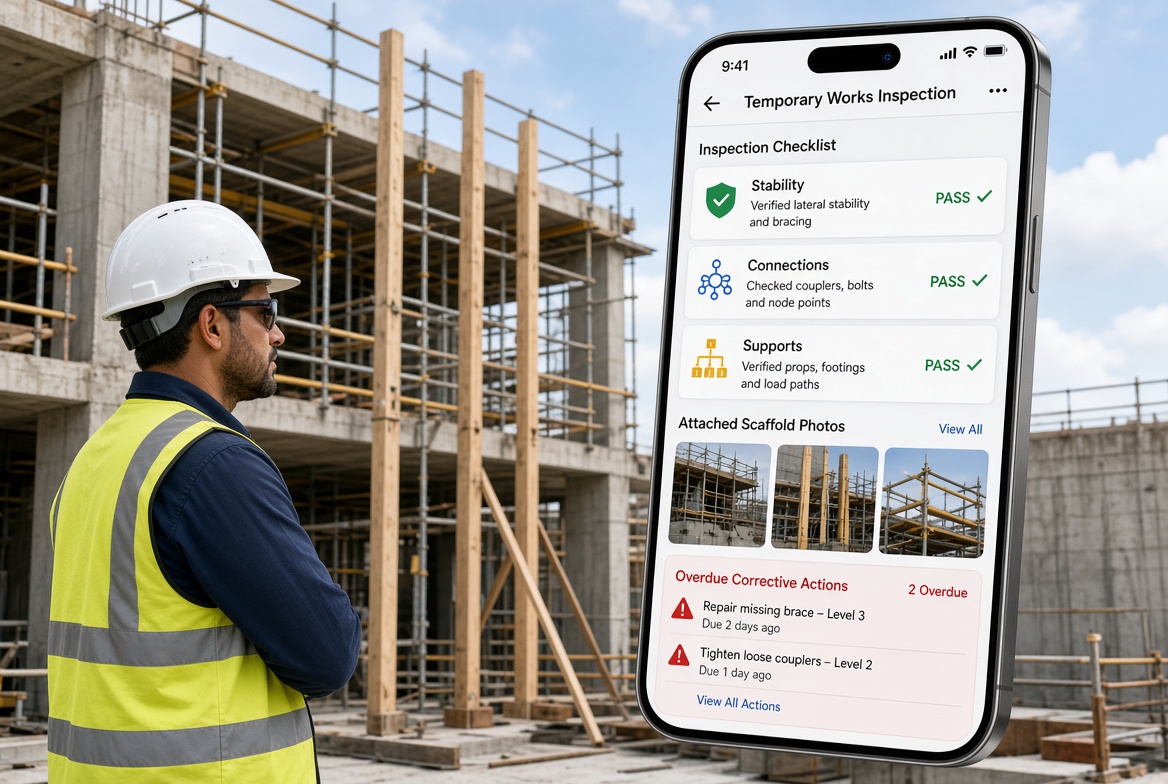
A Temporary Works Supervisor (TWS) may need to record what was inspected, identify defects or concerns, take photographs, assign corrective actions, track outstanding issues and keep a clear record of what happened.
On a busy construction site, doing all of this with paper forms, spreadsheets, WhatsApp messages and scattered photographs can quickly become difficult to manage.
That is why more construction teams are looking at temporary works inspection apps and construction inspection software.
But what actually makes an app good for temporary works?
The best temporary works inspection app is not necessarily the one with the longest feature list. It is the one that makes inspections quick to complete, easy to understand, simple to evidence and easier to follow up.
This guide explains what construction teams should look for when choosing a temporary works inspection app.
What Is a Temporary Works Inspection App?
A temporary works inspection app is mobile software that helps construction teams carry out, record and manage inspections of temporary works.
Depending on the project and organisational procedures, temporary works can include things such as:
The exact inspection requirements depend on the temporary works, project arrangements and applicable procedures.
A suitable app can help a TWS or other competent person record the inspection while working on site rather than completing paperwork later.
Why Use an App for Temporary Works Inspections?
Traditional inspection methods can work, but they often create unnecessary administration.
A typical paper-based process might look like this:
Inspect → write notes → take photographs → return to office → scan paperwork → email report → update spreadsheet → chase outstanding actions
A digital workflow can be much simpler:
Inspect → record findings → attach photographs → assign actions → track → report
This can reduce duplicated data entry and make inspection information easier to find.
The important point is that software does not replace the person carrying out the inspection. It supports the inspection and record-keeping process.
What Should the Best Temporary Works Inspection App Include?
There are several features worth considering before choosing an app.
1. Mobile Inspection Checklists
A good inspection app should allow teams to work from a structured checklist.
For temporary works, this could include inspection points relating to:
The checklist should be configurable rather than forcing every project to use exactly the same inspection.
Different temporary works require different considerations.
2. Easy Photo Evidence
Photographs are often an important part of an inspection record.
The best construction inspection apps should make it easy to:
-
Take a photograph.
-
Attach it to the inspection.
-
Add a description if required.
-
Identify the relevant issue or observation.
-
Keep the photograph with the inspection record.
This is much easier than taking dozens of photographs on a phone and trying to work out later which image relates to which inspection.
Why does this matter?
Imagine discovering a temporary works issue three weeks after an inspection.
If the inspection record contains dated photographs and clear notes, the project team has much better evidence of what was observed at the time.
3. Issue and Defect Reporting
An inspection is not particularly useful if problems disappear into a notebook.
A good app should allow the inspector to record an issue when it is discovered.
For example:
“Temporary support appears damaged and requires review before further loading.”
The issue can then be recorded with:
-
Description
-
Photograph
-
Location
-
Priority
-
Responsible person
-
Due date
-
Status
-
Corrective action
-
Completion evidence
This creates a much clearer process than simply writing “defect found” on a paper form.
4. Corrective Action Tracking
Finding an issue is only the first step.
The next question is:
What happened after the issue was identified?
A useful temporary works inspection app should allow teams to track actions from discovery through to completion.
A simple workflow could be:
Issue identified
↓
Action assigned
↓
Responsible person notified
↓
Corrective work completed
↓
Evidence uploaded
↓
Action reviewed
↓
Issue closed
This makes it easier for supervisors and managers to see which issues are still outstanding.
5. Clear Inspection Statuses
A digital inspection system should make the status of an inspection easy to understand.
For example:
| Status |
Meaning |
| Scheduled |
Inspection is due |
| In progress |
Inspection has started |
| Completed |
Inspection has been completed |
| Action required |
Issue requires follow-up |
| Closed |
Outstanding actions have been dealt with |
The exact statuses should reflect the organisation's own workflow.
The goal is simple: make it obvious what needs attention.
6. Offline Working
This is particularly important for construction sites.
Not every part of a site has reliable mobile signal.
A temporary works inspection app should ideally support working when connectivity is poor or unavailable.
A TWS should not have to stand beside a site office looking for Wi-Fi before being able to complete an inspection.
An effective mobile workflow should allow the user to:
-
Open the inspection
-
Complete checklist items
-
Add notes
-
Capture photographs
-
Record issues
-
Save the inspection
and then synchronise the information when connectivity becomes available.
For construction software, offline capability can be more important than having dozens of advanced features that are difficult to use on site.
7. Simple User Interface
A construction app needs to work in construction conditions.
Users may be:
-
Wearing gloves
-
Standing outside in bad weather
-
Moving around a site
-
Using a phone with one hand
-
Working under time pressure
-
Dealing with poor connectivity
That means the interface should be simple.
A TWS should not need to navigate through ten different screens just to record an observation.
The ideal workflow is something like:
Open inspection → complete checklist → take photos → record issues → submit
The fewer unnecessary steps, the better.
8. Inspection Templates
Different projects have different requirements.
A useful inspection platform should allow teams to create or configure templates for different inspection types.
For example:
For temporary works, the template should be adaptable to the project's procedures and the specific temporary works being inspected.
9. Automatic Inspection Records
One of the biggest advantages of digital inspections is that the record can be created as part of the inspection itself.
Instead of:
Paper form → office administrator → spreadsheet → PDF → email
the system can produce a structured digital record directly from the completed inspection.
A useful record might contain:
This can make records easier to retrieve later.
10. PDF Reports
Sometimes information needs to be shared outside the app.
For example, a project manager may want a copy of a completed inspection report.
A good inspection platform should therefore make it easy to generate a professional report.
A useful PDF report could bring together:
Inspection details + checklist + photographs + observations + actions
in one document.
This can be particularly useful when project records need to be shared, reviewed or retained.
Temporary Works Register vs Inspection App
These two things are related, but they are not the same.
A Temporary Works Register (TWR) provides an overview of temporary works and their management status.
An inspection app records the inspection activity and findings.
For example:
| Temporary Works Register |
Inspection App |
| Lists temporary works |
Records inspections |
| Identifies temporary works items |
Records findings |
| Tracks management status |
Captures photographs |
| Can reference design/check stages |
Records defects/issues |
| Provides project overview |
Tracks corrective actions |
A good digital system may connect these workflows.
For example:
Temporary Works Register → Temporary Works Item → Inspection → Issue → Corrective Action → Evidence → Closure
That gives the project team a much clearer picture of what is happening.
What About BS 5975?
BS 5975 provides guidance for the management of temporary works and, in its current structure, is divided into:
An app does not replace the requirements of a project's Temporary Works Procedure or the responsibilities of competent people.
Instead, software can help teams organise information and maintain records that form part of their established processes.
This distinction is important.
You should not choose an app because it claims to make a project automatically “BS 5975 compliant”.
Choose software because it can support the processes your organisation has established for managing temporary works.
Can a TWS Use an App for Inspections?
Yes, a TWS can use digital tools to support inspection and record-keeping where this fits the project's procedures.
The app does not make someone competent to carry out an inspection.
The person conducting the inspection still needs to have the appropriate competence, knowledge, training and experience for the work involved.
The software simply provides a better way to record and manage the work.
What Happens After a Failed Temporary Works Inspection?
This is one of the most important workflows an inspection app should support.
If an inspection identifies a serious problem, the appropriate response depends on the issue, temporary works arrangement and project procedure.
A typical process may involve:
1. Record the finding
Clearly describe what was identified.
2. Capture evidence
Add photographs and relevant notes.
3. Escalate where necessary
Notify the appropriate responsible person.
4. Control the risk
Where required, prevent use or loading of the affected arrangement until the issue has been appropriately assessed and addressed.
5. Assign an action
Identify who needs to do what.
6. Track the action
Set a suitable deadline and monitor progress.
7. Record completion
Add evidence that the action has been completed.
8. Review and close
Close the issue only when the appropriate person has confirmed that the required action has been dealt with.
The app helps manage the information.
It does not decide whether temporary works are safe or whether an engineering change is acceptable.
Paper vs Temporary Works Inspection App
| Paper system |
Digital inspection app |
| Paper checklists |
Digital checklists |
| Separate photographs |
Photos attached to records |
| Manual filing |
Searchable records |
| Spreadsheet action tracking |
Digital action tracking |
| Manual report creation |
Automated reports |
| Difficult to monitor outstanding actions |
Clear action status |
| Risk of lost paperwork |
Centralised records |
| More office administration |
Less duplicated data entry |
Paper can still be appropriate for some situations.
The question is whether the chosen system makes the team's actual workflow easier.
What Makes the Best Construction Inspection Software?
If you are comparing different construction inspection apps, look beyond the marketing.
Ask:
Can it work on a phone?
If users need to carry a laptop around the site, it may not be genuinely mobile-first.
Can it work offline?
Poor signal should not make an inspection impossible.
Can users attach photographs?
Evidence should stay connected to the inspection.
Can you create your own checklists?
Different projects require different inspection processes.
Can you assign actions?
A finding should lead to a controlled follow-up process.
Can managers see outstanding issues?
Good software should make follow-up easier.
Can you generate reports?
Inspection information often needs to be shared.
Can you find old records quickly?
Searching through folders of PDFs can become painful as projects grow.
Is it easy enough for site teams?
A technically powerful system is not useful if nobody wants to use it.
What Should a TWS Look for in an Inspection App?
If you are a Temporary Works Supervisor choosing an app, concentrate on the everyday workflow.
You should be able to answer:
-
Can I start an inspection quickly?
-
Can I use a project-specific checklist?
-
Can I record observations?
-
Can I take photographs?
-
Can I identify issues?
-
Can I assign actions?
-
Can I see outstanding actions?
-
Can I complete inspections without reliable signal?
-
Can I produce a report?
-
Can I retrieve previous records?
-
Can other authorised project team members access the information?
If the answer to most of these questions is yes, the software is likely to be much more useful than a system designed primarily for office administration.
What About a TWC?
The same principles apply to Temporary Works Coordinators.
A TWC may need a broader view of temporary works management, depending on the project's arrangements.
This can include information relating to:
-
Temporary works items
-
Responsibilities
-
Design stages
-
Checks and approvals
-
Inspections
-
Changes
-
Issues
-
Actions
-
Records
For a TWC, the ability to connect inspection information with the wider temporary works workflow can be particularly valuable.
This is where a temporary works management system can provide more value than a standalone checklist app.
KaelSite: A Mobile-First Approach to Construction Inspections
KaelSite is designed around a simple idea:
Construction software should make site work easier, not create more administration.
With KaelSite, teams can use a mobile-first workflow to record site information, capture photographs, report issues and defects, assign corrective actions and keep inspection records organised.
For temporary works teams, this can provide a practical digital workflow:
Project → Inspection → Checklist → Photos → Issues → Actions → Completion → Report
The aim is not to replace a TWS, TWC, engineer or project procedure.
It is to give the people doing the work a simpler way to record, organise and follow up what happens on site.
Is KaelSite the Best Temporary Works Inspection App?
There is no single app that is automatically the best for every construction company.
The right choice depends on:
-
Project size
-
Number of users
-
Inspection types
-
Existing procedures
-
Reporting requirements
-
Offline requirements
-
Action management
-
Record-keeping needs
-
Integration requirements
-
Budget
-
Ease of use
For a small or medium-sized construction team, however, simplicity can be a major advantage.
If your team needs a mobile-first system for inspections, observations, issues, photographs, corrective actions and reporting, KaelSite is designed around those everyday site workflows.
How to Choose a Temporary Works Inspection App
Before buying software, run a real site scenario through the system.
For example:
“A TWS discovers a problem with temporary works during an inspection.”
Ask the software vendor to demonstrate exactly what happens.
Can the user:
-
Open the correct project?
-
Find the relevant inspection?
-
Complete the checklist?
-
Take photographs?
-
Record the issue?
-
Assign the corrective action?
-
Set a due date?
-
Notify the responsible person?
-
Track the action?
-
Upload completion evidence?
-
Generate a report?
-
Find the record again later?
If the demonstration is complicated, imagine doing it on a busy construction site.
The best construction software is often the software that people can actually use consistently.
Temporary Works Inspection App Checklist
Before choosing an app, use this checklist:
| Feature |
Important? |
| Mobile-first |
✓ |
| Offline capability |
✓ |
| Inspection checklists |
✓ |
| Custom templates |
✓ |
| Photo evidence |
✓ |
| Issue reporting |
✓ |
| Corrective actions |
✓ |
| Due dates |
✓ |
| Action tracking |
✓ |
| Inspection history |
✓ |
| PDF reports |
✓ |
| Searchable records |
✓ |
| Multiple projects |
✓ |
| User permissions |
✓ |
| Simple interface |
✓ |
Not every project needs every feature.
The important thing is to choose a system that matches your actual working process.
Frequently Asked Questions
What is the best temporary works inspection app?
The best app is one that fits your project's inspection and temporary works procedures while being simple enough for site teams to use consistently. Important features include mobile inspections, offline working, photographs, issue reporting, corrective actions, searchable records and reporting.
Can a TWS use a mobile app for inspections?
Yes. A mobile app can be used to support inspection and record-keeping where it fits the project's established procedures and arrangements.
Does an inspection app make a TWS competent?
No. Software does not provide competence. The person carrying out the inspection must have the appropriate competence for the work involved.
Can a temporary works inspection app replace a Temporary Works Register?
Not necessarily. A register and an inspection record serve different purposes. A well-designed system can connect the two, but they should not automatically be treated as the same thing.
Should a temporary works inspection app work offline?
For many construction sites, offline capability is highly valuable because mobile connectivity can be unreliable.
Can inspection apps replace paper checklists?
They can provide a digital alternative where appropriate, but the system should reflect the project's own procedures and record requirements.
What should happen after a failed temporary works inspection?
The response depends on the issue and project procedure. Generally, the finding should be recorded, appropriate people notified, necessary controls put in place, corrective action assigned and the outcome properly recorded.
Is a construction inspection app useful for other inspections?
Yes. The same digital workflow can potentially be used for many types of construction inspections, including site safety inspections, housekeeping inspections, plant checks, quality observations and defect reporting.
Is KaelSite only for temporary works?
No. KaelSite is designed as a broader construction site management and inspection platform, with workflows that can support inspections, issues, photographs, corrective actions, reporting and other site records.
Final Thoughts
A temporary works inspection should not end when the inspector presses “submit”.
The real value comes from what happens afterwards:
What was found?
What evidence was captured?
Who needs to act?
Has the action been completed?
Can the project team find the record later?
That is why choosing a temporary works inspection app should be about more than digital checklists.
Look for software that supports the complete workflow — from inspection and evidence through to action tracking and reporting.
For construction teams, the best system is ultimately the one that makes the right process easier to follow every day.
KaelSite is built to make that process simple, mobile and practical for the construction site.

Comments (0)
Add a Comment
No comments yet. Be the first to comment!