What Is a Temporary Works Register? TWR Explained for Construction Sites
If you work with temporary works, you may have heard the term Temporary Works Register, or TWR.
But what exactly is a temporary works register?
Why is it important?
Who manages it?
What information should it contain?
And can you manage one digitally instead of using a spreadsheet?
A Temporary Works Register is an important part of managing temporary works on a construction project. It provides a structured way of listing temporary works and tracking their progress through the temporary works process.
CITB describes the Temporary Works Register as a document, usually in spreadsheet format, used to list temporary works for a project and continually monitor the progress of each item. It can help with classification, design, design checking and implementation.
This guide explains how a TWR works, what should be included, who is responsible for it and how digital construction software can make temporary works management easier.
What is a Temporary Works Register?
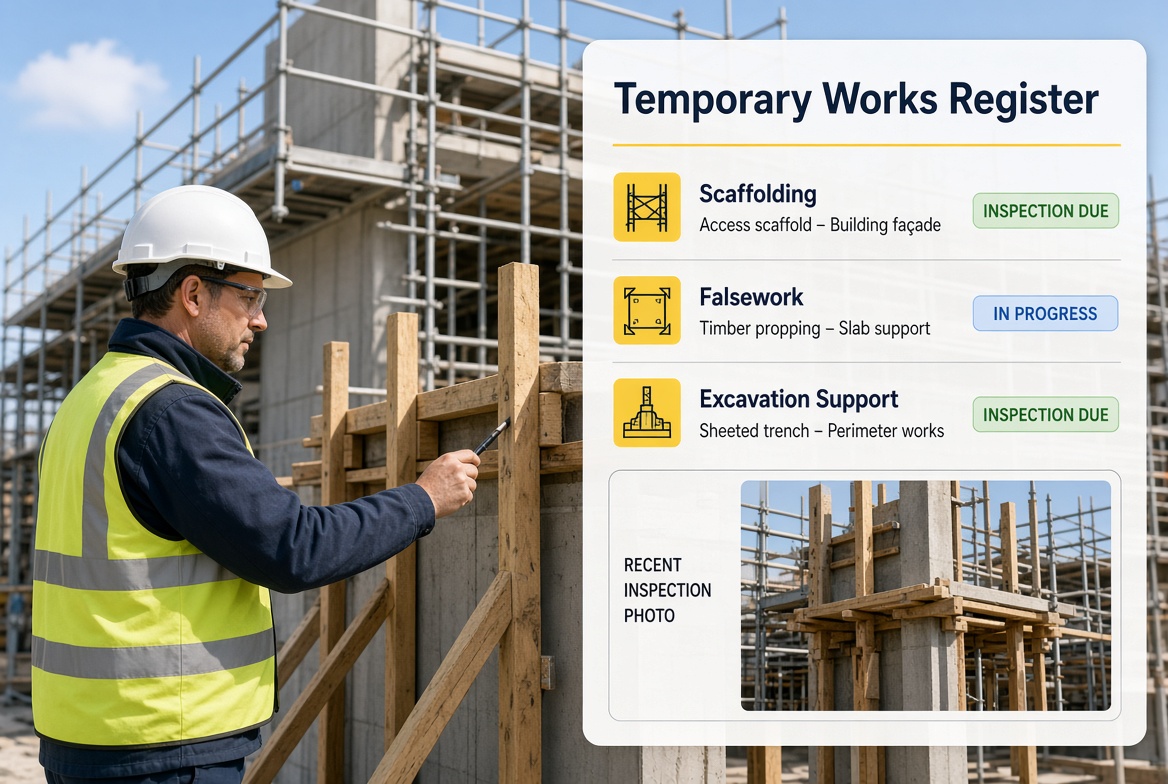
A Temporary Works Register (TWR) is a project record used to identify and track the temporary works on a construction project.
Instead of managing each temporary works item separately with disconnected documents, the register provides an overview of the temporary works programme.
A project might have temporary works involving:
-
Excavation support
-
Formwork
-
Falsework
-
Propping
-
Temporary access
-
Temporary structures
-
Temporary support to existing structures
-
Temporary works associated with construction activities
-
Temporary works supporting plant or equipment
The exact temporary works on a project will depend on the construction activities and project requirements.
The register helps the project team understand what temporary works exist, where they are in the process and what actions or documentation are required.
What does TWR stand for?
TWR stands for Temporary Works Register.
You may also see:
These terms are sometimes used interchangeably, although the exact format and information included should follow the project's temporary works procedure.
Why is a Temporary Works Register important?
Temporary works can be safety-critical.
If temporary works are missed, poorly coordinated or not properly controlled, the consequences can be serious.
A register provides a central overview.
For example, imagine a project has ten temporary works schemes.
Without a central register, it can become difficult to answer basic questions:
Has the design been completed?
Has the design been checked?
Has it been approved?
Has the RAMS been reviewed?
Has the temporary works been installed?
Has it been inspected?
Can it be loaded?
Does it require further inspection?
Has it been dismantled?
A properly maintained register helps make these stages visible.
CITB's published temporary works register template includes fields covering the temporary works item, design requirements, design check category, approval, RAMS review, inspection, loading, inspection regime, removal and implementation risk classification.
Who is responsible for the Temporary Works Register?
The Temporary Works Coordinator (TWC) has an important role in the management of the Temporary Works Register.
CITB material based on BS 5975 identifies ensuring that a temporary works register is established and maintained as one of the duties associated with the Principal Contractor's TWC.
However, the exact responsibilities should always be confirmed against the project's temporary works procedure and organisational arrangements.
A TWS may also interact with the register, particularly where inspections, implementation and site activities are concerned.
A simple way to think about the roles is:
TWC → coordinates and manages the temporary works process
TWS → supervises temporary works activities and supports the TWC
Temporary Works Designer → designs the temporary works
Temporary Works Design Checker → checks the design where required
The exact arrangements can vary by project.
What should be included in a Temporary Works Register?
There is no single universal spreadsheet that will be correct for every project.
The information required should be determined by the project's temporary works procedure.
However, CITB's published template provides a useful example of the type of information that may be tracked.
This can include:
1. Temporary works item number
Each temporary works item can have its own reference.
For example:
This makes it easier to identify individual schemes.
2. Description
The register should identify what the temporary works are.
For example:
TW-004 — Excavation support system
or
TW-007 — Temporary propping to existing structure
3. Design requirement
The register can record when the temporary works design is required.
4. Design check category
CITB's template includes design check categories 0, 1, 2 and 3.
The appropriate category should be determined through the project's temporary works process.
5. Designer and checker information
Where applicable, the register can record information about the temporary works designer and design checker.
6. Approval
The register can record relevant approval dates and information.
7. RAMS review
Relevant RAMS review and acceptance information can also be tracked.
8. Inspection
The register can record inspection requirements and relevant inspection dates.
9. Permit to load
Where applicable, the process can include the inspection required before a permit to load is issued.
10. Removal
The register can also track the temporary works through dismantling and removal.
This is important because temporary works management does not simply end when the temporary structure has been installed.
Temporary Works Register example
A simple conceptual register might look like this:
| TW Ref |
Temporary Works |
Design |
Check |
RAMS |
Inspection |
Status |
| TW-001 |
Excavation support |
Complete |
Complete |
Accepted |
Required |
Awaiting installation |
| TW-002 |
Temporary propping |
Complete |
Complete |
Accepted |
Complete |
In use |
| TW-003 |
Formwork system |
In progress |
— |
Pending |
Pending |
Design stage |
| TW-004 |
Temporary access |
Complete |
Complete |
Accepted |
Complete |
Complete |
This is only an illustrative example.
Your project's actual register should reflect its temporary works procedure, risk profile and documentation requirements.
Temporary Works Register vs Temporary Works Inspection
These are not the same thing.
A Temporary Works Register provides an overview of temporary works and tracks their progress.
A Temporary Works Inspection records the details of a specific inspection.
For example:
Temporary Works Register
TW-002 — Temporary propping — Inspection required — 14 October
Inspection record
TW-002 inspected on 14 October. Findings recorded. Photographs attached. Action raised for identified issue.
The inspection record provides the detailed evidence.
The register provides the overall project-level view.
Both can work together.
What happens when a problem is found?
One of the biggest advantages of a well-managed register is that it can help you see where temporary works are in the process.
But identifying an issue is only the beginning.
For example:
Inspection
↓
Problem identified
↓
Issue recorded
↓
Relevant people informed
↓
Appropriate action determined
↓
Action completed
↓
Follow-up inspection if required
↓
Record updated
The exact response will depend on the issue and the project's procedures.
A register should not be treated as permission to make engineering decisions outside the appropriate process.
If an inspection identifies a structural or safety concern, the appropriate competent person should be involved.
What is a Temporary Works Register spreadsheet?
Traditionally, many companies manage their TWR using a spreadsheet.
This can work well on smaller projects when the information is relatively straightforward.
A spreadsheet can contain columns for:
-
Reference number
-
Description
-
Designer
-
Design checker
-
Design status
-
Approval
-
RAMS
-
Inspection
-
Permit to load
-
Risk classification
-
Removal
-
Notes
CITB itself publishes a Temporary Works Register template in spreadsheet-style format as part of its temporary works support material.
The problem starts when the register becomes disconnected from everything happening on site.
Problems with managing a TWR in a spreadsheet
A spreadsheet can tell you that an inspection is required.
But it does not necessarily make carrying out that inspection easy.
You might have:
Spreadsheet
→ Inspection required
Then separately:
Paper form
→ Inspection completed
Then:
Email
→ Defect reported
Then:
Another spreadsheet
→ Corrective action tracked
Then:
Folder
→ Photographs stored
This can create unnecessary administration.
It can also make it difficult to see the relationship between the temporary works item, inspection, defect, evidence and corrective action.
Can a Temporary Works Register be digital?
Yes.
A digital temporary works management system can bring more of the workflow together.
Instead of simply having a spreadsheet, you can connect:
Temporary Works Item
↓
Design information
↓
Inspection
↓
Photographs
↓
Issues
↓
Corrective Actions
↓
Follow-up
↓
Reports
This creates a more connected record.
The objective is not simply to replace Excel.
The objective is to make the temporary works process easier to manage.
What is the best Temporary Works Register software?
The best temporary works software depends on the size and complexity of your projects and the processes your organisation needs to follow.
However, useful features can include:
Temporary Works Register
Create and manage temporary works items in one place.
Inspection checklists
Create repeatable inspection forms for site teams.
Photo evidence
Attach photographs directly to inspections and issues.
Issue tracking
Record problems against the relevant temporary works item.
Corrective actions
Assign actions and track completion.
Due dates
See which actions are approaching or overdue.
Mobile access
Allow supervisors to access information from site.
Offline capability
Useful where mobile coverage is unreliable.
Reports
Generate inspection and issue reports when required.
Searchable history
Find previous inspections and records quickly.
Training and certificate records
Where required by your organisation, track relevant training and certification alongside site responsibilities.
Temporary Works Register app
A Temporary Works Register app can be particularly useful for site teams because the register does not have to remain confined to a desktop computer.
For example, a TWC could manage the overall register from a laptop while a TWS accesses relevant inspection tasks from a mobile device.
A typical workflow could be:
TWC creates TW-015
↓
TWS receives inspection task
↓
TWS visits site
↓
Inspection completed on mobile
↓
Photographs added
↓
Issue identified
↓
Corrective action assigned
↓
TWC can see the updated status
This reduces the need for information to be manually transferred between separate systems.
How KaelSite can help manage temporary works
KaelSite is designed around practical construction site workflows.
Instead of treating inspections, defects and reports as completely separate activities, KaelSite can connect them into a single workflow.
For example:
Step 1 — Create the temporary works record
Record the relevant temporary works item and project information.
Step 2 — Carry out the inspection
The supervisor can complete the relevant inspection checklist from a mobile device.
Step 3 — Capture evidence
Photos and notes can be added directly during the inspection.
Step 4 — Report an issue
If something needs attention, create an issue linked to the inspection.
Step 5 — Assign corrective action
Give the action to the appropriate person and add a due date where appropriate.
Step 6 — Track progress
Managers can see which items are open, completed or require follow-up.
Step 7 — Close the workflow
Once the appropriate action has been completed and verified, the record can be updated.
This creates a connection between the register and what is actually happening on site.
KaelSite is a support tool. It does not replace the TWC, TWS, designer, design checker, engineer, competent person, temporary works procedure, approval process or required sign-off.
Temporary Works Register and BS 5975
The Temporary Works Register is closely associated with the temporary works management process described in BS 5975.
CITB's current temporary works materials reference BS 5975:2024 and provide temporary works documents and guidance for training and understanding the process.
The register is one component of a wider temporary works management process.
It should not be viewed as a standalone spreadsheet that, by itself, makes temporary works safe.
A good process needs appropriate:
-
Roles
-
Competence
-
Design
-
Checking
-
Communication
-
Risk management
-
Construction controls
-
Inspection
-
Monitoring
-
Documentation
The register helps coordinate and track these activities.
Temporary Works Register and TWC
The TWC has a particularly important relationship with the register.
The TWC may need to understand:
-
What temporary works exist
-
What stage each item is at
-
Which designs are required
-
Which designs have been checked
-
What approvals are required
-
What inspections are required
-
Which items are currently in use
-
What actions remain open
-
What needs to happen before removal
This makes the register a useful management tool rather than simply an administrative document.
Temporary Works Register and TWS
The TWS interacts with the register from a more site-focused perspective.
Depending on the project's arrangements, the TWS may be involved in:
This creates an important connection:
TWC manages the temporary works process.
TWS helps supervise temporary works on site.
The register provides visibility of the temporary works process.
What happens after a temporary works inspection?
A common mistake is to think that an inspection is complete when the checklist has been submitted.
A better workflow is:
Inspect
↓
Record
↓
Identify issues
↓
Take appropriate action
↓
Track action
↓
Reinspect where required
↓
Close
This is particularly important where an inspection identifies a defect or concern.
A digital system can help prevent an issue from disappearing into a folder of completed forms.
Temporary Works Register checklist
When reviewing your temporary works register process, ask:
-
Have all relevant temporary works been identified?
-
Does every item have a clear reference?
-
Is the current status visible?
-
Are design requirements recorded?
-
Are design checks recorded where applicable?
-
Are approvals tracked?
-
Are relevant RAMS reviews recorded?
-
Are inspection requirements clear?
-
Are inspection records easy to find?
-
Are issues linked to the relevant temporary works?
-
Are corrective actions tracked?
-
Are due dates visible?
-
Are follow-up inspections recorded where required?
-
Is removal or dismantling tracked?
-
Can the project team quickly identify outstanding actions?
If several answers are "no", the problem may not be the temporary works process itself.
It may simply be that the information is spread across too many places.
Should you use Excel or a temporary works app?
There is no universal answer.
For a small project with a limited number of temporary works items, a spreadsheet may be perfectly adequate.
As projects become larger or more complex, however, the amount of information increases.
You may have:
At that point, dedicated software can reduce administration and improve visibility.
The important question is not:
"Do we use Excel?"
It is:
"Can we reliably identify, track, inspect and close every relevant temporary works item?"
Frequently asked questions about Temporary Works Registers
What does TWR stand for?
TWR stands for Temporary Works Register.
What is a Temporary Works Register?
It is a project record used to list temporary works and monitor their progress through the temporary works process. CITB describes it as usually being in spreadsheet format.
Who maintains the Temporary Works Register?
The TWC has an important responsibility for establishing and maintaining the register within the temporary works management arrangements. The exact responsibilities should follow the project's procedure.
Is a Temporary Works Register mandatory?
The requirement depends on the project's temporary works procedure and organisational arrangements. A register is an established part of the temporary works management process described in BS 5975 and supported by CITB's temporary works materials.
Can I use Excel for a Temporary Works Register?
Yes. CITB's own published example is spreadsheet-style, so Excel can be a practical solution for some projects.
Is there a Temporary Works Register template?
Yes. CITB publishes a Temporary Works Register template as part of its temporary works support material.
What should a Temporary Works Register contain?
The exact contents depend on the project, but information can include temporary works descriptions, design requirements, design checking, approval, RAMS review, inspection, loading, implementation risk and removal.
What is the difference between a TWR and an inspection checklist?
The TWR provides an overview of temporary works items and their status.
An inspection checklist records the detailed findings of a specific inspection.
Can a TWS update the Temporary Works Register?
This depends on the project's procedures and responsibilities. A TWS may contribute inspection and site information, while the TWC typically has responsibility for coordinating and maintaining the register.
What is the best Temporary Works Register app?
The best solution depends on your project. Look for a system that combines register management with inspections, photographs, issue tracking, corrective actions, reporting and mobile access.
Can KaelSite replace a Temporary Works Coordinator?
No.
KaelSite can support the workflow, records and administration around temporary works, but it does not replace the competent person responsible for coordinating temporary works.
Final thoughts
A Temporary Works Register is much more than a spreadsheet.
It is a way of maintaining visibility over the temporary works on a project and tracking important stages of the process.
A good register should help answer a simple question:
"Where are we with every temporary works item on this project?"
If the answer requires searching through emails, folders, paper forms and multiple spreadsheets, there is an opportunity to improve the process.
Digital construction software can bring the register, inspections, photographs, issues, corrective actions and reports closer together.
For TWC and TWS teams, that can mean less administration and better visibility of what is happening on site.
KaelSite is built to support that workflow — helping construction teams move from inspection → evidence → issue → action → follow-up → record, while leaving technical decisions, competence and required approvals with the appropriate people.
A well-managed temporary works register helps you know what needs attention.
A good site workflow helps you make sure the attention actually happens.

Comments (0)
Add a Comment
No comments yet. Be the first to comment!