What Is a TWC? Temporary Works Coordinator Explained
If you work on a construction project involving temporary works, you may hear the term TWC regularly.
But what does TWC mean? What does a Temporary Works Coordinator actually do? Who is responsible for the Temporary Works Register? What happens when an inspection identifies a problem? And what training does a TWC need?
This guide explains the Temporary Works Coordinator (TWC) role in practical terms and looks at how digital tools can help manage temporary works information on site.
Important: The exact responsibilities of a TWC depend on the project's temporary works procedures, organisational arrangements, competence requirements and the type of temporary works involved.
What does TWC stand for?
TWC stands for Temporary Works Coordinator.
A Temporary Works Coordinator is generally responsible for coordinating the temporary works process within a construction project.
Temporary works are structures, systems or arrangements used to support, protect, provide access to, or otherwise facilitate construction activities.
Examples can include:
The exact temporary works used will depend on the project.
What does a Temporary Works Coordinator do?
The TWC generally has a coordination and management role.
Depending on the project, this can involve coordinating:
-
Temporary works design
-
Design briefs
-
Temporary works registers
-
Design checks and approvals
-
Site inspections
-
Testing and monitoring
-
Communication between project teams
-
Temporary works information
-
Changes to temporary works
-
Defects and corrective actions
-
Records and documentation
The TWC therefore needs visibility of what temporary works exist, where they are, what stage they are at and whether the required processes have been followed.
What are the main responsibilities of a TWC?
The responsibilities vary from project to project, but commonly include the following.
1. Coordinate temporary works
A TWC helps ensure that temporary works are properly coordinated throughout their lifecycle.
This may involve coordination from the initial requirement through design, approval, installation, use, inspection, modification and removal.
2. Maintain temporary works information
A project can contain many temporary works items at different stages.
The TWC needs access to accurate information about those items.
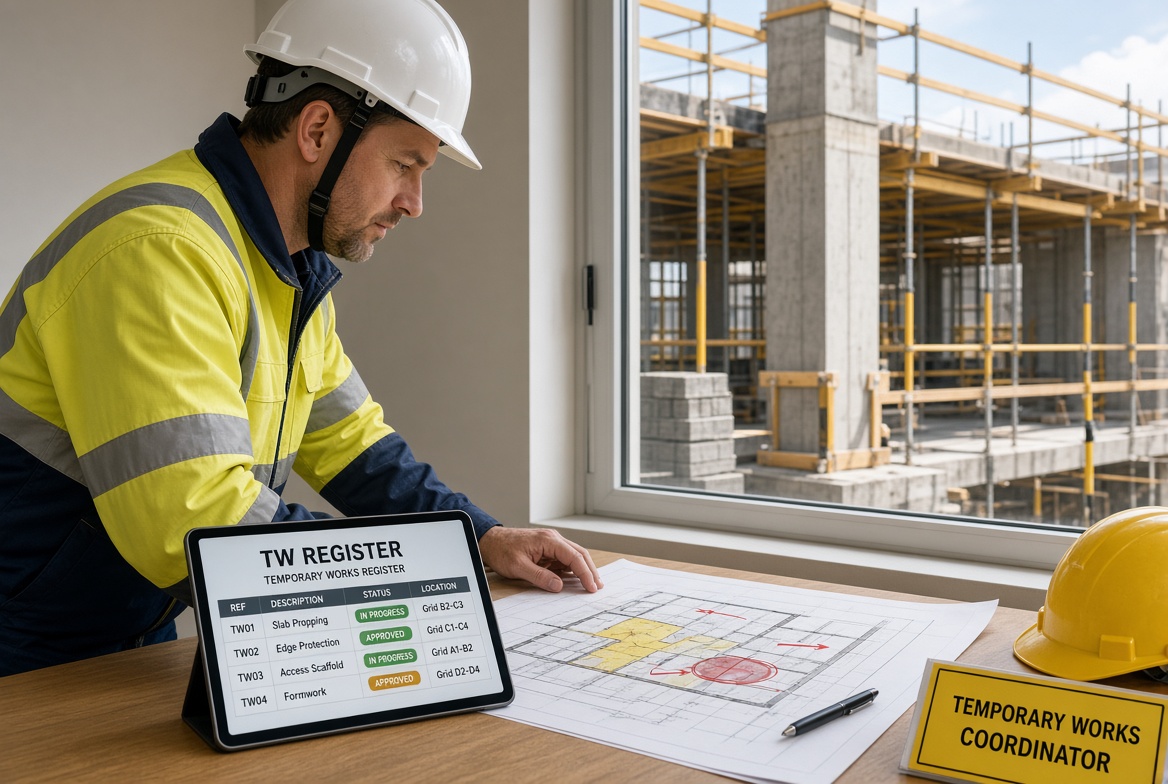
This is where a Temporary Works Register becomes particularly useful.
3. Coordinate inspections
Temporary works need appropriate inspection and monitoring arrangements.
The TWC may coordinate:
-
What needs to be inspected
-
When inspections are required
-
Who is responsible
-
What needs to be recorded
-
How defects are reported
-
What happens after an issue is found
The actual arrangements should always follow the project's procedures.
4. Manage communication
Temporary works often involve multiple people.
A TWC may need to coordinate information between:
Poor communication can create significant risks, especially when site conditions or temporary works change.
5. Monitor outstanding actions
Finding an issue is not enough.
The project needs to know:
A structured action-tracking system can make this much easier.
What is the difference between a TWC and TWS?
This is one of the most common questions.
The simplest distinction is:
TWC = coordination and management
TWS = supervision and monitoring
A TWC generally has the broader coordination role, while a TWS is typically more closely involved with supervising temporary works activities on site.
However, responsibilities can vary.
For a detailed comparison, see:
TWS vs TWC: What's the Difference?
What is a Temporary Works Register?
A Temporary Works Register is a structured record of temporary works items on a project.
It can help a project team understand what temporary works exist and track their progress through the relevant process.
Depending on the project, the register may contain information such as:
For a TWC, keeping this information organised is an important part of maintaining visibility over temporary works.
Why is a Temporary Works Register important?
Imagine a large construction project with:
If this information is spread across different spreadsheets, folders and email conversations, it can become difficult to establish the current status of each temporary works item.
A structured register gives the project a central reference point.
It can help answer questions such as:
What temporary works do we currently have?
Where are they?
Who is responsible?
Have they been inspected?
Are there outstanding actions?
What needs attention next?
What should a TWC check?
There is no single universal TWC checklist for every project.
The checklist should reflect the project's procedures and the temporary works involved.
However, a TWC may need to consider:
Planning
-
Has the need for temporary works been identified?
-
Has the temporary works requirement been properly defined?
-
Is there an appropriate design brief?
Design
-
Has the design process been followed?
-
Have appropriate checks and approvals been completed?
-
Are relevant design documents available?
Installation
-
Are the temporary works being installed as required?
-
Are relevant site conditions understood?
-
Are changes being properly controlled?
Inspection
-
Are required inspections being completed?
-
Are inspection records available?
-
Have defects been identified?
-
Are follow-up actions being tracked?
Monitoring
-
Have site conditions changed?
-
Has the temporary works arrangement been modified?
-
Are there new loads or external influences?
-
Are outstanding issues being followed up?
Records
-
Is the Temporary Works Register up to date?
-
Are supporting documents available?
-
Are inspection records complete?
-
Can the project demonstrate what happened?
What risks should a TWC look for?
Temporary works can involve significant risks when they are incorrectly designed, installed, modified, loaded or maintained.
A TWC may need to consider risks involving:
-
Structural stability
-
Ground conditions
-
Excavations
-
Temporary supports
-
Loading
-
Installation
-
Alterations
-
Weather
-
Water
-
Site traffic
-
Plant interaction
-
Unauthorised changes
-
Inadequate inspection
-
Poor communication
The specific risks depend on the temporary works and project conditions.
The role of the TWC is not simply to identify every possible hazard personally. It is to coordinate the temporary works management process and make sure appropriate people and procedures are involved.
What happens when a temporary works inspection fails?
The phrase "failed inspection" can mean different things on different projects.
If an inspection identifies a defect, concern or condition that does not meet the project's requirements, the response should follow the project's established procedures.
A practical workflow may look like:
Identify
↓
Record
↓
Report
↓
Assess
↓
Take appropriate action
↓
Reinspect if required
↓
Close the issue
The important thing is that there should be a clear record of what was found and what happened afterwards.
Why should TWC records be digital?
Temporary works management can generate a lot of information.
A TWC may need to manage:
-
Registers
-
Drawings
-
Designs
-
Inspection records
-
Photographs
-
Defects
-
Actions
-
Approvals
-
Reports
-
Dates
-
Supporting documentation
Paper records can work, but they can become difficult to search, update and share.
Digital records can make information easier to organise and retrieve.
What is the easiest way to manage a Temporary Works Register?
A spreadsheet may be sufficient for some smaller projects, but larger projects can quickly become more complicated.
A dedicated digital workflow can make it easier to connect the register with:
-
Inspections
-
Issues
-
Photographs
-
Actions
-
Responsibilities
-
Deadlines
-
Reports
Instead of having:
Register → separate inspection form → separate photos → separate issue list → separate report
a digital platform can connect those pieces of information.
Can a TWC use a mobile app?
Yes.
A mobile-first system can be particularly useful because temporary works management does not happen entirely in an office.
TWC-related activities can involve:
Being able to access and update information from a phone or tablet can reduce the need to return to a computer for routine administrative tasks.
How can KaelSite help a TWC?
KaelSite is designed to help construction teams manage inspections, issues, evidence, actions and compliance records digitally.
For a Temporary Works Coordinator, KaelSite can support workflows around:
Inspections
Create digital inspection forms and checklists that can be completed from site.
Evidence
Capture photographs and supporting evidence alongside inspection findings.
Issues
Record defects, observations, non-conformances and other issues.
Actions
Assign actions to the appropriate person and monitor deadlines.
Tracking
See which issues remain open and which have been completed.
Reporting
Generate reports from the information captured during site activities.
Offline working
Construction sites do not always have reliable connectivity. Offline functionality can allow teams to continue working where an internet connection is unavailable, subject to the system's capabilities.
The aim is simple:
Keep temporary works information connected and accessible.
What should a TWC look for in construction software?
If you are considering software for temporary works management, look for a system that can handle the practical workflow rather than simply storing documents.
Useful capabilities can include:
The most important consideration is whether the system fits the project's actual procedures.
Does software replace the Temporary Works Coordinator?
No.
Software is a support tool, not a replacement for a competent person.
A digital system cannot replace:
KaelSite can help organise and record information, but the project team remains responsible for following its own temporary works arrangements and ensuring that appropriately competent people carry out the required work.
What training does a TWC need?
CITB offers the Temporary Works Coordinator Training Course (TWCTC) through its Site Safety Plus training framework.
Training is an important part of developing knowledge for the role, but completing a course should not automatically be treated as proof of competence for every project or situation.
Competence depends on the individual, their experience, knowledge, skills and the requirements of the work they are responsible for.
What should a newly trained TWC do?
After completing training, a TWC should become familiar with the actual temporary works procedures used by their organisation and project.
Useful steps include:
-
Understand the project's temporary works procedure.
-
Understand your specific responsibilities.
-
Review the Temporary Works Register.
-
Understand the inspection and monitoring arrangements.
-
Identify who the relevant competent people are.
-
Understand escalation routes.
-
Establish a reliable record-keeping system.
-
Monitor outstanding actions.
-
Make sure changes are properly communicated.
-
Keep records organised.
The objective is to turn knowledge from training into a reliable site process.
TWC checklist
A practical project-specific TWC checklist might ask:
-
Are all relevant temporary works identified?
-
Is the Temporary Works Register current?
-
Are responsibilities clearly assigned?
-
Are design and checking arrangements established?
-
Are inspections scheduled appropriately?
-
Are inspection records complete?
-
Have defects been recorded?
-
Are corrective actions assigned?
-
Are overdue actions being followed up?
-
Have changes been communicated?
-
Are relevant documents available?
-
Is there evidence of appropriate close-out?
This checklist should be adapted to the project's own procedures.
Frequently asked questions
What does TWC stand for?
TWC stands for Temporary Works Coordinator.
What does a TWC do?
A TWC generally coordinates and manages the temporary works process, including relevant design, inspection, monitoring, records and communication arrangements.
What is the difference between TWS and TWC?
A TWS generally focuses on supervising and monitoring temporary works activities, while a TWC generally has a broader coordination role.
What is TWCTC?
TWCTC stands for the Temporary Works Coordinator Training Course.
Does a TWC need training?
The appropriate training and competence requirements depend on the project and organisation. CITB offers TWCTC as a training course for people involved in temporary works coordination.
Who manages the Temporary Works Register?
The project's procedures should define who is responsible. The TWC is generally closely involved in coordinating the temporary works process and maintaining oversight of the register.
How often should temporary works be inspected?
There is no single inspection frequency that applies to every temporary works situation. Inspection requirements should be established according to the project's procedures, the temporary works involved and relevant circumstances.
Can KaelSite manage temporary works?
KaelSite can support temporary works-related workflows such as digital inspections, evidence capture, issue management, action tracking and reporting. It does not replace the project's temporary works procedures or competent people.
Final thoughts
A Temporary Works Coordinator has an important coordination role in making sure temporary works are properly managed throughout their lifecycle.
The challenge is not only technical.
It is also about information.
The TWC needs to know what temporary works exist, what stage they are at, whether inspections have been completed, what issues have been identified and whether outstanding actions have been dealt with.
A well-organised digital workflow can make that information easier to manage.
Instead of chasing:
Spreadsheets → paper inspections → photographs → emails → action lists
a connected system can bring the process together:
Register → Inspect → Record → Evidence → Action → Track → Report → Close
For construction teams using KaelSite, the objective is straightforward:
Make temporary works information easier to capture, manage and act on — without replacing the people and procedures responsible for the work.

Comments (0)
Add a Comment
No comments yet. Be the first to comment!